CODES
21
IRIS
ZOOM
WHITE
FOCUSAF
POWER
MENU
FREEZE
1 2
3
4
5
6
7
HELP
8 9
MEMORY
#21
#16
#23#22 #24 #27
#26
#18#17 #19 #20
#25
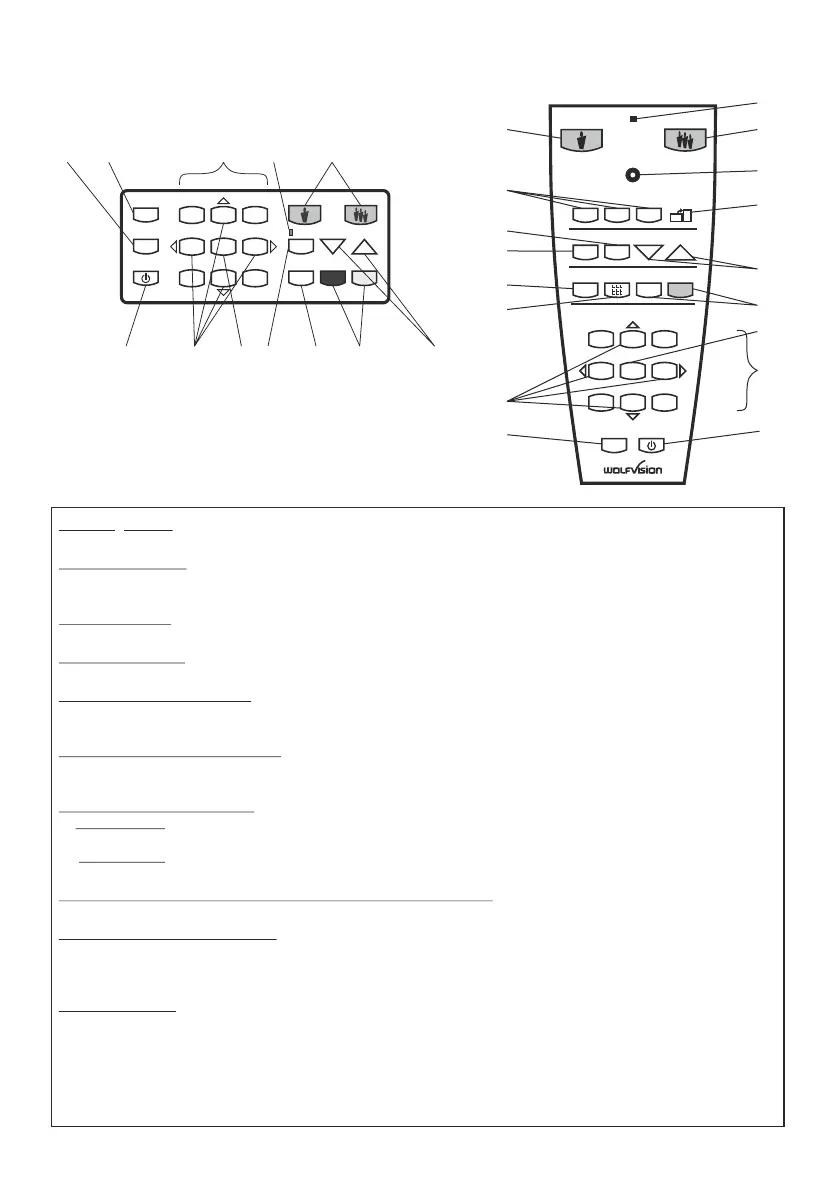
Key panel on the EYE-12
Storing presets:
Press one of the PRESET keys (#28) for 2 seconds.
Recalling presets:
Press the respective PRESET key (#28) quickly.
Alternative press the FREEZE key (#17) for 2 seconds to recall preset 1.
Storing images:
Press one of the MEMORY keys (#18) for 2 seconds.
Recalling images:
Press the respective MEMORY key (#18) quickly.
Filling the memory quickly:
Press the ALL key (#29) for more than 4 seconds and follow the instructions of the on-screen menu (Press
MEMORY 1 (#18) for snapshot or MEMORY 3 (#18) to erase the memory).
Activating the on-screen menu:
Press the MENU key (#16) for 1 second to activate the on-screen menu. Use the Number keys (#22) to
navigate. For the help function, press the Number 5 key (#23).
Switching the output mode:
Higher mode: Simultaneously press both FOCUS keys (#27) on the unit and
the Number 2 key (arrow-up) (#22) on the remote control.
Lower mode: Simultaneously press both FOCUS keys (#27) on the unit and
the Number 8 key (arrow-down) (#22) on the remote control.
Resetting the output mode to the default of "auto resolution":
Simultaneously press both FOCUS-keys (#27) on the unit and the Number 5 key (#23) on the remote control.
Resetting the on-screen menu:
For resetting the entire menu simultaneously press both FOCUS keys (#27) on the unit head and the
Number 4 key (back arrow) (#22) on the remote control.
For resetting only the selected item press the Number 5 key (#23) for 2 seconds.
Change IR code:
Change the IR code in the "Misc. Settings" (code A is default).
imultaneously PRESET 1, PRESET 2 and ZOOM TELE
ress PRESET 1, PRESET 2 28 and ZOOM WIDE 20
LASER indication LED (#30)
on-screen menu Change the IR code on the
remote control too by pressing s (#28) (#20) to switch
from code A to B, C, D ... A ...in the order given. For resetting the remote control to code A simultaneously
p (# ) (# ) (on the remote control).
The shows the selected code (it flashes one time for code A, two times for code
B, three times for code C and four times for code D).
#20
#18
#20
#28
#32
#25
#27
#17
#29
#26
#23
#22
#16
#21
FOCUS
MEMORY
FREEZE
AFWHITE
HELP
MENU
POWER
TELE
LASER
FOCUS
1
2 3
A
A
1
2
3
4
5
6
7
8
9
PRESETS
IMAGE TURN
FREEZE
ALL
IRIS
WIDE
WHITE AF
#31
#30
#19
IR-Remote Control


 To Next Page