4
Product description
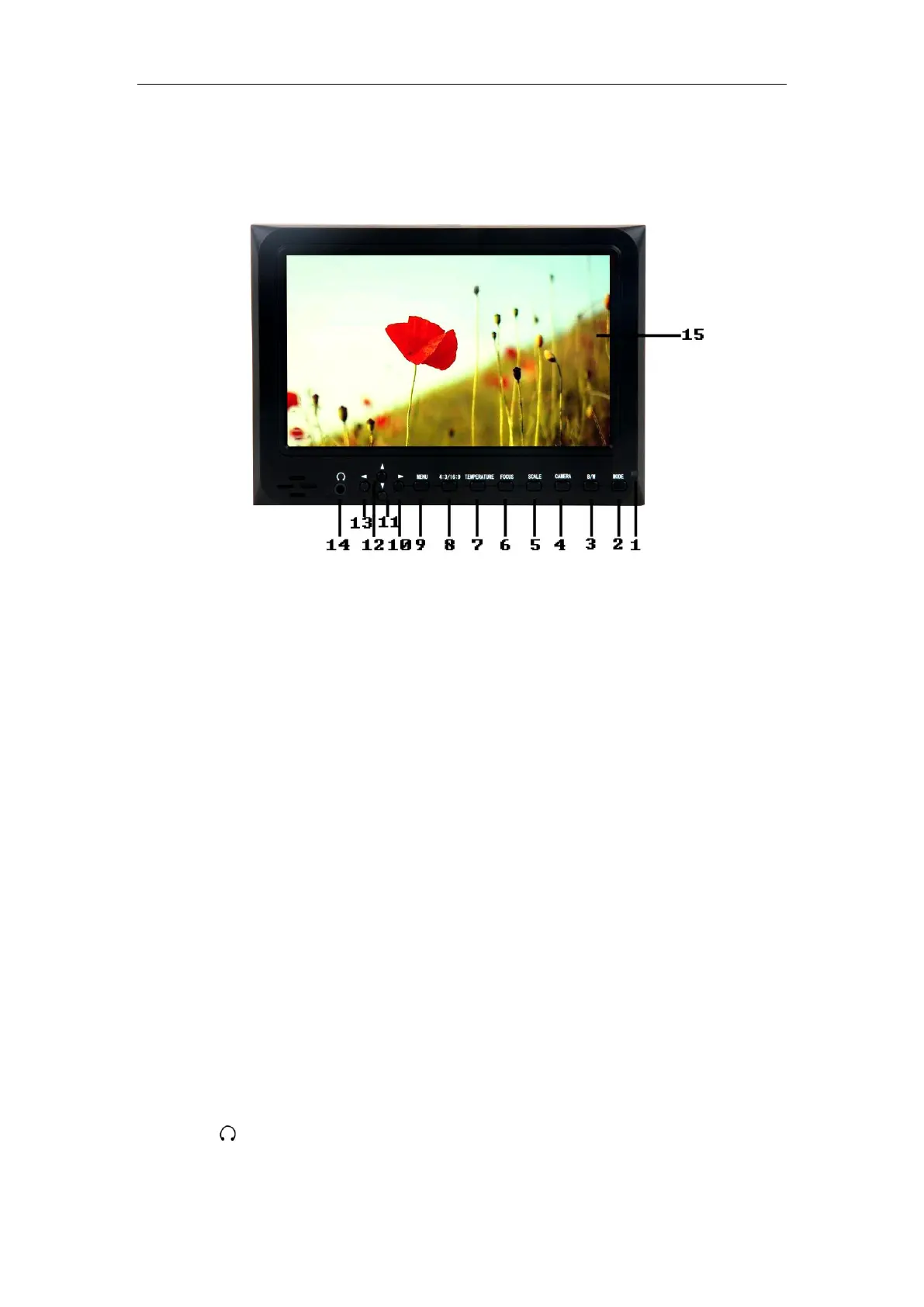
Front view
1. Power indicator light:Light turns red when powered
2. MODE: To switch VIDEO、HDMI、YPbPr input signal
3. B/W: Check Field, Press to switch the image monochrome (red、green、blue、
monochromatic and color)
4. CAMERA: Click to switch ON/ OFF 5D-Ⅱ mode
5. MARKER: Click to switch ON/ OFF Screen Markers mode
6. FOCUS: Click to switch ON/ OFF Peaking Filter(Focus Assist)mode
7 .COLOR.TEMP :Color temperature value option adjustment
8. 4:3/16:9: Use to switch between 4:3 and 16:9 aspect ratios
9. MENU:To activate OSD (on-screen display) menu
10. ▶ : Function confirmation or value up while using menu setting functions
11. ▼: Menu item value down adjustment button
12. ▲: Menu item value up adjustment button. No Menu State to cycle adjust the 5
level brightness
13. ◀:Function confirmation or value down while using menu setting functions
14. : 3.5mm Earphone Jack
15. Display screen



 To Next Page