1.Scan the QR code below with your smartphone or search Aiwit
in App Store or Google Store for download and installation.
2. Open the successfully installed the Aiwit APP, follow the
instructions in the APP, register an account with your email
address and remember the account. This will be the account to
log into the Aiwit APP.
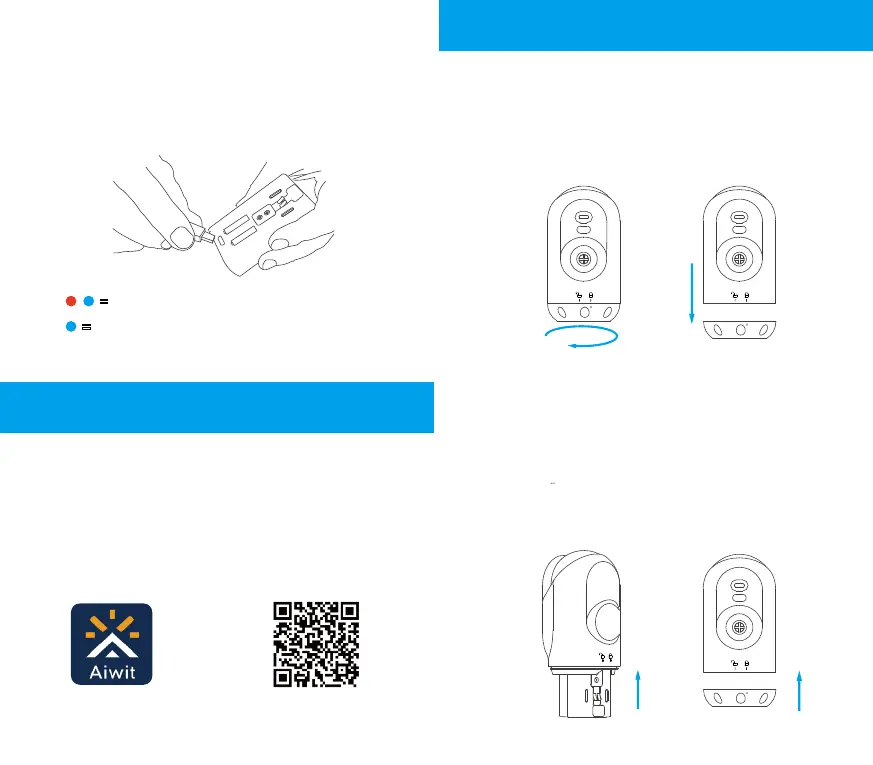
3. Both the red and blue lights on the top of the battery pack will
be constant on while charging. When it is fully charged, the red
light goes out and the blue light stays on, and the battery pack
automatically enters the state of protection to accidents caused
by overcharging; the first charge takes 6-8 hours.
= Battery pack charging status light
=
Battery pack fully charged status light
Download and Install Battery
Camera Aiwit APP
Set up the Battery Camera
1. Remove the battery cover.
Take out the battery camera, gently twist the bottom battery
cover counterclockwise and stop when the marking is aligned
with the unlock icon, and then remove the bottom cover from
the battery camera.
2. Insert the battery.
Blue indicator light
The blue light is constant on to
indicate real-time monitoring view
The blue light flashes to indicate
PIR motion detection
Aiwit APP
iOS / Android
Application download
Tear off the insulation sticker on the fully charged battery pack
and insert the battery pack into the corresponding card slot at
the bottom of the battery camera until a “click” is heard, which
indicates that it is in place; locate the unlock symbol on the
back of the battery camera and align it with the marking on the
battery cover; push the cover and rotate it clockwise until the
marking is aligned with the lock symbol, and then close the
cover.
5 4


 To Next Page
 Loading...