EasyManua.ls Logo

WONIK ROBOTICS Allegro Hand - User Manual

WONIK ROBOTICS Allegro Hand
23 pages
Print Icon
To Next Page IconTo Next Page
Loading...
wiki.wonikrobotics.com/AllegroHandWiki
Question and Answer IconNeed help?

Do you have a question about the WONIK ROBOTICS Allegro Hand and is the answer not in the manual?

Overview

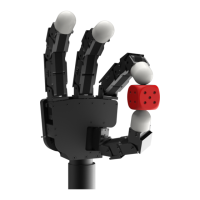
The Allegro Hand is a low-cost, highly adaptive robotic hand designed for research in grasping and manipulation. It features four fingers and sixteen independent current-controlled joints, making it a versatile platform for various robotic applications.

Function Description:

The Allegro Hand is an anthropomorphic robotic hand capable of dexterous manipulation. It is equipped with four fingers, each having four degrees of freedom (DOF), totaling sixteen active joints. These joints are independently current-controlled, allowing for precise and robust control over the hand's movements. The hand is designed to be lightweight and portable, facilitating its integration into various robotic systems and experimental setups. It supports real-time control and online simulation, which are crucial for developing and testing complex manipulation algorithms. The Allegro Hand can be used with the RoboticsLab development environment, which provides robust dynamics and system control engines, a feature-rich controls SDK, and tools for modeling custom robots and testing environments in 3D. This environment allows users to add built-in and custom sensors, actuators, and other devices, offering flexibility for prototyping and testing control algorithms.

Important Technical Specifications:

  • Number of Fingers: Three (3) fingers and a thumb (1), totaling 4.
  • Degrees of Freedom: 4 fingers x 4 = 16 (Active).
  • Actuation Type: DC Motor.
  • Gear Ratio: 1:369.
  • Max. Torque: 0.70 Nm.
  • Overdrive Torque: 0.90 kg.
  • Weight:
    • Finger: 0.17 kg
    • Thumb: 0.19 kg
    • Total: 1.20 kg
  • Joint Resolution:
    • Measurement: Potentiometer
    • Resolution (nominal): 0.002 degrees
  • Communication:
    • Type: CAN
    • Frequency: 333 Hz
  • Power Requirement: 12-24V, 120W.
  • System Requirements (for software operation):
    • CPU: Intel® Core™2 Duo or higher
    • RAM: At least 2GB
    • HDD: At least 2GB
    • Graphics: OpenGL 3.0 H/W Acceleration enabled with at least 64Mb of video RAM
    • OS: MS Windows® XP, MS Windows® Vista, MS Windows® 7
    • Additional S/W: MS Visual Studio®
    • Communication: NI or PEAK CAN (any CAN interface can be user-configured).

Usage Features:

The Allegro Hand comes with multiple ready-to-use sensorless grasping algorithms, enabling it to handle a variety of object geometries. It is capable of holding objects up to 1.5 kg. The user manual provides a quick start guide, including a list of items in the box, power supply requirements, and a wiki for users. The wiki, located at wiki.wonikrobotics.com/AllegroHandWiki, offers additional information, forums, and tutorials.

The hand's control software communicates with the real or simulated hand at a regular control interval of 3 milliseconds, during which joint torques are calculated and joint angles are updated. The CAN protocol is used for communication, with an 11-bit standard arbitration identifier composed of a Message ID and a Device ID. This allows multiple Allegro Hands to be used on the same CAN bus by distinguishing them with unique Device IDs.

The manual details various CAN messages for controlling and monitoring the hand, including:

  • Servo ON/OFF: To engage or disable joint motor drivers.
  • Set Torque Finger #: To set the torque for individual fingers.
  • Set Position Finger #: To set the position for individual fingers.
  • Set Periodic Read: To set the periodic read interval for position, IMU, temperature, and status data.
  • Config: To set Device ID and Baud-rate for RS-485.
  • Information: To retrieve product information and status.
  • Serial: To retrieve the product serial number.
  • Position Finger # (R): To read the current angle position of individual fingers.
  • IMU (R): To read the current IMU quaternion.
  • Temperature Finger # (R): To read the current temperature of individual fingers.
  • Status (R): To read the current status.

The manual also provides information on data structures for various messages, including torque, position, periodic read, configuration, information, serial, IMU, temperature, and status data. It explains how to interpret the data fields, such as joint positions, which are represented as signed 2-byte integers and can be converted to angles using a provided formula.

A sample program for using the Allegro Hand is available for download from a Git repository, with versions for Windows and Linux environments. The BHAnd Library provides several grasping algorithms that users can integrate into their robot research. The manual outlines various predefined grasp modes:

  • Home: Sets the hand to a starting position where all joints are oriented properly for executing a grasp.
  • Ready: Prepares the hand for each type of grasping motion.
  • Grasp 3: A torque-controlled, three-fingered grip for pick-and-place style object grasping.
  • Grasp 4: A torque-controlled, four-fingered grip for pick-and-place style object grasping.
  • Pinching with index finger: A torque-controlled, two-fingered pinch for pick-and-place style object grasping and more dexterous manipulation.
  • Pinching with middle finger: Similar to pinching with the index finger but using the middle finger.
  • Envelop: A grasping algorithm to fully envelop an object within the hand's four fingers.
  • Power Off: Stops sending PWM signals and allows encoder values to be read.

Maintenance Features:

The manual includes instructions for mounting and reassembling the Allegro Hand, as well as removing the mounting block.

  • Mounting Block Removal: Involves removing six M3 flat-head screws (three on each side) that connect the mounting block to the Allegro Hand. Users are cautioned to secure the hand while unscrewing the mounting block to prevent dropping the hand once disconnected.
  • Mounting: The hand can be mounted to a surface using six M3 socket-head cap screws. A note advises mounting the hand to a raised area to avoid thumb-mount interference during hand movement.
  • Reassembly: Involves placing the hand onto the mounting block and replacing the six M3 flat-head screws.
  • Mount Block Dimensions: Detailed dimensions of the mounting block are provided in millimeters.
  • Wiring: Instructions for connecting the Allegro Hand to a power supply and communication interfaces are provided, along with a pinout table for the connector. The Allegro Hand requires a 12-24V, 120W power supply.
  • CAN Driver Installation: Information on installing CAN interface drivers (NI USB-8473s CAN and PEAK PCAN-USB) for Windows and Linux is provided, including product pages and driver page links. Users are reminded to reboot after driver installation.

Technical support is available through the wiki at wiki.wonikrobotics.com/AllegroHandWiki, which also serves as a forum for users to share problems and solutions. Contact information for WONIK ROBOTICS is provided for further questions.

WONIK ROBOTICS Allegro Hand Specifications

General IconGeneral
BrandWONIK ROBOTICS
ModelAllegro Hand
CategoryRobotics
LanguageEnglish