OPERATION
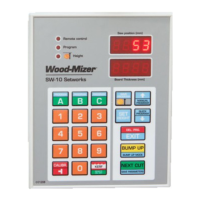
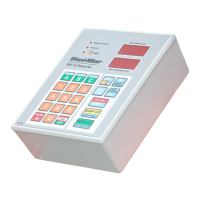
SW-10 Controller Panel
OPERATION SW-10doc032018 2-2
2
Descriptions of the controller panel buttons:
A, B, C - Board thickness memory buttons, program memory buttons
SAVE PROG - confirming a program, setting a head return height
MANUAL PROGRAM - activating the Manual Program mode, switching items upwards
QUICK PROGRAM - activating the Quick Program mode, switching items downwards
SET HEIGHT - entering a real distance between the blade and the sawmill bed
DEL. PRG./EXIT - deleting a previously stored program, exiting an active function
BUMP UP MODE – Bump Up function: Automatically moves the saw head up to clear the log or cant
when it is returned. You can choose between two, permanently defined Bump Up values.
NEXT CUT– automatic head downward movement (to next cut height), storing entered values
KERF - setting blade kerf value, activating/disabling the Remote mode
CALIBR – activating the auto-calibration mode, entering the input divider value
NOTE: Do not use any hard objects, or too much force, to press the controller
buttons.
NOTE: Protect the controller keypad against precipitations and sunbeams.
Clean it with a soft rag and mild cleaners.


 To Next Page
 Loading...