EasyManua.ls Logo

Woodbridge B0930S - User Manual

Woodbridge B0930S
12 pages
Print Icon
To Next Page IconTo Next Page
Loading...
R
WOODBRIDGE
WOODBRIDGE
WOODBRIDGE
WOODBRIDGE
R
WOODBRIDGE
WOODBRIDGE
WOODBRIDGE
WOODBRIDGE
R
WOODBRIDGE
WOODBRIDGE
WOODBRIDGE
WOODBRIDGE
R
WOODBRIDGE
WOODBRIDGE
WOODBRIDGE
WOODBRIDGE
R
WOODBRIDGE
WOODBRIDGE
WOODBRIDGE
WOODBRIDGE
R
WOODBRIDGE
WOODBRIDGE
WOODBRIDGE
WOODBRIDGE
Customer Service Phone: 562-229-0088. (Monday - Friday 9 AM - 5 PM Pacific Time)
Or Email:
help@woodbridgebath.com
www.woodbridgebath.com
R
WOODBRIDGE
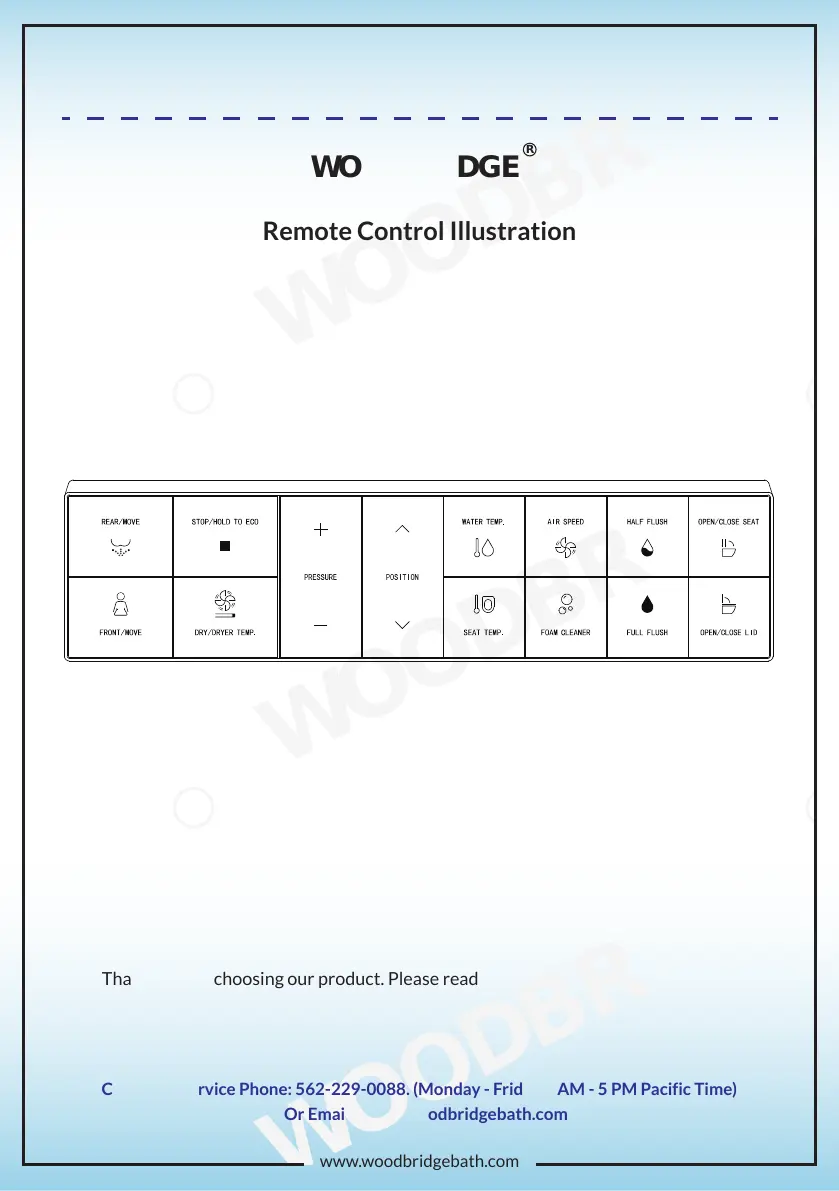
Remote Control Illustration
Thank you for choosing our product. Please read the instructions carefully before
installation and keep it available for future maintenance or reference.
USER MANUAL B0930S
Remote Control Instructions

Other manuals for Woodbridge B0930S

Questions and Answers

  • T
    timothy26Aug 15, 2025
    What to do if no water comes out of my Woodbridge Toilets nozzle?
    • N
      ncalhounAug 15, 2025
      If no water is coming from the nozzle of your Woodbridge Toilets, there might be a few reasons: * The water supply hose could be kinked. If so, straighten the hose. * The angle valve might be off. Turn the angle valve on. * There may have been a water failure. Restore the water supply.
  • S
    Shelby NelsonAug 18, 2025
    Why is the water spraying poorly on my Woodbridge Toilets?
    • N
      Nicole RiddleAug 18, 2025
      If you're experiencing poor water spraying with your Woodbridge Toilets, consider the following: * A kinked water supply hose can cause this. Straighten the hose to remove any kinks. * The angle valve may not be fully turned on. Ensure it is fully opened. * The filter might be clogged. Try cleaning the filter.
  • J
    Jonathan JenkinsAug 21, 2025
    How to fix a Woodbridge Toilets remote control that cannot display?
    • A
      Alison HayesAug 21, 2025
      If your Woodbridge Toilets remote control isn't displaying anything, check these: * Make sure the batteries are loaded in the correct direction (+ and -). * The batteries may be low. Try replacing them with new ones.
  • M
    michellehoweAug 26, 2025
    What to do if the spray wand on my Woodbridge Toilets cannot retract?
    • M
      Mrs. Cheryl RussoAug 26, 2025
      If the spray wand on your Woodbridge Toilets won't retract, it could be due to: * A power outage. Gently push the spray wand back in and then turn the power on. * The wand might be stuck due to impurities. Remove any impurities that are blocking it.
  • W
    watsonmelissaAug 28, 2025
    Why won't the spray wand stretch out on my Woodbridge Toilets?
    • P
      Patrick HaleyAug 28, 2025
      If the spray wand on your Woodbridge Toilets isn't stretching out, check these possible causes: * The power might be off. Turn the power on. * The sensor may not be activated because you are not within the sensing area of the seat. Adjust your position on the seat.
  • G
    Gabrielle PriceSep 1, 2025
    How to increase the water temperature on Woodbridge Toilets?
    • K
      Kathy MartinezSep 1, 2025
      If the water temperature is too low on your Woodbridge Toilets, adjust the water temperature setting.
  • S
    Shelly TrevinoSep 4, 2025
    Why is the seat temperature low on my Woodbridge Toilets?
    • H
      Hector HoffmanSep 4, 2025
      If you're experiencing a low seat temperature on your Woodbridge Toilets, consider these possibilities: * The seat temperature may not be set properly. Adjust the seat temperature. * The unit might be in standby or energy-saving mode. Switch to functional mode and wait for at least 3 minutes.
  • K
    Karen LewisSep 8, 2025
    How do I fix low dryer temperature on my Woodbridge Toilets?
    • H
      howardmelissaSep 8, 2025
      If the dryer temperature is too low on your Woodbridge Toilets, adjust the dryer temperature setting.
  • G
    Glenda BullockSep 12, 2025
    What to do if the dryer is not blowing on my Woodbridge Toilets?
    • J
      Jill CummingsSep 12, 2025
      If the dryer isn't blowing on your Woodbridge Toilets, it might be in standby mode. Switch to functional mode to use the dry function.

Summary

Remote Control Illustration

Installation Preparation

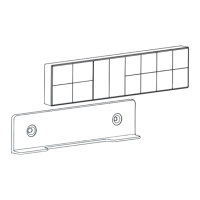
Remote Control Holder Installation

Steps for securely mounting the remote control holder on the wall using screws or adhesive.

Battery Installation

Instructions for correctly inserting batteries into the remote control unit.

Usage Instructions

Remote Control Button Functions Overview

Detailed illustration and explanation of each button on the remote control.

Washing Operations

Details on performing rear, front, and oscillating washing functions with the remote.

Drying and Water Control

Adjusting drying air, water volume, and nozzle/air outlet position during use.

Comfort and Saving Features

Managing energy saving, water, seat temperatures, and night light features.

Air Speed and Foam Control

Adjusting drying air speed and activating foam functions for enhanced cleaning.

Flush Functions

Instructions for using half flush, full flush, and auto flush features.

Lid and Seat Control

Operating the seat lid and seat automatically or manually via the remote.

Advanced Settings and Modes

Pairing the remote, enabling quiet mode, and setting up auto pre-wet functions.

Deodorization and Sensor Functions

Activating auto deodorization and foot sensor features for improved user experience.

Woodbridge B0930S Specifications

General IconGeneral
BrandWoodbridge
ModelB0930S
CategoryController
LanguageEnglish