
 Need help?
Do you have a question about the Woodley InSight V-CHEM and is the answer not in the manual?
Defines the analyser's purpose for quantitative in-vitro determination of clinical chemistry analytes in blood samples.
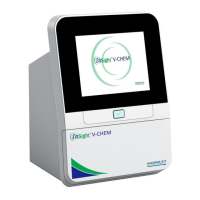
Details the analyser's key parts: motor, spectrophotometer, microprocessor, touchscreen, and external printer.
Explains symbols for direct current, warnings, biohazard, and IVD, providing essential safety and diagnostic information.
Covers packaging materials, transportation guidelines, and optimal storage conditions for the analyser.
Specifies EMC standards met by the equipment and provides guidance on potential radio interference.
Introduces the analyser's mechanical, electronic, display, and structural modules, detailing their functions.
Guides on basic software functions, diagnostic features, and the Help and Debugging functions for operation and troubleshooting.
Procedure to check the outer packaging for damage upon receiving the analyser, ensuring it's intact before proceeding.
Instructions for carefully unpacking the analyser, verifying contents against the packing list, and initial placement.
Provides essential physical specifications and environmental conditions required for proper analyser operation and installation.
Details the process of installing the analyser, including placement, power connection, and startup procedures.
Provides step-by-step instructions for cleaning the analyser's air filter sponge to maintain optimal performance.
Details the cleaning procedure for the temperature sensor and optical lens using specific tools and materials.
Guides on connecting the analyser to a network via Wi-Fi for software upgrades and data transfer.
Explains how to perform software upgrades using a USB flash drive when a wireless network is unavailable.
Details the process for uploading failure data for diagnostics, emphasizing stable transmission modes like Wi-Fi.
Explains how to recalibrate the touchscreen if accuracy issues arise, guiding through the on-screen calibration process.
Describes how to adjust reagent results based on quality control, modifying coefficients for specific items.
Refers to an attached list for recommended spare parts required for maintenance and repair of the analyser.
Lists and illustrates the essential tools required for performing repairs and maintenance on the InSight V-CHEM analyser.
Addresses 'Multi-way Switch Failure', its cause, and advises contacting support for this rare error.
Details '+12V Power Supply Abnormal' errors, their causes, and recommended contact for this rare issue.
Covers '-12V Power Supply Abnormal' faults, potential causes, and advises contacting support for this rare issue.
Explains 'AD Transformation Fault' due to chip damage, its causes, and recommends contacting support.
Diagnoses 'Optical Module Fault', lists potential reasons like dirty lenses or lamp issues, and outlines troubleshooting steps.
Addresses 'Location LED Abnormal' faults, their causes (e.g., LED intensity), and troubleshooting steps.
Explains 'Optical Output is Unstable' errors, linking them to ambient temperature and xenon lamp issues, with troubleshooting.
Covers 'Drawer Open/Close Faults', their reasons (position switch, motor), and troubleshooting steps.
Details 'Motor Speed Fault', related to data transmission and synchronization issues between main boards, and troubleshooting.
Covers errors related to sample volume, dilution, mixed solution, and unevenness, with reasons and troubleshooting.
Indicates 'Disc Expired' as the cause for this error code.
Addresses 'Temperature Fault', its causes (environment, fan, sensor), and troubleshooting steps.
Explains 'Not Enough Exposure Points' errors, their causes (LED intensity, motor speed), and troubleshooting steps.
Covers 'Dark Current' errors, relating them to whole blood mode, light intensity, or faulty optical circuits.
Details 'Light Intensity Saturation' errors due to water mist or circuit issues, suggesting analyser restart.
Addresses 'Temperature Data Transmission Fault', likely due to abnormal data signals or connection cables.
Explains 'Temperature Sensor Fault', its reasons (broken sensor, abnormal voltage), and troubleshooting steps.
Covers NTC and heating film faults, detailing causes like broken resistance, poor contact, or incorrect insertion.
Addresses 'FPGA Fault', its reasons (chip welding, circuit board issues), and troubleshooting steps.
Details 'Scan Module Fault', reasons for disconnection (scanner not connected, abnormal connection), and troubleshooting.
Covers 'Main II Board Error Fault', its causes (soldering, circuit board, cable issues), and troubleshooting.
Details reasons for a black screen (no power, cable issues, panel fault) and troubleshooting steps.
Addresses 'White Screen' errors occurring when BIOS cannot start, usually due to program errors, and troubleshooting.
Covers 'White Screen' errors when BIOS can start, caused by connection issues or kernel errors, with troubleshooting.
Describes 'Blurred Screen' issues where parts of the display disappear or colours are abnormal, listing reasons and troubleshooting.
Explains 'Touchscreen Not Responding' causes (deformation, failure) and troubleshooting steps, including recalibration.
Details reasons for repeated automatic restarts (power, kernel error, power strip) and troubleshooting steps.
Addresses 'System Breakdown' where the interface has no response, listing causes like memory or positioning issues.
Covers issues where the analyser fails to start normally after powering on, focusing on power cord connection checks.
Explains why the system might return to the main interface during detection (motor, disc issues) and troubleshooting steps.
Details reasons for the Wi-Fi interface failing to find connectable signals (cable, module issues) and troubleshooting.
Discusses Wi-Fi connection failures, possibly due to weak signal, and suggests using a mobile hotspot.
Addresses 'Black Screen' when a button is pressed, attributing it to software bugs and conflicts, with restart/core board solutions.
Covers system startup failures due to missing or damaged library files, requiring recovery procedures or core board replacement.
Explains Wi-Fi connection failures despite good signal, due to router settings or software bugs, requiring troubleshooting.
Addresses inaccurate reference ranges after software upgrades, caused by residual old files, and suggests upgrade procedures.
Provides guidance on downloading and installing the data management platform software, recommending contact for the package.
Covers 'Unable to Sync Data Wirelessly' errors due to network issues or weak Wi-Fi signals, with troubleshooting steps.
Addresses serial line data synchronization failures, likely caused by data cable problems or software version mismatches.
Explains inconsistencies in reference ranges between the analyser and DMP, due to operator modifications or version mismatches.
Details 'Standard Expression Error' during DMP startup, often caused by version mismatches, with uninstall/reinstall solutions.
Covers errors during data printing, such as garbled data, usually due to version conflicts or simultaneous printing from multiple devices.
Addresses errors when closing the data management platform, potentially caused by antivirus software interference.
Explains 'Error of Data Source ODBC' due to missing driver files, recommending contacting support for drivers.
Describes errors where results show '[---]', caused by abnormal samples or abnormal detection wavelength intensity.
Details 'LDL-C' reporting errors, linked to abnormal sample results or detection wavelength issues.
Covers errors in 'Na+' reporting, potentially due to abnormal sample results or abnormal detection wavelength.
Explains errors in 'Cl-' reporting, relating to reagent deviations or abnormal sample results.
Addresses results exceeding upper limits, caused by abnormal sample results or abnormal detection wavelength intensity.
Details results below lower limits, due to abnormal sample results or abnormal detection wavelength intensity.
 General
| Brand | Woodley |
|---|---|
| Model | InSight V-CHEM |
| Category | Measuring Instruments |
| Language | English |

 To Next Page