EasyManua.ls Logo

Woood CONNECT - User Manual

Woood CONNECT
6 pages
Print Icon
To Next Page IconTo Next Page
Loading...
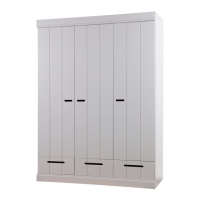
3drs kast met la
CONNECT
1/6
Connect 3drs kast met la.cdr 28.08.2014 V2.0
1
3
000601
36 x
Ø8x35 MM
000316
75 x
000103
64 x
24 MM
000102
52 x
Ø 15 MM
000219
39 x
3,5 X 35 MM
000204
28 x
4 X 16 MM
000335
2 x
000349
8 x
000902
1 x
903 MM
A
B
C E
G H
F
M
D
J
000315
4 x
000448
9 x
2MM
000418
9 x
35mm
8V
000565
3/0 x
K L
N O
000601
6 x
Ø8x35 MM
C
4
5
000601
6 x
Ø8x35 MM
000103
2 x
24 MM
B
C
000601
6 x
Ø8x35 MM
000103
2 x
24 MM
B
C
000601
6 x
Ø8x35 MM
000103
4 x
24 MM
B
C
000247
12 x
K7/6,3x9 MM
000821
3 x
Quadro
400 MM
P
Q
BB-B
TP-K
TP-O
BB-O
BB-O
TP-M
C
C
C
C
C
C
C
C
C
C
C
C
C
C
C
C
C
C
C
C
C
B
B
B
B
B
B
000104
12 x
Ø 12 MM
T
B
B
B
BB-B
C
C
C
C
C
C
C
C
B
B
C
2x
2
000601
12 x
Ø8x35 MM
C
000201
6 x
3 X 15 MM
000371
6 x
S
R
000232
12/0 x
3 X 15 MM LK
000369
28 x
Ø14 wit
U
Produced by De Eekhoorn Woodworkings BV
Question and Answer IconNeed help?

Do you have a question about the Woood CONNECT and is the answer not in the manual?

Summary

Assembly Step 1

Attach BB-B Panels

Connect the base panels BB-B using screws and dowels.

Assembly Step 2

Attach TP-K Panel

Install the TP-K panel with the provided hardware.

Assembly Step 3

Attach TP-M Panel

Secure the TP-M panel to the assembly.

Assembly Step 4

Attach TS-O and TP-O

Connect the TS-O and TP-O panels using dowels.

Assembly Step 5

Attach BB-O Panels

Connect the BB-O panels to the main structure.

Assembly Step 6

Attach Components to TS-G

Mount screws, dowels, and cam locks onto TS-G panels.

Assembly Step 7

Assemble Main Frame Sections

Connect TS-G panels with ZL and ZR sections using hardware.

Assembly Step 8

Connect Side and Base Panels

Assemble TS-O, TP-O, TP-M, TP-K, and TS-G panels.

Assembly Step 9

Connect Base and Side Panels

Assemble BB-O, TP-K, TP-M, TS-G, and BB-B panels.

Assembly Step 10

Assemble Drawer and Cabinet Frame

Connect ZL, TP-M, TP-O, BB-O, TP-K, TS-G, BB-B, and ZR panels.

Assembly Step 11

Attach Sliding Rails

Mount the PL sliding rails onto the cabinet frame.

Assembly Step 12

Install Drawer Slides and Runners

Attach A and H components to ZL, TS, BB-B, and ZR panels.

Assembly Step 13

Attach Drawer Base

Mount the BB-O drawer base onto the ZR panel using hardware.

Assembly Step 14

Install Shelves and Drawer Runners

Mount shelves (E) and drawer runners (LP) in the cabinet.

Assembly Step 15

Attach Drawer Slides to Frame

Install drawer slides (P) onto TS-O and TS-G components.

Assembly Step 16

Assemble Drawers

Construct the LL, LA, LB, LR, and LF drawer parts.

Assembly Step 17 A

Attach Door Hinges

Install hinges (F, H, L) and screws on DS and LD-RM panels.

Assembly Step 17 B

Attach Doors to Cabinet

Mount doors (SD-RM, SD-LM) to the cabinet using hinges.

Woood CONNECT Specifications

General IconGeneral
BrandWoood
ModelCONNECT
CategoryIndoor Furnishing
LanguageEnglish

Related product manuals