
 Need help?
Do you have a question about the WOOX R4252 and is the answer not in the manual?
Contact details for European and non-European support.
Steps to access FAQ and submit feedback within the WOOX Home app.
Instructions for physically mounting the camera and bracket.
Instructions for powering the device on/off and performing a reset.
Explanation of LED indicator colors for charging and status.
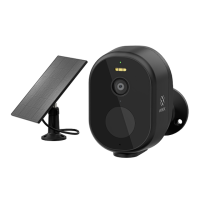
Detailed list of items included in the product package.
Key specs including resolution, dimensions, waterproof, network, and operating conditions.
Information on batteries, their lifetime, and solar panel power.
Details on audio, motion detection, and micro SD card support.
Specifies the requirement for the WOOX Home mobile application.
Specifies the network requirement for the router.
Steps for downloading, installing, and creating/logging into the WOOX Home app.
Instructions for preparing the device and initiating pairing via LED status and QR code scanning.
Confirming Wi-Fi, and completing device registration and naming.
 General
| Resolution | 1080p |
|---|---|
| Power | DC 5V/1A |
| IP Rating | IP65 |
| Infrared Distance | 10 meters |
| Night Vision | Yes |
| Weather Resistance | Yes |
| Connectivity | Wi-Fi |
| Two-Way Audio | Yes |
| Motion Detection | Yes |
| Wireless connection | Wi-Fi 802.11 b/g/n |
| Operating temperature | -20°C to 50°C |
| Storage | MicroSD up to 128GB |
| Cloud Storage | Yes |

 To Next Page