Technical specifications
To replace batteries
Notes
1 Make sure the batteries are inserted correctly,
observing correct polarity.
in use for a long period of time.
2 Remove the batteries when the megaphone is not
3 Drained batteries do not give sufficient sound
volume. Replace the batteries at regular intervals.
1. When holding the megaphone at the
grip, fix the microphone hanger inlet in
the microphone fixing hanger, then
press the (1) press-to-talk power on-off
switch back with your index finger.
2. Position the speaker opening mouth
towards the object, and speak through
the microphone mouthpiece. Bring the
microphone mouthpiece close to your
lips and speak normally.
3. Turn the sound volume control, on the
right hand side of the microphone and
adjust the sound level to optimum
without causing howling.
For making
announcements
Press
ER 55 S MEGAPHONE
Volume
control
(rear)
(4)
Siren/Talk mode switch (2)
Battery
compartment
Grip
Carrying strap
3
Press-to talk
switch (1)
Siren
activation
button
(3)
4. If you need to use the built-in siren, select it in
the Siren/Talk mode switch (2) and press the
activation button (3) in the rear side of the grip.
If you want to continue speaking, select "TALK"
position in the switch (2)
For speak, select "TALK" position in the
Siren/Talk mode switch (2)
Power output .............................................................................. 25 W
EN
All manuals and user guides at all-guides.com
all-guides.com

 Need help?
 General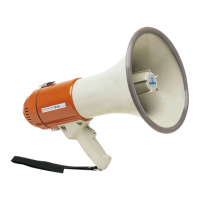

 To Next Page