Output terminals for auxiliary loudspeaker (39)
These terminals allow the connection of a small external loudspeaker that gets driven by an internal auxiliary
power amplifier, providing a 1 W nominal output. Only the mixed audio signal coming from "AUX IN" is
included in the output. In addition, the output signal is controlled only by the Monitor volume control (38).
The 600Ω /1 V monitor output allows headphones to be connected.
Telephone/Emergency (39)
The Telephone/Emergency input is for emergency announcements/signals and is not affected by the Master
volume control. The volume can be set by the tel. paging volume control (42).
The terminals allow connection of a telephone/paging system interface.
NOTE: The Telephone/Emergency input has the highest priority; all other units will be overriden.
+
1W @ 8Ω
+ GND -
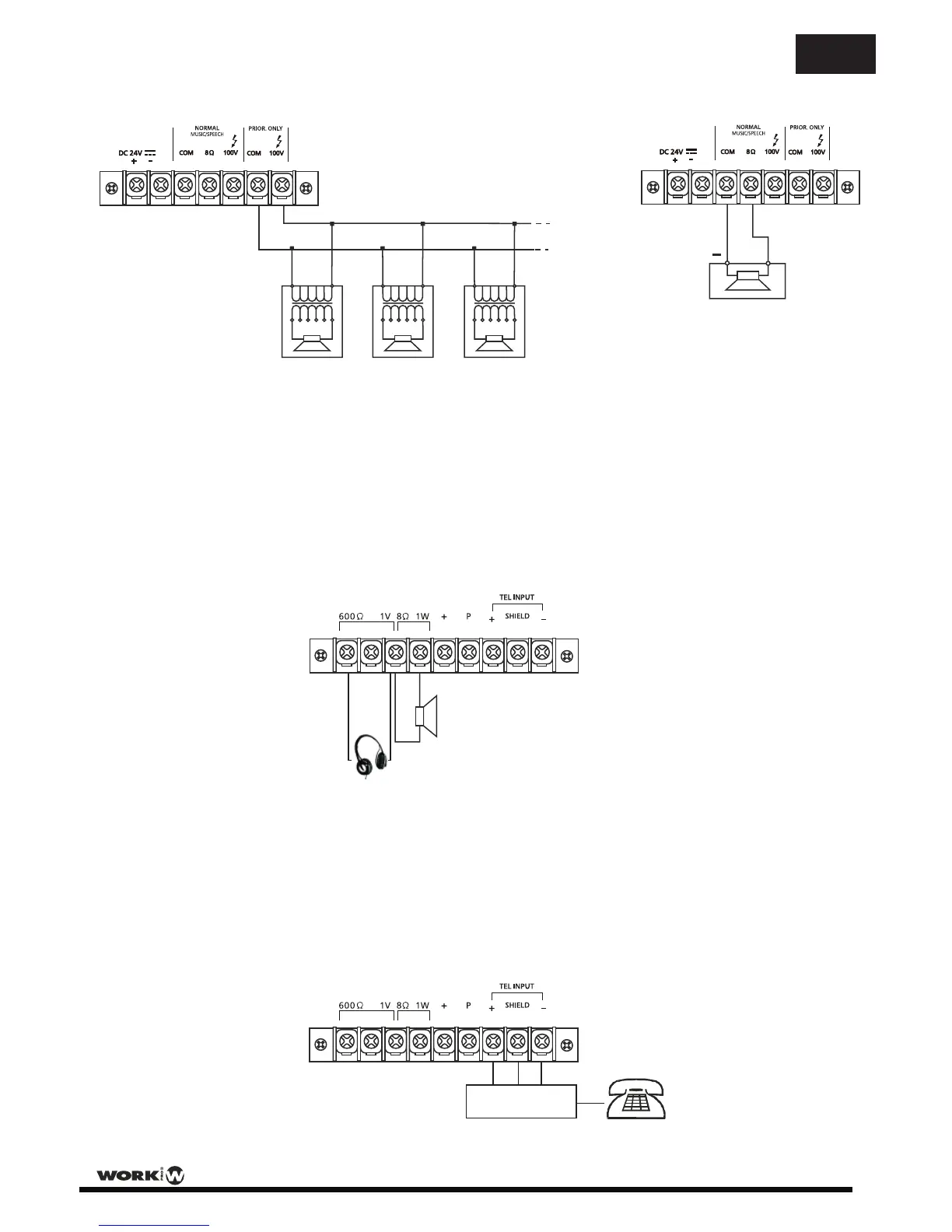
Connecting multiple speakers in parallel to the 100V PRORITY ONLY output
0 100V 0 100V 0 100V
Connecting a single speaker to 8 ohm output
+
8 ohm
Example loudspeaker output connections (15) & (16)
8 A
8 A
EN
User Manual / Manual de Usuario PA 120/2
- 6 -


 To Next Page