Step 8
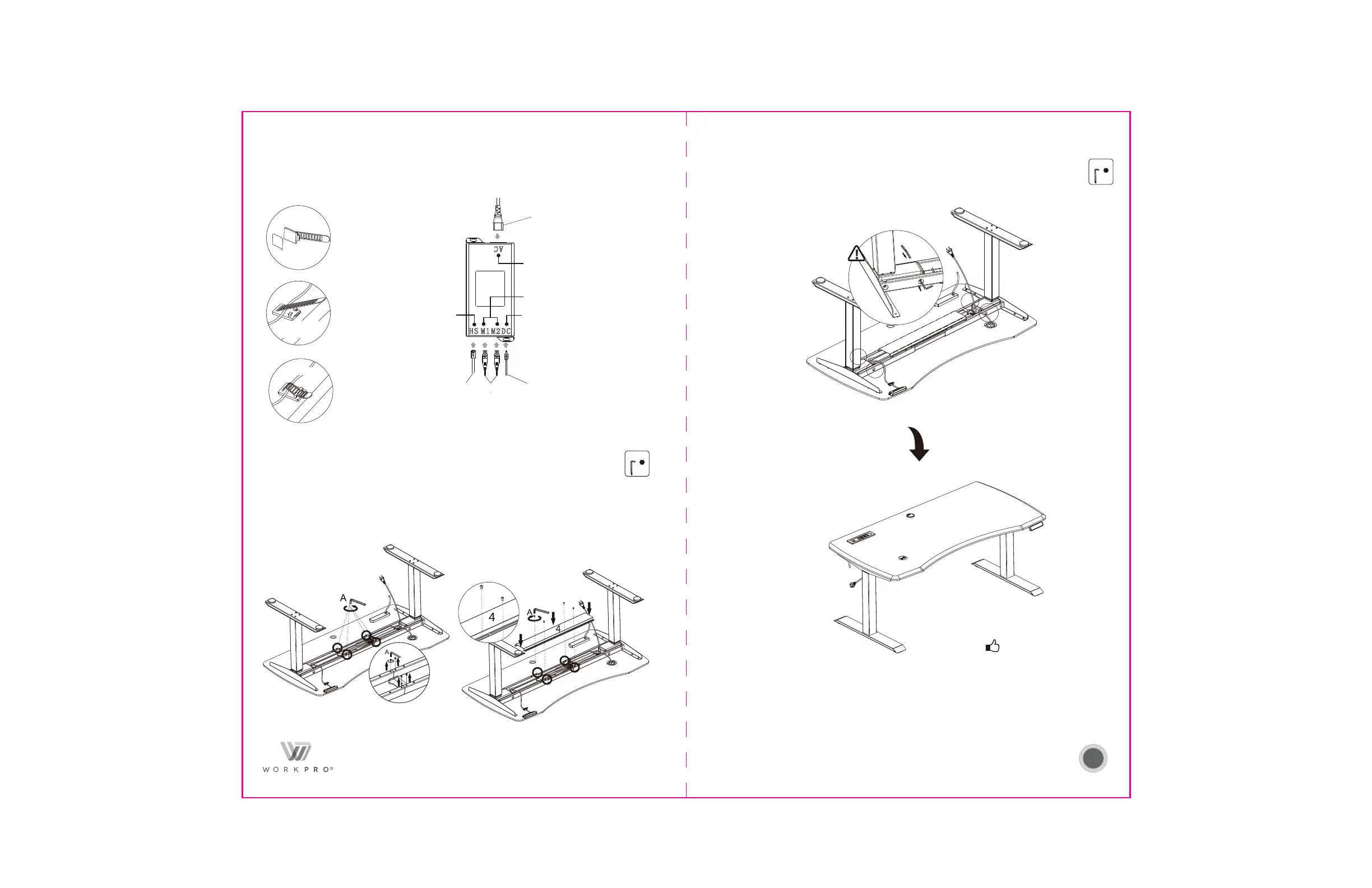
Install cable management tray
Instale la bandeja de gestión de cables
Installez le plateau de gestion des câbles
Unscrew out 4 screws in the middle/
Desenrosque 4 tornillos en el medio/
Dévissez 4 vis au milieu
Paso 8
Étape 8
7
Step 9
Finish the installation
Finalice la instalación
Terminez l'installation
Paso 9
Étape 9
A
4x4
A
4x4
A C
H S
M 1 M 2
6
D C
5
2
Port for
hand switch/
Puerto para
interruptor manual/
Port pour
l’interrupteur manuel
Port for power plug/
Puerto para enchufe de alimentación/
Port pour la prise de courant
Port for the lifting column/
Puerto para elevar la columna/
Port pour la colonne de levage
Port for wireless charger/
Puerto para el cargador inalámbrico/
Port pour le chargeur sans fil
Wireless charger/
Cargador inalámbrico/
Chargeur sans fil
7
7
7
Use the cable tie (7) to sort out the cables on the table to keep the cables tidy if needed./
Use el gestor del cable (7) para organizar los cables de la mesa y mantenerlos en orden./
Utilisez le serre-câbles (7) pour disposer les câbles sur la table afin de les garder en ordre, si nécessaire.
Tear off / Rasgue / Déchirez
Fix them / Fíjelos / Réparez-les
Manage cables/
Gestione los cables/
Gérez les câbles
A
A
2
2
2
Overturn/
Gire/
Renversez
Installation complete/
Instalación completa/
1Installation complète
Unscrew out/
Desenrosque/
Dévissez
Tighten/
Apriete/
Serrez
Tighten/
Apriete/
Serrez
Tighten/
Apriete/
Serrez
Tighten/
Apriete/
Serrez
Tighten/
Apriete/
Serrez
Tighten/
Apriete/
Serrez
Tighten/
Apriete/
Serrez


 To Next Page