
 Need help?
Do you have a question about the WorkPro W004532A and is the answer not in the manual?
Keep work area clean, prevent unintentional starting, avoid explosive atmospheres, and keep bystanders away.
Use correct plugs, avoid contact with grounded surfaces, protect from rain and wet conditions, and do not abuse the cord.
Stay alert, use common sense, avoid operating while tired or under the influence of drugs/alcohol.
Do not force the tool, use the correct tool for application, and maintain tools for safety.
Use correct batteries and chargers, handle with care, avoid shorting terminals, and be aware of battery leakage.
Have tool serviced by qualified person using only identical replacement parts to maintain safety.
Wear ear protectors, use clamps or vice to hold workpiece, and ensure adequate lighting.
Do not put pressure on the tool, keep area free of tripping hazards, and only use accessories in good condition.
Use safety glasses, ear defenders, protective clothing, gloves, and dust masks as needed.
Ensure correct voltage and check tool condition; do not use if in doubt.
Avoid liquid contact and keep charger away from water to prevent electric shock or fire.
Unplug before cleaning, use damp cloth, and position cable to avoid damage or stress.
Use extension cords only if necessary and ensure proper ventilation and temperature range.
Use only WORKPRO batteries and chargers; avoid charging in static-prone areas.
Store batteries within recommended temperature range; avoid extreme heat.
Avoid fire, explosion, physical shock, and short-circuiting; handle leaks carefully.
Recycle end-of-life batteries properly; do not attempt repair or disassembly.
Charge new batteries fully; recharge when voltage is low or performance degrades; store at 50-75% charge.
Unpack all parts, remove packing, check for completeness and damage; keep packaging from children.
Explains electrical, measurement, safety, and disposal symbols found on the product.
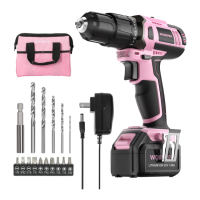
Identifies key components of the WORKPRO 20V Li-ion Cordless Drill.
Details electrical, performance, and physical characteristics of the drill.
Read manual before use; tool is for driving screws and drilling wood, metal, and plastic.
Instructions for charging the battery and removing/installing the battery pack.
How to start, stop, and control speed with the variable speed trigger switch.
Locks the switch trigger in the OFF position to prevent accidental starting.
Controls the direction of rotation for drilling and screw driving tasks.
Selects between low speed/high torque and high speed/low torque for different applications.
How to insert bits into the chuck and adjust torque for driving screws.
Allows manual tightening and illuminates the work area with an LED light.
Steps for drilling into hard surfaces, including marking and applying pressure.
Explains automatic stops for overload, overheat, or low battery voltage.
Troubleshoot by checking rotation control position and battery charge level.
Adjust the torque setting to a higher position for better screw driving results.
Factors affecting battery life and recommendations for charging and usage.
Clean the tool with a damp cloth; no regular mechanical maintenance is required.
Discharge battery, cover terminals, and recycle or dispose of properly according to local regulations.
 General
| Brand | WorkPro |
|---|---|
| Model | W004532A |
| Category | Power Screwdriver |
| Language | English |

 To Next Page