This document describes the Self series of unattended payment terminals, including the Self/2000, Self/4000, and Self/5000 models, designed for kiosk payment solutions across various segments such as petrol, transport, vending, and parking. These terminals are single-component (all-in-one) devices, compliant with the EVA EPS standard, and can be mounted from the front or rear for indoor or outdoor use, withstanding harsh weather conditions. The Self series leverages experience from previous product ranges like the iSelf series to enhance the unattended payment experience.
Function Description:
The Self series offers a range of functionalities depending on the model:
- Self/2000: A contactless-only terminal.
- Self/4000: Features a contactless, chip, and magnetic stripe card reader, along with a conventional physical keypad.
- Self/5000: A payment terminal with a touch display (no physical keypad) that supports all types of card readers, including contactless, chip, and magnetic stripe.
These terminals are designed for integration into complete solutions for end customers by qualified partners and integrators. Typical end customer solutions include petrol stations, ticketing kiosks (for airline tickets, cinema, transport), vending machines, parking kiosks, and EV charging stations.
Important Technical Specifications:
- Weight:
- Self/2000: 340 g
- Self/5000: 443 g
- Self/4000: 392 g
- Dimensions: 107 x 85 x 110 mm (height x width x depth).
- Power Supply: 9-16 V, 2A.
- Platform: Tetra.
- Memory: 512 MB SDRAM and 512 MB Flash.
- Functionality (Self/2000): Contactless cards reader, 3.26" graphic display (240 × 320) with touch, optional camera, buzzer, audio connector output, 1x Maintenance Button, 1x µSD slot, 2x SAM slots, wake-up mechanism on RS232 connectors.
- Functionality (Self/5000): Contactless cards reader, 3.26" graphic display (240 × 320) with touch, camera, buzzer, audio connector output, 1x Maintenance Button, 1x µSD slot, 2x SAM slots, wake-up mechanism on RS232 connectors, hybrid card reader (magnetic & chip).
- Functionality (Self/4000): Contactless cards reader, 2.27" backlighted landscape mode display (640*240), 16 backlighted keys, camera, buzzer, audio connector output, 1x Maintenance Button, 1x µSD slot, 2x SAM slots, wake-up mechanism on RS232 connectors, hybrid card reader (magnetic & chip).
- Link: 2x USB host (USB-A), 1x USB device (USB-B), 2x RS232 (RJ11), 1x Ethernet (RJ45).
- Operating Temperature:
- Operational: -20 °C to +65 °C (for user safety, IEC 60950)
- Functional: -20 °C to +70 °C (operational without tampering issue)
- Max Relative Humidity (Operating): 85% at 40 °C, non-condensing.
- Storage Temperature: -20 °C to +70 °C.
- Max Relative Humidity (Storage): 85% at 55 °C, non-condensing.
- Front Face Shock Resistance: IK09.
- Vibrations Resistance: NF EN 60068-2-6 compliant (10 test sequences per axis: 5 Hz to 9 Hz with 3.3 mm amplitude; 9 Hz to 200 Hz with 10 m/s² acceleration; 200 Hz to 500 Hz with 15 m/s² acceleration, 30 min endurance on each resonance frequency).
- Bumps Resistance: NF EN 60068-2-29. E compliant (each direction, 500 drops ½ sinus 25 g-6 ms).
- Water and Dust Resistance: IP65 (Self/2000 front face only); IP44 (Self/5000 and Self/4000 front face only).
- Security: Vandal resistant, certified anti-tamper and attack resistant, PCI PTS5.x compliant.
Usage Features:
- Display and Touch: Self/2000 and Self/5000 feature a full touch screen for displaying buttons or a numeric keyboard. Self/4000 has a backlighted display and a mechanical keyboard.
- Card Readers: All models support contactless cards. Self/4000 and Self/5000 also support chip and magnetic stripe cards with a backlit card entrance.
- Connectivity: Devices offer multiple USB, serial (RJ11), and Ethernet (RJ45) ports for various peripheral connections.
- Audio Output: Mono class D PWM amplifier, connectable to 4 or 8 ohms speakers with a signal level up to 3.3 V.
- Add-on Boxes:
- MDB Add-on Box: Allows the terminal to be powered by an MDB power supply (10-45 V) via a 6-pin Molex connector, or 9-16 V directly at the unit. It supports MDB slave (Version 4.2) features.
- Communication Add-on Box: Offers radio communication (4G/2G EU standard).
- SIM Insertion: Slots are available for SIM cards, typically in the communication add-on box.
- Antenna Mounting: Connectors for main and diversity antennas are provided, with specific guidelines for antenna gain to comply with FCC and IC regulations (0.56 dBi for Bluetooth, 2.15 dBi for 4G cellular).
- Power Saving: The unit is designed with a "stand-by mode" to save power.
- Installation:
- Can be mounted directly onto a kiosk panel with a specific cut-out (dimensions provided in millimeters).
- Can be mounted on a custom EVA plate (provided in the standard package), which must be permanently connected to GND for safety.
- Screws M3 (1 Nm +- 0.2 torque) are used for fixing, with washers recommended.
- The device footprint surface on the kiosk must be flat and clear of holes/ridges to ensure IP65 standard waterproofness.
- A rubber gasket at the rear ensures waterproofness between the kiosk panel and the product.
- Environmental Integration:
- Indoor Use: Possible without restriction, vertical installation recommended for ergonomics and rain protection (up to 35° angle from vertical). PIN code confidentiality must be preserved.
- Outdoor Use: Requires precautions such as waterproofing (especially for hybrid card readers), screen readability under direct sunlight, and PIN code confidentiality. Vertical integration (0-degree angle) is mandatory for Self/4000 and Self/5000 in outdoor environments to prevent water accumulation.
- Protection against Rain/Water: Adding a visor or installing the terminal in a recess is recommended. Water drainage pipes should be connected to evacuate water by gravity.
- Protection against Sunlight: Adding a visor or recess is recommended. Vertical installation helps protect against sun and rain.
- Protection from Prying Eyes: Kiosk integrators are responsible for side protections (e.g., recess integration, side protective vents) with a minimum of 2 cm clearance on each side.
Maintenance Features:
- Maintenance Button and LED: Located on the back of the device.
- LLT Mode: Press button at power up/restart until red LED lights on.
- Maintenance Mode: Press button at power up/restart until red LED starts blinking.
- Product Restart: Press button until 3 red flashes, then release (blue flash appears).
- Operating Status: Green LED indicates normal operation; other LED configurations signal an issue.
- Cleaning Instructions:
- Unplug all wires before cleaning.
- Use a soft cloth slightly soaked with soapy water for the exterior.
- Clean the glass carefully due to special surface treatment.
- Do not clean electrical connections.
- Avoid solvents, detergents, abrasive products, pressurized liquids, and direct sun exposure.
- Security Checks: Regular checks for tampering are advised upon receipt and periodically. The terminal detects "tampered state" and will flash "Irruption!" if compromised, disabling further use. Access to the terminal should be restricted to trustworthy staff. Regular checks on the chip card reader are also recommended.
- Evacuation Pipe: An accessory delivered for Self/5000 and Self/4000 to guide water inside the kiosk, often used with a "Y" adapter fitting for both tubes.
- Environmental Compliance: The product is labelled in accordance with European Directives for Waste Electrical and Electronic Equipment (WEEE) and batteries, requiring producers to be liable for take-back, treatment, and recycling. Packaging waste must also be collected separately.

 Need help?
 General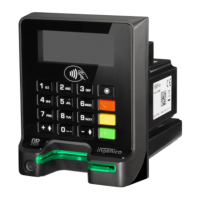

 To Next Page