2
Operating instructions
Your Cinemin™ Swivel pico projector works with a variety of devices that output video
signals, including most Apple iPhone
®
/iPod™/iPad™ products, digital video cameras,
laptops, netbooks, and some smartphones with video output.
Note that some of these devices use proprietary connectors or require specific adapters.
Connectivity
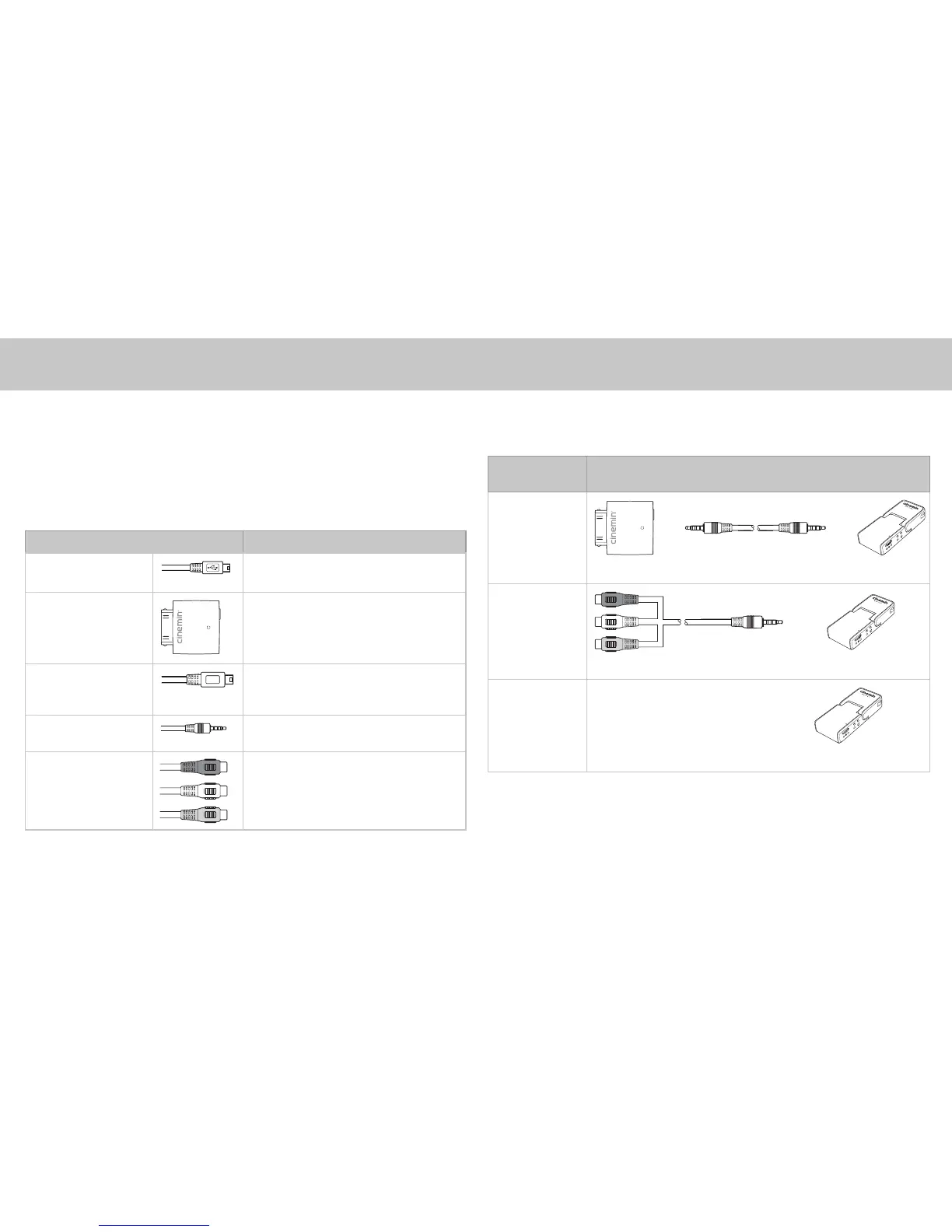
Swivel comes with the following connectors for using with your media player device:
Connector Description
USB (A) to mini USB
(B – 5 pin) cable
For connecting Swivel to AC/DC adaptor
or computer for charging only.
iPod/iPhone/iPad
adaptor
With AV out and mini USB (B – 4 pin) port
for connecting to computer.
Use with 3.5 mm to 3.5 mm cable to
connect to Swivel.
USB (A) to mini USB
(B – 4 pin) cable
For connecting iPod/iPhone/iPad adaptor
to computer for charging or synchronizing
data to your iPod/iPhone.
3.5mm to 3.5mm
cable
For connecting iPod/iPhone/iPad adaptor
to Swivel.
3.5mm to AV
composite cable
For connecting Swivel to a media player.
Connecting to a video source
To connect your media player device to Swivel, refer to the following table for common
examples of connections:
Video output
from source
Connector(s) from source to Swivel
Apple iPhone/
iPod/iPad 30-pin
connector



 To Next Page
 Loading...