3. Modem Initialization String: To define the Modem
Initialization String (up to 32 characters), type 3 and
press [Enter]. For more information on the initialization
string, please refer to the user's guide for your external
modem. Make certain that the modem is set to auto-
answer in one ring. (Default = ATE0M0Q1&C1&D2S0=1).
4. Modem Disconnect String: To define the Disconnect
String (up to 32 characters), type 4 press [Enter], and
follow the instructions in the submenu. For more
information, please refer to the user's guide for your
external modem. (Default = undefined).
5. Baud Rate: To select the baud rate for the Modem Port
and Console Port, type 5 press [Enter], and follow the
instructions in the submenu. Make certain to select a rate
that is compatible with the external modem, and/or the
device connected to the Console Port. (Default value
determined by Option Switch 1; Factory Setting = 9600).
Note: When this setting is changed, the new baud
rate will not be applied until the user exits and then
re-enters the NPS Command Mode.
6. Command Echo: Enables/Disables the command echo.
When enabled, commands sent to the NPS will be echoed
back to your PC, allowing keystrokes to be displayed . To
enable/disable the echo, type 6, press [Enter] and follow
the instructions in the submenu. (Default determined by
Option Switch 3; Factory Setting = Disabled).
5-5
Configuration
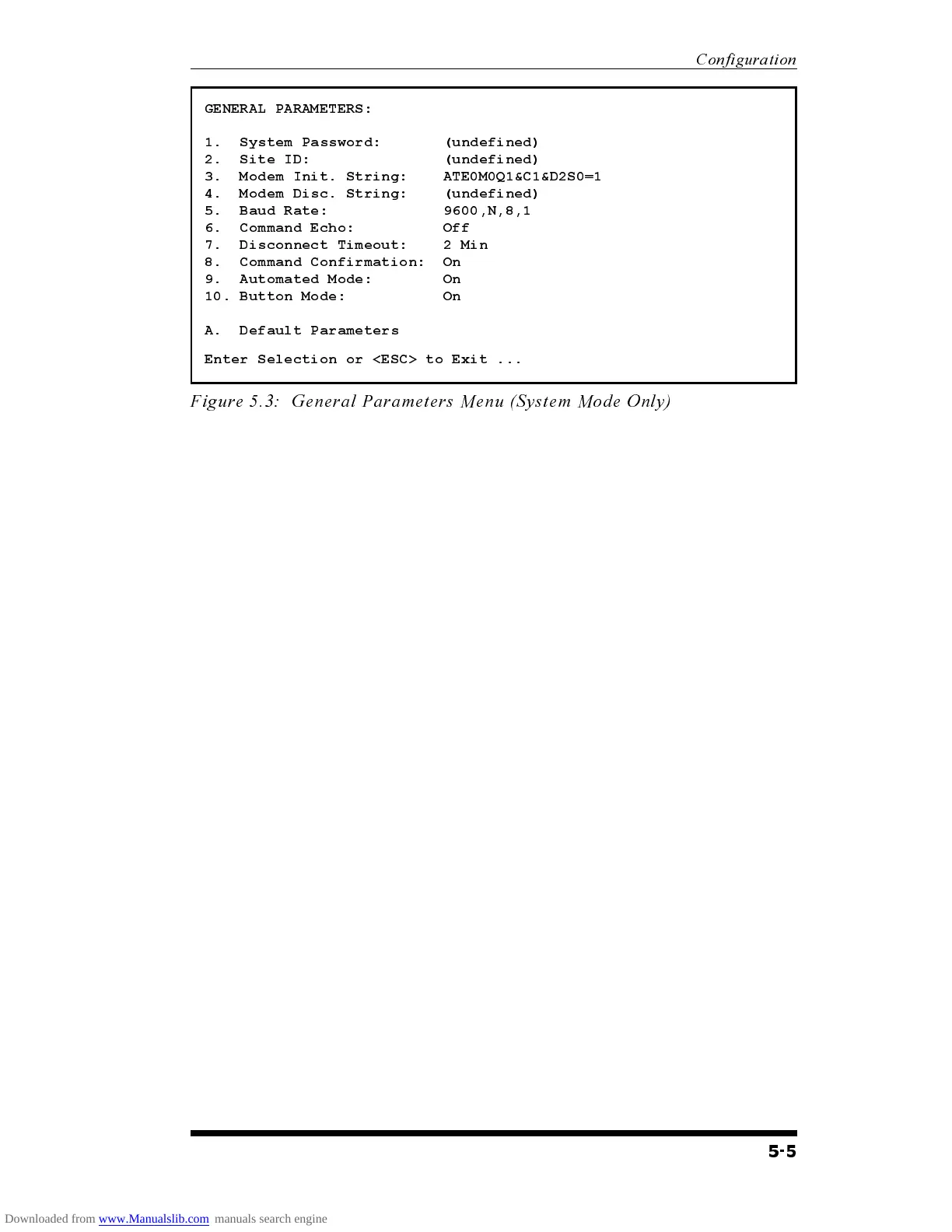
GENERAL PARAMETERS:
1. System Password: (undefined)
2. Site ID: (undefined)
3. Modem Init. String: ATE0M0Q1&C1&D2S0=1
4. Modem Disc. String: (undefined)
5. Baud Rate: 9600,N,8,1
6. Command Echo: Off
7. Disconnect Timeout: 2 Min
8. Command Confirmation: On
9. Automated Mode: On
10. Button Mode: On
A. Default Parameters
Enter Selection or <ESC> to Exit ...
Figure 5.3: General Parameters Menu (System Mode Only)



 To Next Page