2. Unit Description
2.1. Front Panel
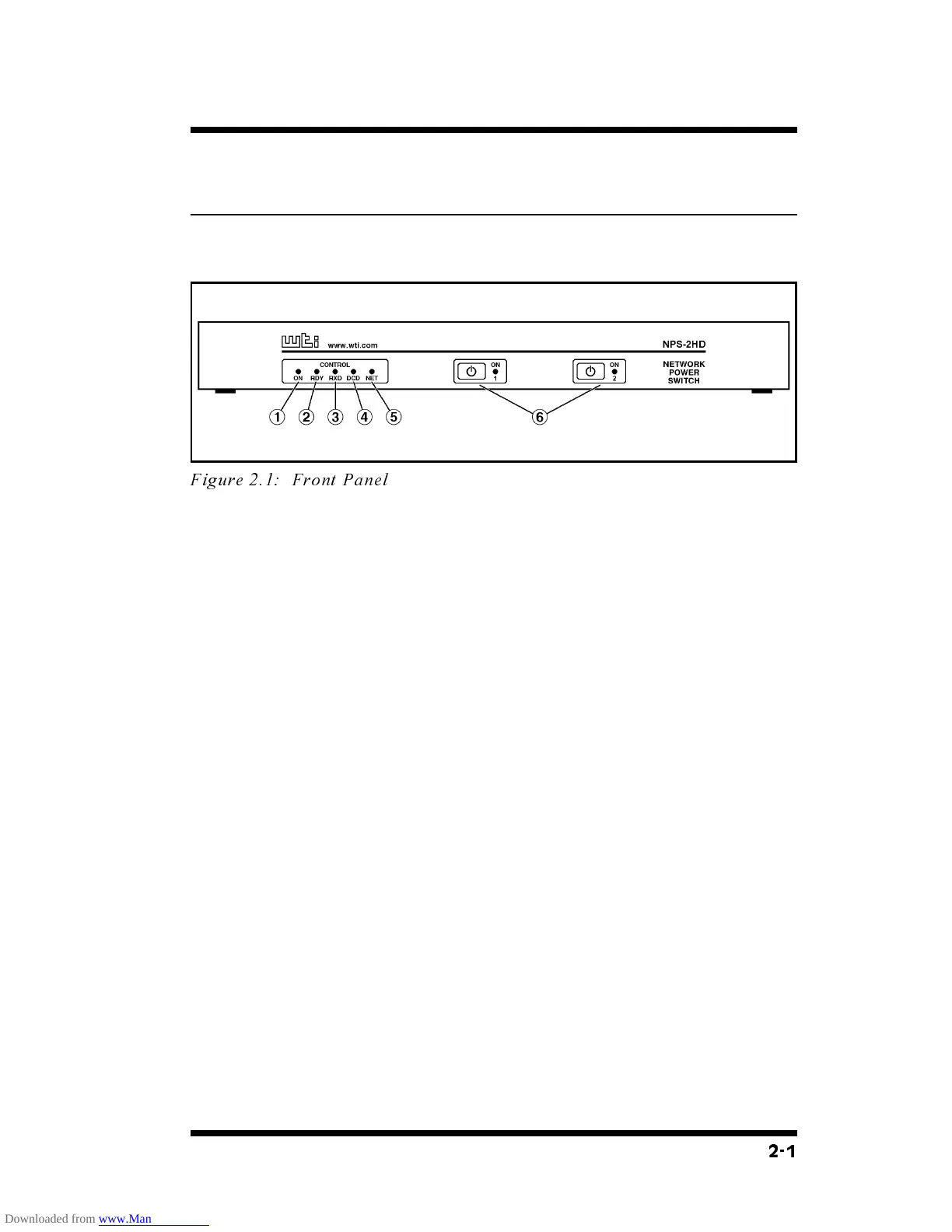
As shown in Figure 2.1, the NPS-2HD front panel includes a
series of LED indicators which function as follows:
À
ON: Lights when AC Power is applied to the NPS-2HD.
Á
RDY: Flashes when the NPS-2HD is ready to receive
commands.
Â
RXD: Lights when the NPS-2HD receives commands.
Ã
DCD: Lights when the Modem Port detects the Carrier.
Ä
NET: Lights when a Telnet session is in progress.
Å
Plug Indicators and Manual Control Buttons: An
On/Off Indicator and Manual Control Button for each
switched plug. To manually switch a plug "On" or "Off",
press and hold the appropriate Manual Control Button for
one second; the corresponding plug will be toggled
On or Off.
Note: If desired, the Manual Control Buttons can
also be disabled as described in Section 5.4.
2-1
Figure 2.1: Front Panel



 To Next Page