This document is a Quick Start Guide for the WUIPET WIFI Automatic Pet Feeder, model DU4L-WC-01. It provides comprehensive information on setting up, operating, maintaining, and troubleshooting the device, along with its technical specifications and a brand story.
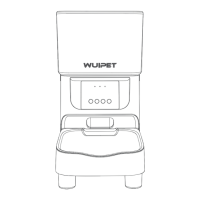
The WUIPET WIFI Automatic Pet Feeder is designed to improve the lives of pet parents and their pets by ensuring timely and consistent feeding. It connects to a home's wireless router, allowing users to program and monitor pet meals remotely via the Smart Life app.
Function Description:
The primary function of the device is to automatically dispense dry pet food at scheduled times and in specified portion sizes. It offers remote control via a smartphone app, enabling users to schedule meals, adjust portions, view feeding activity logs, and manually dispense food. The feeder also includes a voice recording feature to call pets at meal times. It can operate on both AC power and D-cell batteries for backup during power outages.
Important Technical Specifications:
- Model: DU4L-WC-01
- Food Tank Capacity: 4 liters (17 Cups)
- Power: DC 5V power adapter; 3 x alkaline D batteries (not included) for backup.
- Power Adapter: AC110-240V input, DC 5V output
- Working Current: Avg. 80mA
- Operating Temperature: -30°C to 50°C (-22°F to 122°F)
- External Socket: 5.5mm power socket
- Net Weight: 1.54kg / 3.39lbs
- Dimensions: 18.9 x 17.5 x 28.7cm / 7.4 x 6.9 x 11.3in
- WIFI Standards: 802.11 b/g/n
- Wireless Frequency: 2.4GHz (channel 1-14)
- Encryption: WPA/WPA2
- Radiation Power: +20dBm
- System Supported: Android & iOS (iPhone on iOS 11.0 or later; smartphone on Android 6.0 or later)
- Kibble Size: Suitable for dry food ONLY, with kibble size ranging from 2-12mm / 0.07-0.47in in diameter. Larger kibble may get stuck.
Usage Features:
- Control Panel: Features LED indicators, Lock/Unlock Button, Record Button, Feed Button, and Set Button.
- Recording Button: Allows recording a voice message (less than 10s) to call pets at feeding times.
- Lock/Unlock Button: Press and hold for 6s to lock/unlock the system, preventing accidental changes.
- Feed Button: Manually dispenses a portion of food.
- Set Button:
- When not connected to the App: Press and hold for 7s to switch between Manual Mode and AP Mode.
- In locked mode: Press and hold for 6s to reset the device.
- LED Indicators:
- Blue Flash every 0.5s: Feeder in Bluetooth or Manual mode, ready to connect with App.
- Blue Slowly blink: Feeder in AP Mode, ready to connect with App.
- Blue Stay solid: Connected to WIFI and fully operational.
- Off: Normal operation.
- Red Blink: Food dispensing system error (reset by holding Set Button for 6s).
- Red Stay for about 6s: Resetting WIFI connection.
- App Control (Smart Life app):
- Schedule meal times and portion sizes (1-10 meals, 1-12 portions per meal).
- View the last 7 days of feeder activity (up to 1000 feeding activities).
- Remotely dispense meals.
- Receive smartphone alerts when pets are fed.
- Share feeder access with other Smart Life accounts.
- Height Adjustment: Includes 1-inch and 2-inch feeder raisers to adjust the height of the food tray, suitable for pets of different sizes. Anti-slip stickers are provided for stability.
- Power Backup: Can be powered by 3 alkaline D batteries (not included) to ensure continuous feeding during power outages. The battery level icon blinks on the display when battery level is low (<4V).
- WIFI Connection: Requires a 2.4GHz wireless router (802.11b/g/n). The WIFI password should be composed of no more than 12 digits and letters, without special symbols. Recommended distance from router is within 6 meters without wall barriers.
- Connectivity Modes: Supports Bluetooth Mode, AP Mode, and Manual Mode for initial setup.
Maintenance Features:
- Cleaning: Recommended to clean regularly for pet health. Washable parts include the lid, food tank, stainless bowl, and bowl holder feeder raisers.
- Cleaning Procedure:
- Disconnect power.
- Remove the lid and desiccant bag.
- Remove the food tray by pressing down the stainless steel bowl with its holder.
- Remove the food tank by toggling switches on both sides and pushing upwards.
- Rinse and air dry all washable parts thoroughly before reassembling.
- Desiccant Bag: The feeder includes a desiccant bag in the lid carrier to keep food fresh.
- Battery Check: Check batteries regularly and replace with new ones before extended absences.
Safety Precautions:
- Dispose of packaging materials properly, keeping polybags away from children and pets.
- Do NOT allow small children to play with or around the feeder.
- Supervise children when the appliance is in use.
- Do NOT use with pets unable to reach the food tray or with physical disabilities.
- Do NOT immerse the base in water.
- Do NOT place foreign objects in the feeder.
- Do NOT use outdoors.
- Do NOT use wet, canned, or moist food.
- Do NOT disassemble the unit beyond instructions in the guide.
- Use only manufacturer-recommended attachments.
- Do NOT operate if malfunctioning or damaged; contact customer service.
- Always unplug when not in use and before cleaning.
- Never pull the power cord to unplug.
- Turn off electricity to the wall outlet if the plug gets wet.
- Examine the feeder after installation; do not plug in if water is on the power cord or plug.
- Position the power cord out of foot traffic to avoid tripping.
- Do NOT allow pets to chew on or swallow parts; consider a cord conduit.
- If an extension cord is necessary, use one with a proper rating.
- Do NOT install or store where exposed to weather or temperatures below 4°C / 39°F.
- Use alkaline D batteries ONLY; do NOT use rechargeable batteries.
- Lift and carry the feeder using both hands and the base, keeping it upright.
- Observe all important notices on the feeder and packaging.
The guide also includes a section on how to create a DIY cardboard cat house, with a QR code linking to an operation video. The brand story emphasizes WUIPET's commitment to pet well-being through high-quality, science-backed, and ethically produced solutions.


 To Next Page
 General