1
Start up
en
GB
F
I
E
P
NL
DK
S
N
FIN
J
CN
ROK
PL
HR
H
RUS
CZ
GR
LT
LV
EST
SLO
SK
M
TR
User Manual
English
Before using the product for the first
time, please read carefully through
the Safety Instructions and the User
Manual. The person responsible for
the instrument must ensure that all users understand
these directions and adhere to them.
Contents
Start up
..................................................................... 1
Operation ................................................................. 2
Care and advice on operation.......................... 11
Transport................................................................ 11
Warranty ................................................................. 11
Technical data ...................................................... 12
Safety instructions .............................................. 13
Start up
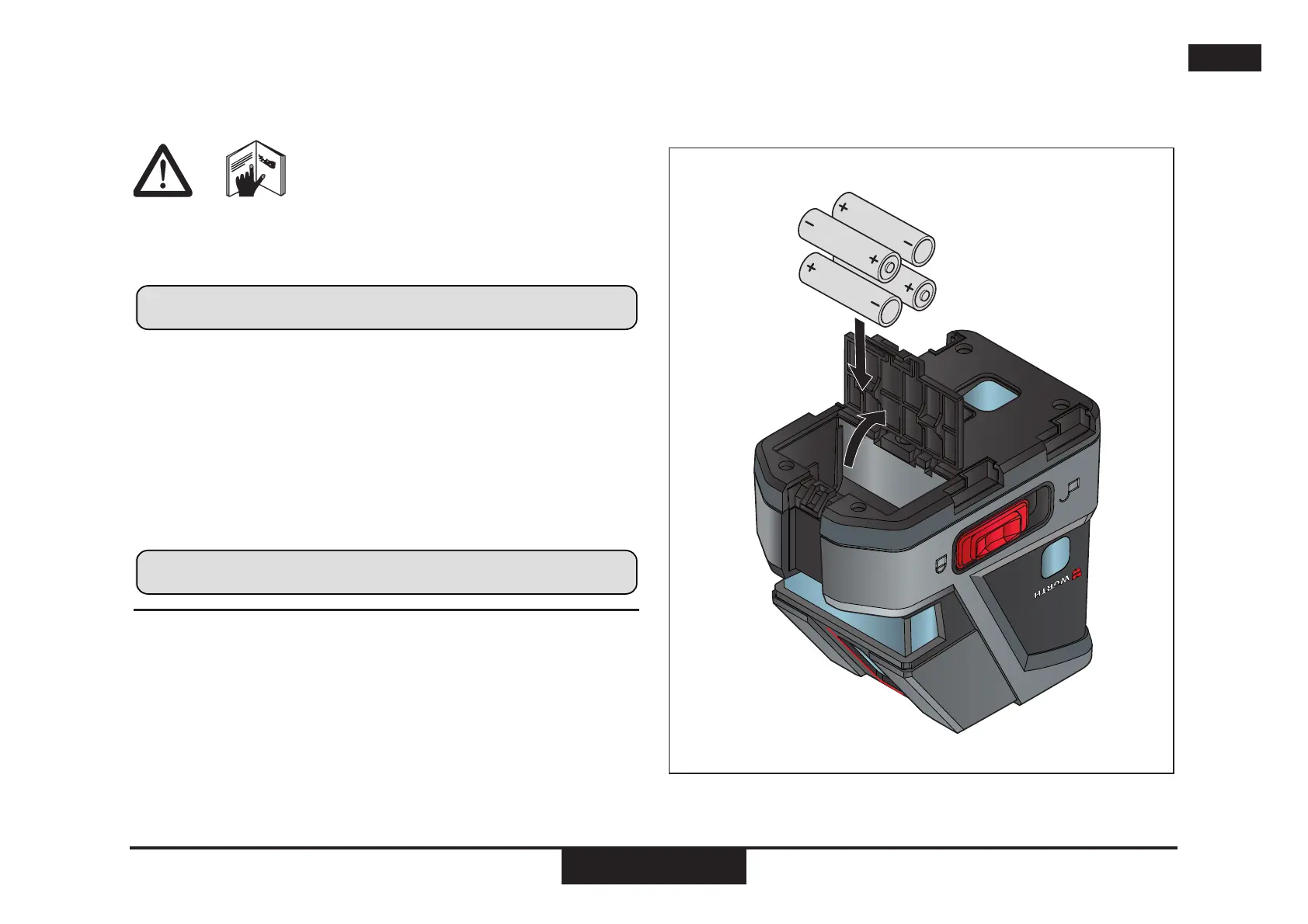
Inserting / replacing batteries
Slide the locking button forwards to unlock the battery
compartment. Open the battery compartment cover and
insert the batteries, observing the correct polarity. Then
press the battery compartment cover back down until it
engages.
The battery symbol 5 lights up when the battery voltage
is too low. Replace the batteries as soon as possible.
• Insert the batteries observing the correct polarity
• Use alkaline batteries or rechargeable batteries only
• Remove the batteries if the instrument is not to be
used for a long period of time (to prevent corrosion)


 To Next Page