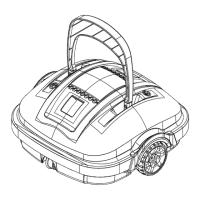
The WYBOT Robotic Pool Floor Cleaner WY1102 is an environmentally-friendly, rechargeable automatic cleaner designed to filter pool water and remove particles without the need to replace the pool water. This device is specifically engineered for swimming pools with a flat floor, offering an autonomous cleaning solution.
Function Description:
The primary function of the WY1102 is to autonomously clean the floor of swimming pools. It operates by moving across the pool floor, vacuuming debris and filtering the water. The cleaner is equipped with a mechanism that allows it to automatically reverse direction when it encounters a wall, ensuring comprehensive coverage of the pool area. It is designed to run for a maximum of 60 minutes per cleaning cycle. Once the battery runs low, the cleaner will automatically move to the pool wall and cease operation, signaling the end of its cleaning task.
Usage Features:
Before its first use, the cleaner requires a simple assembly process. This involves attaching the flipper and securing it with the provided screws. The manual notes that the installation direction of the two screws is opposite. Additionally, scrapers can be installed to enhance the suction effect, particularly in pools with a significant amount of debris or particles. However, if the pool bottom is uneven or has pits, it is recommended not to install the scrapers to prevent the cleaner from getting stuck. A retrieving hook is also provided, which can be attached to a standard pool pole (not included) for easy retrieval of the cleaner from the water.
The cleaner is powered by a rechargeable battery, and it is crucial to fully charge the device before each use. Charging involves connecting the charging connector to the charging socket located at the bottom of the cleaner, placing the cleaner in an upright position, and then plugging the charger into a main electrical outlet. The indicator lamp on the charger will turn red during charging and green once fully charged. It is important to charge the robotic cleaner indoors, and strictly forbidden to charge it with the bottom facing up to prevent damage to the swing plate. The charging socket must be clean and dry before connecting the charger.
To initiate cleaning, the cleaner must first be submerged into the pool. Before turning it on, it's essential to purge any trapped air. This is done by holding the cleaner with both hands and submerging it, then rotating it until no air bubbles are observed escaping. Once fully submerged and air-free, the power button, located at the bottom of the cleaner, should be pressed to switch on the product. After approximately 5 seconds, water will begin to flow out from the nozzle, indicating that the cleaner is operational. The cleaner should then be slowly released into the pool in an upright position, allowing it to sink to the pool floor. If the cleaner flips upside down during release, the floating handle can be used to correct its orientation.
A key feature of the WY1102 is its adjustable running pattern. The cleaner comes with two adjustable wheels, and by modifying their combination, users can alter the cleaning path of the device. To adjust the wheels, the lock buckles need to be opened, and the top cover removed. The wheels can then be detached by pushing the wheel stem catch. Different combinations of the wheels (labeled A, B, and C) are suggested for various pool types and desired cleaning behaviors:
- A – C: This is the factory setting, suitable for most types of pools.
- B – C: This combination results in a smaller rebounding angle, potentially offering more focused cleaning.
- C – C: This setting provides minimum maneuvering, ideal for rectangular or longer pools where straight-line cleaning is efficient.
- A – B: This combination is recommended for round pools, likely to optimize coverage in circular shapes.
After selecting the desired combination, the wheel is inserted until the catch clicks, securing it in place.
Maintenance Features:
Regular maintenance is crucial for the longevity and efficient operation of the WY1102. After each use, the cleaner should be cleaned. This process involves opening all lock buckles, detaching the top cover, and removing the filter screen. The dirt and debris accumulated on the filter screen should then be rinsed off thoroughly with running water. Following this, the robotic cleaner should be wiped with a clean cloth and allowed to air dry completely before storage.
For long-term storage, it is recommended to charge the cleaner every three months to maintain the battery life between 40% and 60%. Using only the original and authorized charging adapter for this purpose is emphasized. Failure to charge the cleaner for extended periods can lead to the battery voltage dropping below the over-discharge protection voltage, potentially causing irreversible damage to the battery.
The manual also provides a troubleshooting guide to address common issues. For instance, if the cleaner does not change direction when hitting the pool wall, it might be due to the flipper being stuck or not turning freely. The suggested solution is to hose off any dirt around the hinge of the flipper to ensure its free movement. If the LED indicator does not light up when the charger is plugged in, it could indicate a faulty charger, in which case customer service should be contacted for a replacement. If the cleaner does not vacuum the entire pool floor, it might be due to an improper running pattern setting or an irregular pool shape, prompting users to try different wheel combinations. Lastly, if the pool filter is running, the water current can affect the cleaner's operation, so it is advised to turn off the pool's filter pump while using the robotic cleaner.
Safety instructions are also a key part of maintenance and usage. Users are advised to always clean and wash the filter tray after use, turn off the cleaner during maintenance or when not in use, and store it in a cool, ventilated place away from direct sunlight. During charging, the cleaner should be kept in a cool place and not covered to prevent overheating of internal electrical components. Only certified professionals are authorized to disassemble the sealed driving kit. The manual also warns against operating the cleaner while people are in the pool or while the pool filter is running. It also highlights that oil seals for the motor contain grease, which could cause water pollution if leaks occur.


 To Next Page
 General
 Weight and Dimensions