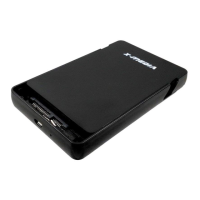
This document describes the X-MEDIA 3.5" USB HDD External Enclosure, available in models XM-EN3200-BK and XM-EN3400-BK. This enclosure allows users to connect a 3.5" hard disk drive (HDD) to a computer via USB, providing external storage capabilities.
Function Description
The X-MEDIA 3.5" USB HDD External Enclosure serves as a housing for a 3.5" hard disk drive, converting it into a portable external storage device. It supports both SATA I/II/III and IDE hard disk drives, depending on the model. The enclosure connects to a computer using a USB 2.0 AM-AM cable, enabling data transfer and power supply. Its primary function is to provide a convenient and protected way to use a standard internal HDD as an external, plug-and-play storage solution. This is particularly useful for expanding storage, backing up data, or transferring files between computers. The aluminum casing of the enclosure is designed to dissipate heat, ensuring optimal performance and longevity of the installed hard drive.
Important Technical Specifications
- Supported Hard Drives:
- XM-EN3200-BK: Supports 3.5" SATA I/II/III Hard Disk Drive.
- XM-EN3400-BK: Supports 3.5" IDE or SATA I/II/III Hard Disk Drive.
- Interface: USB 2.0.
- Data Transfer Rate: Up to 480Mbps (USB 2.0 standard).
- Material: Electroplated aluminum casing for better heat dispersion.
- Compatibility:
- Operating Systems: Microsoft® Windows® 2000/XP/Vista/7/8/8.1/10 (32/64-bit); MAC 9.x or above.
- USB: USB enabled computer system with available USB port.
- Power: AC Adapter (included).
- Indicators: LED indicator for power and activity.
- Included Accessories:
- AC Adapter
- Enclosure Stand
- USB 2.0 AM-AM Cable
- User Guide
- Mini Screw Driver & Screws set
Usage Features
The enclosure is designed for ease of installation and use.
- Plug and Play: The device is plug and play and hot swappable, meaning it can be connected and disconnected without needing to restart the computer, provided the operating system supports it.
- Simple Installation: The installation process involves a few straightforward steps:
- Using the provided mini screw driver, remove the screws from both sides of the enclosure panel.
- Gently pull out the panel from the enclosure.
- For the XM-EN3400-BK model, connect the IDE and Power cable to the hard disk.
- For the XM-EN3200-BK model, connect the SATA Hard disk.
- Slide the installed hard disk with the panel back into the enclosure and secure it with the provided screws.
- Connect the USB cable from the enclosure to the computer system.
- Driver Installation: No driver installation is required for USB enabled computer systems, as this enclosure uses natively installed drivers. Supported operating systems should automatically detect and install the enclosure.
- Verifying Installation: After physical installation, users can verify the device in Windows by right-clicking "Computer" (or "This PC" on newer Windows versions), selecting "Manage," then navigating to "Disk Management" under "Storage." The newly installed hard disk should appear as "Unallocated" or "New Volume."
- Disk Initialization and Formatting: For a new hard disk, it will appear as "Unallocated" in Disk Management. Users will need to right-click the unallocated space, select "New Simple Volume," and follow the wizard to create and format a new partition. This process assigns a drive letter and prepares the disk for use. If the hard disk already contains data, it should appear with its existing partitions and drive letter.
- External Storage: Once installed and formatted, the enclosure functions as a standard external hard drive, accessible through "My Computer" or "This PC."
- Enclosure Stand: An enclosure stand is included, allowing the device to be positioned vertically, which can save desk space and potentially aid in heat dissipation.
Maintenance Features
- Heat Dissipation: The electroplated aluminum casing is specifically designed for better heat dispersion, which is crucial for maintaining the performance and lifespan of the hard drive, especially during prolonged use.
- Durability: The robust enclosure protects the internal hard drive from physical damage, making it suitable for transport and regular use.
- Careful Handling: The manual emphasizes the importance of careful handling to prevent damage to the hard disk. Users are warned that hard disks require careful handling, especially when being transported. Dropping, lost data, or physical damage may result from improper handling. Always handle your hard disk or storage device with caution.
- Regular Data Backup: While not a direct feature of the enclosure, the device facilitates data backup, which is a key maintenance practice for any digital data.
- Cleaning: Although not explicitly detailed, general electronic device cleaning practices (e.g., dusting the exterior) would apply to maintain the enclosure's appearance and prevent dust buildup from affecting heat dissipation.
In summary, the X-MEDIA 3.5" USB HDD External Enclosure is a user-friendly and robust solution for converting internal 3.5" hard drives into versatile external storage devices, offering broad compatibility and essential features for data management and protection.

 Need help?

 To Next Page
 General