Need help?
Do you have a question about the X-Vision Optics XANB50 and is the answer not in the manual?
Details controls on the binocular's bottom, including the focus dial for clarity.
Outlines controls on the binocular's top, such as zoom, mode, power, and card slot.
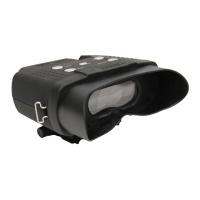
The X-Vision Optics Deluxe Night Vision Binocular, model XANB50, is designed to provide enhanced visibility in low-light and complete darkness conditions, as well as to capture photos and videos. This quick start guide outlines the essential steps for initial setup, operation, and maintenance, ensuring users can quickly harness the device's capabilities for observing the unseen.
The XANB50 binocular serves as a versatile optical tool, primarily focused on night vision capabilities. It integrates an infrared (IR) illuminator to enhance visibility in environments with minimal or no ambient light. The device allows users to observe distant objects clearly in the dark, making it suitable for various applications such as wildlife observation, security, and outdoor exploration. Beyond real-time viewing, the binocular also features photo and video recording functionalities, enabling users to document their observations. These media files are stored on a Micro SD card (not included), which can be easily inserted into a dedicated slot. The binocular's design prioritizes ease of use, with intuitive controls for power, focus, zoom, and mode selection. The inclusion of multiple IR levels allows for adjustable illumination, catering to different viewing distances and ambient light conditions.
To begin using the XANB50, it is crucial to fully charge the binocular for approximately 3 hours before its first use. This ensures optimal battery performance. Powering the device on or off is achieved by pressing and holding the power button. Once powered on, the screen will display the live view.
Focusing the image is a critical step for clear viewing. This is accomplished using the focus dial, located on the bottom of the device. Users should adjust this dial until the image on the screen appears clear. Depending on the range of the object being viewed, this may require multiple turns of the dial. The binocular also features a zoom function, controlled by a dedicated button on the top panel, allowing users to magnify the image as needed for closer inspection.
For night vision operation, the IR button must be pressed. The XANB50 offers multiple IR levels, which can be cycled through by repeatedly pressing the IR button. A higher IR setting generally provides greater visibility in darker conditions and at longer distances. It's important to note that night vision functionality does not work through glass, as glass will reflect the IR light signal, obstructing the view.
The device supports both photo and video recording. To utilize these features, a Micro SD card must be installed in the designated slot. Once the card is in place, users can switch between photo and video modes using the mode button. Pressing the camera button will then initiate photo capture or video recording. The mode button also allows access to factory settings, where users can adjust various parameters.
The power button serves a dual purpose: a long press turns the device on or off, while a short press adjusts the backlight (screen brightness), allowing users to optimize the display for different viewing conditions.
Proper maintenance ensures the longevity and optimal performance of the XANB50 binocular. One crucial maintenance tip is to always turn off the binocular when it is not in use. This conserves battery life and prevents unnecessary wear on the internal components.
The device includes an auto shut-off feature, which can be adjusted under the mode settings. Users are encouraged to refer to the comprehensive manual for detailed instructions on customizing this setting to suit their preferences. This feature helps prevent the device from remaining on inadvertently, further contributing to battery conservation.
When handling the memory card, it is imperative to always power off the binoculars before removing the Micro SD card. This practice prevents potential data corruption or damage to the card or the device's internal memory card slot.
For any customer service inquiries or additional information, users can contact X-Vision Optics via email at support@xvisionoptics.com or by phone at 833-993-2383. Further resources, including detailed product information and support, are available on the X-Vision Optics website at www.xvisionoptics.com and on their Facebook page.
 General
| Magnification | 10x |
|---|---|
| Objective Lens Diameter | 50mm |
| Prism Type | BAK4 |
| Exit Pupil | 5mm |
| Waterproof | Yes |
| Fogproof | Yes |
| Lens Coating | Fully Multi-Coated |
| Weight | 30 oz |


 To Next Page