2
Checking Battery Level
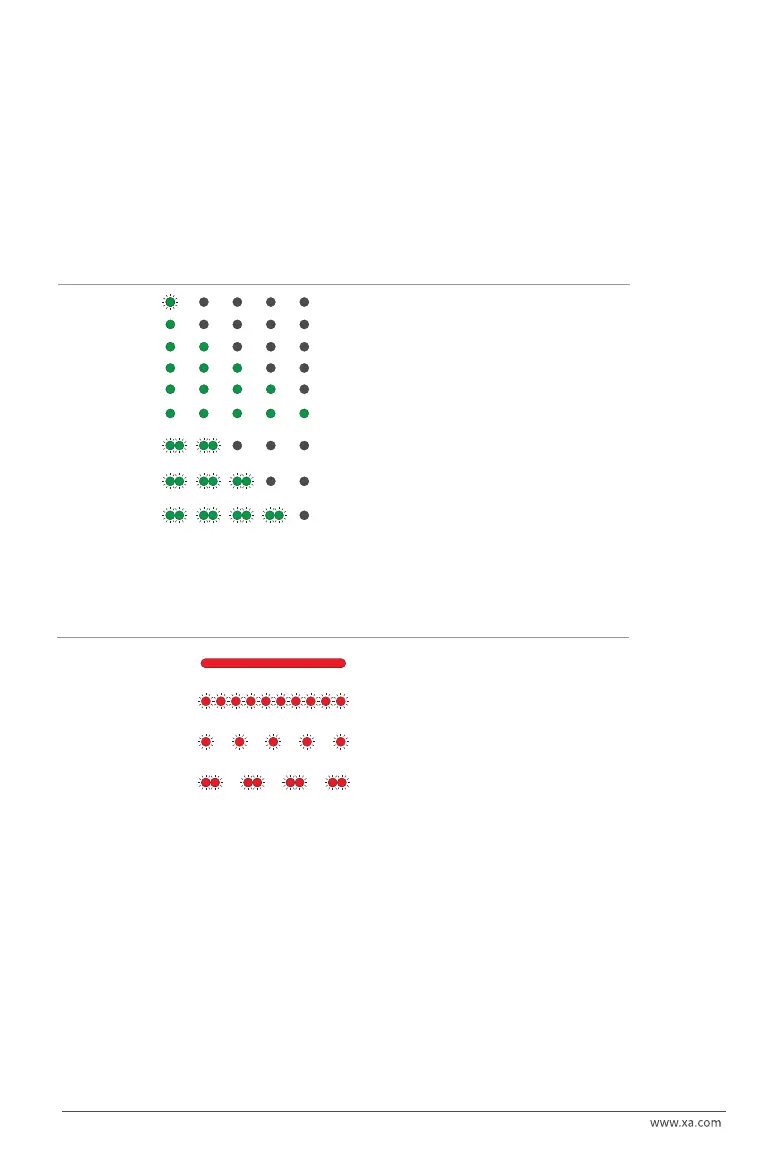
When the battery is OFF, press the power button once to display the battery level.
When the battery is ON, check the battery level indicators to see the battery level.
RED LIGHT ON
Normal Normal
RED QUICK FLASH Overheated
Temporarily locked. Prohibited
from charging and usage.
RED SLOW FLASH
Low Temperature
Battery requires preheating.
RED DOUBLE FLASH
Battery Malfunction
Stop using immediately.
Battery Level LED Status Battery Level
Checking Battery Status
• During the battery charging, the fan on the charger will be turned on to dissipate heat. The battery
management system will automatically suspend the charging if the temperature is over 50° C, and
resume after the temperature drops below 50° C. The ideal ambient charging temperature (20° - 35° C)
for charging helps maintain the normal service life of the battery.
• The battery level indicators corresponding to the current battery level will be solid green, and the
remain will be flashing in series indicating the battery is currently charging. Once the charging is
completed, the buzzer will beep for 30secs and all the battery level indicators will ashes for 2 minutes,
then the battery will turn o automatically
Battery Preheating
Press and hold the power button for 5 seconds when the battery is OFF until a beep is heard from the
battery and the status indicator is on. The pre-heating of the battery will start and the battery will turn o
automatically after heating.
[1] Device: Device as UAV or Charger
[2] Preheating: Preheating can be conducted when the battery is not connected to a device
Battery Charging
Battery Level LED
1 GREEN FLASH
1 GREEN
2 GREEN
3 GREEN
4 GREEN
5 GREEN
2 LIGHTS
DOUBLE FLASH
Self-locked
Remotely locked
3 GREEN
DOUBLE FLASH
Battery is locked due to low power level. Please contact
customer support to unlock the device.
Battery is locked remotely. Please contact customer
support to unlock device.
Status Battery Level
0% - 10%
10% - 30%
30% - 50%
50% - 70%
70% - 90%
90% - 100%
Anti-tamper lock
4 GREEN
DOUBLE FLASH
Battery is locked remotely. Please contact customer
support to unlock device.


 To Next Page
 Loading...