The XAG CM13600 Charger is a high-power charger designed for agricultural applications, featuring a wide voltage range and a robust air cooling system. It incorporates multiple protection functions, including undervoltage, overvoltage, overtemperature, and fault isolation, to ensure safe and reliable operation. The charger is designed to monitor the status of the smart supercharge battery in real-time during the charging process, stopping charging when the battery is fully charged or if any issues arise.
Function Description:
The CM13600 Charger serves as a power supply for charging XAG Smart SuperCharge Batteries. It connects to a 16A power socket and provides a regulated DC output to charge the battery. The charger includes indicator lights to communicate its operational status, such as idle, normal charging, input issues, or device failures. It is designed for easy connection to a cooling tank and then to the battery, initiating charging once the battery is turned on.
Important Technical Specifications:
- Model: M2CM1-3600BH
- Dimensions: 329.73 × 118.44 × 110.44 mm
- Weight: 4.6 kg
- Input:
- AC 100-120 Vac 50/60 Hz, 15.0 A
- AC 220-240 Vac 50/60 Hz, 15.0 A
- Output:
- DC 56.6 Vdc-21 A (Max)/1200 W (100-120 Vac 50/60 Hz)
- DC 56.6 Vdc-58 A (Max)/3300 W (220-240 Vac 50/60 Hz)
- Cooling Method: Forced air cooling
- Operating Ambient Temperature: -20–40°C
- Battery Compatible: XAG B13960S Smart SuperCharge Battery, XAG B13970 Smart SuperCharge Battery (without adapter); other B series batteries may require an adapter.
Usage Features:
- Indicator Description:
- Output Indicators:
- Solid Green: Idle
- Flashing Green: Not connected to battery or communication failure
- Solid Red: Normal
- Input Indicators:
- Solid Green: Input normal
- Flashing Green: No ground wire connection, charging can be risky
- Solid Red: Device failure, protection triggered, output OFF
- Flashing Red: Device overheats, output protection, output OFF
- Charging Procedure:
- Connect the charger's power input to a 16A power cord. The indicator will turn solid green when power-up is complete.
- Securely connect the charger connector to the cooling tank.
- Carefully place the battery into the battery compartment of the tank.
- Connect the charger connector to the battery.
- Turn on the battery to begin charging.
- Safety Precautions:
- Always use a 16A socket conforming to national/professional standards for charging. Using non-standard sockets can damage the charger and battery, with the user assuming full responsibility for any resulting losses.
- Ensure the power sockets are clean and free of metal contact.
- Keep the battery connector clean and dry. Avoid contact with metal objects, electrolytes, corrosive liquids, or other liquids that could lead to short circuits.
- Never leave the charger exposed to sunlight, rain, or moisture outdoors.
- Do not charge with AC power exceeding the rated voltage range.
- When using a generator as a power supply, ensure it can start and run for a while before connecting the charger. It is recommended to use a variable frequency generator to maintain the harmonic distortion in the generator at less than 15%.
- Match the ratings of the plug, socket, and line to the wattage of the charger as overloading may lead to a fire.
- In case of an anomaly or alarm while charging, cut off power instantly and test to ensure everything is working properly before proceeding.
- For safety, maintain a minimum of 30 cm distance between the battery and the charger, and between two batteries, to prevent overheating and potential fire hazards.
- Regularly check components including the interface and plug.
- If the charger is damaged, stop using it and contact XAG or XAG after-sales service outlets.
- Never use a damaged charger. For maintenance or replacement, contact XAG or XAG after-sales service outlets.
- Do not convert or dismantle the charger without permission. Unauthorized modification voids warranty and user assumes responsibility for any consequences.
- Keep away from heat, and ensure no flammable and explosive objects are within 2 meters when using this product for charging.
- The charger does not cover any damage to XAG charging devices, batteries, or other XAG products caused by using non-XAG batteries or charging devices.
- Unplug the charger from the battery and store it in a safe, clean, and cool place.
- Make sure the charger has stopped and cooled before checking and repairing it.
- Never use the battery or charger manufactured by non-XAG manufacturers.
- Compatibility: This product is only compatible with XAG B13960S and B13970 Smart SuperCharge Batteries without connecting an adapter. For other B series batteries, contact a local dealer or XAG's online shop for an adapter.
Maintenance Features:
- Cleaning: Keep the power sockets clean and free of metal contact. Ensure the battery connector is clean and dry.
- Inspection: Regularly check components including the interface and plug for any damage or wear.
- Storage: Unplug the charger from the battery and store it in a safe, clean, and cool place when not in use.
- Troubleshooting: If an anomaly or alarm occurs during charging, immediately cut off power and inspect the device. Refer to the indicator descriptions for troubleshooting.
- Repair: Do not attempt to convert or dismantle the charger without permission. For maintenance or replacement, contact XAG or XAG after-sales service outlets.
- Environmental Considerations: Avoid exposing the charger to direct sunlight, rain, or moisture. Ensure adequate ventilation and maintain a safe distance from flammable and explosive materials during operation.

 Need help?
 General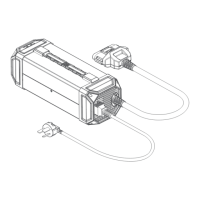

 To Next Page