7
raon, will automacally turn on. The speaker will conrm the acvaon of
BT mode with a sound nocaon and message on the display. Before rst
use, pair the speaker with the selected device by acvang BT connecon on
the laer and select XBLITZ MASTER PRO from the list. Successful connecon
will be conrmed by a sound nocaon from the speaker.
To switch to the next track, briey press the + buon. To switch to the
previous song, briey press the - buon. To increase or decrease the volume,
hold down the + buon or the - buon respecvely. Briey press the M
buon to switch the unit to FM mode.
During a phone call, the speaker will read out the caller’s phone number,
then start beeping the incoming call. Briey press the POWER buon to
answer the call or hold the same buon to reject the call.
To enter FM mode, briey press the M buon. For automac programming
of radio staons, press the POWER buon. The unit will scan the frequen-
cies in the broadcast band 87.5 - 108 MHz and will store radio staons in
scanning order. These will be stored in the speaker’s memory. To switch
between the preset radio staons, briey press the + or - buon. Increasing
and decreasing the volume is analogous to BT mode - by holding down the
+ or - buons.
Note: To improve the quality of radio signal, it is recommended to plug the
supplied USB cable into the micro-USB port on the device.
Connect the speaker to another device using the AUX line.The device will
automacally switch to AUX mode. To switch the speaker to another mode,
use the MODE buon or remove the AUX cable (the speaker will then return
to the default BT mode).
The device plays .mp3 les from external storage media - USB ash drives
and micro-SD cards. To switch to .mp3 playback simply insert the selected
storage media into the corresponding slot on the speaker. To switch between
tracks, briey press the + or - buons. A short press on the POWER buon
stops playback from the mass storage.
Note: to avoid the possibility of damaging the mass storage, it is recommen-
ded to plug and unplug it when the device is switched o.
The device has several LED backlight modes. To switch between the modes,

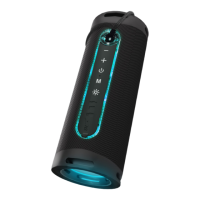

 To Next Page