19
04. INSTALLATION
CAMERA INSTALLATION INSTRUCTIONS
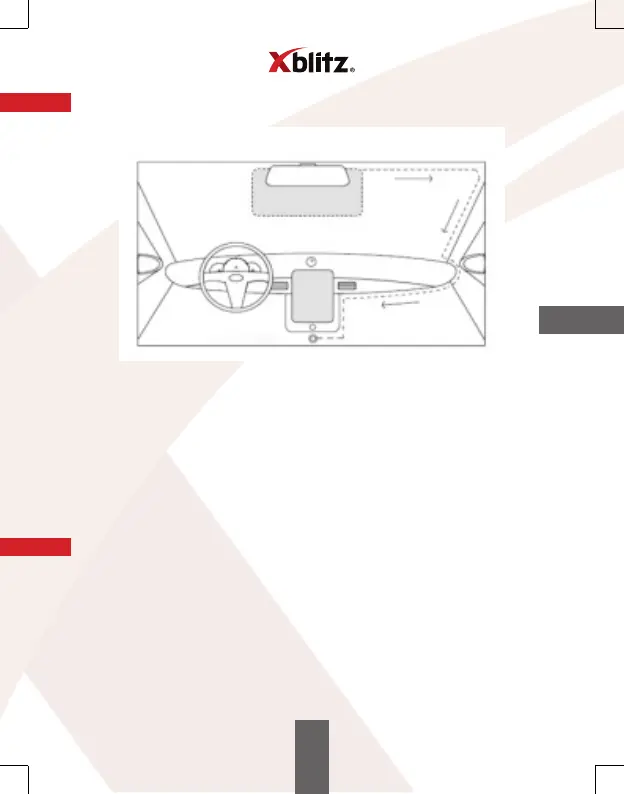
LIGHTER SOCKET
1. Select and clean the location where you want to install the camera.
2. Place the camera holder.
3. Insert the memory card into the slot in the camera.
4. Place the camera in the holder.
5. Point the camera lens towards the road.
6. Connect the camera to the charger.
7. Guide the power supply cable so that it does not obscure the view of the driver
(see the picture above).
8. Plug the power supply plug into the car lighter socket.
05. GETTING STARTED
1. Download the free "Ucam" app to your mobile device that uses Android or iOS
operating system.
2. Turn on the camera (the camera turns on automatically when connected to the
power supply).
3. Open the Ucam app on your mobile device.
4. Press the "Please connect DVR" button and then "Go to connect DVR".
5. From the list of available Wi-Fi networks, connect to the Xblitz S4 network and
when your phone asks for a password, type "12345678".
6. Go back to the app. If everything has gone successfully, you should be able to see
the image recorded by the camera.
EN


 To Next Page