19
EN
04. MOUNTING THE CAMERA
MOUNTING THE CAMERA
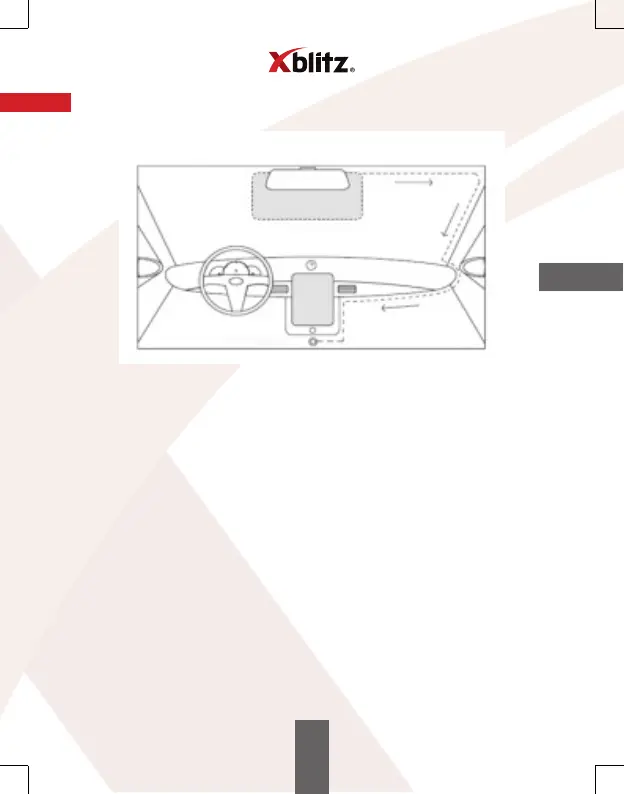
LIGHTER SOCKET
1. Select the camera mounting location. It is best to set the camera so that
the screen preview shows the largest area in front of the car.
Make sure the camera does not obstruct the driver's view while driving.
2. Mount the holder on the windshield, then install the camera.
3. Route the USB cable as shown above.
4. Route the rear camera AV cable and connect it to the car camera.
5. Connect the mini USB plug to the camera or battery/ mount.
6. Connect the charger to a 12/ 24V cigarette lighter socket.
The mounting location of the secondary camera supplied with the kit depends
on your preference. The camera has an IP67 (weatherproof) waterproof rating.
Mounting the rear camera:
Connect the black cable to the AV port on the main unit, drag the secondary camera
to the mounting location and connect it. Make sure the master device sees
the secondary camera (if not, check that the cable is properly connected
on both ends).
Rear camera Installation: connect the rear camera wires to the reversing light
wiring (red = plus). This connection will allow you to use the device as a reversing
camera.
The wiring placed on the outside of the vehicle should be properly insulated and
not tightly stretched.



 To Next Page