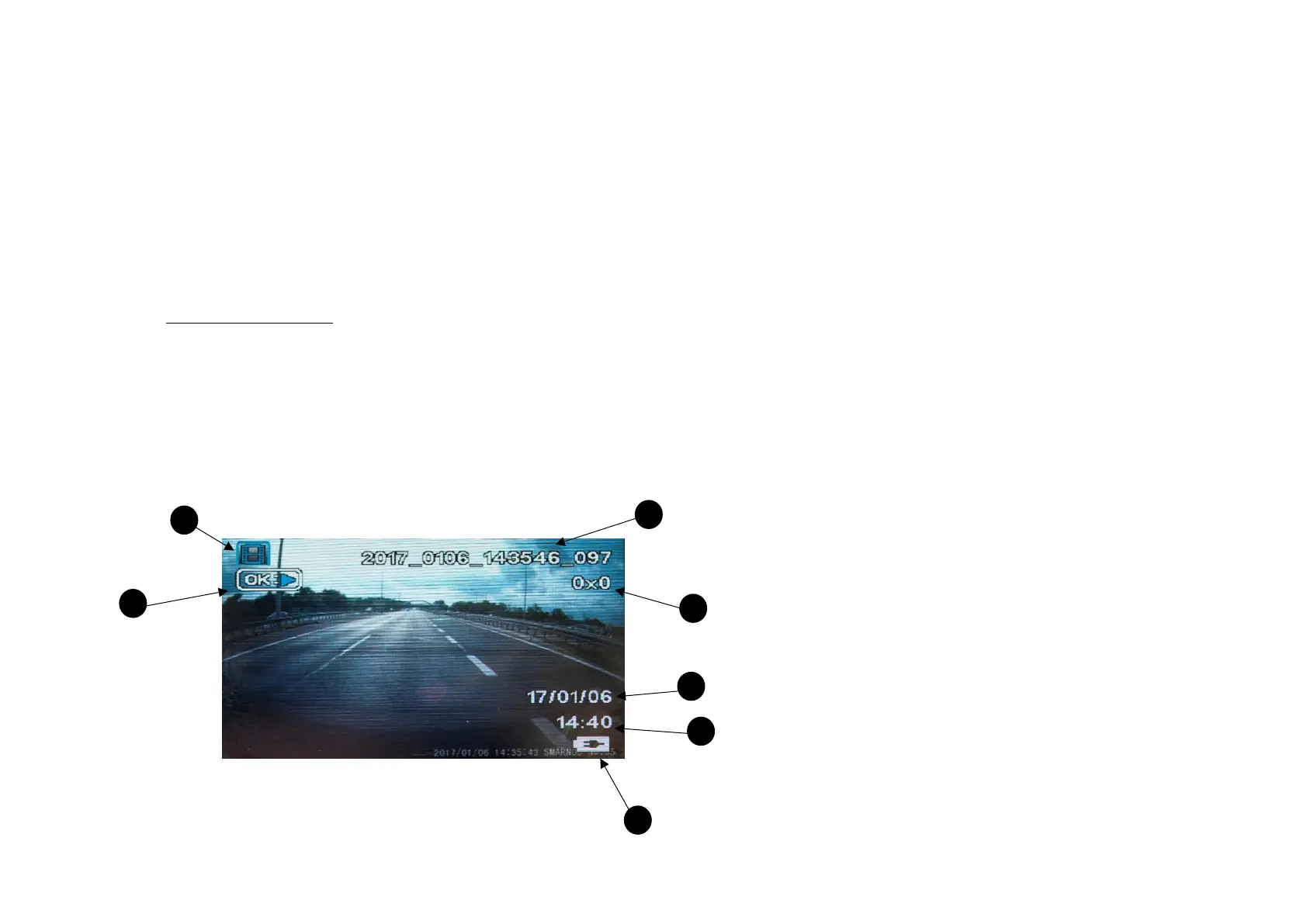
1- File type (for a photo file - no icon)
2- File name
3- Resolution
4- Date of photo / video recording
5- Time of photo / video recording
6- Battery Indicator
7- Date and time of photo / video recording
8- PLAY icon (OK)
Playback Mode
▪ We use the OK button to play a video file.
▪ We use the UP and DOWN buttons to navigate between files.
▪ We use the MENU button to enter the current mode settings. Double pressing it (in every mode) lets you enter the Main Menu.
▪ We use the MODE button to navigate between different camera modes.
When playing a video:
▪ We use the OK button to activate Play/Pause command.
▪ The DOWN button reduces, and the UP button increases the volume of the recording.
▪ Fast forward playback: press and hold the UP button. Depending on for how long you hold the button, the playback speed will be set to
x2, x4, or x8.


 To Next Page