CRASH NAV
Your specialized in-car navigation system takes you straight to the coolest action spots around the
world.
1. Select a Global Region from the world map. Your tour begins in the USA, but as you progress you can
dominate Europe and the Far East too.
2. At the Select Location screen, highlight a location marked NEW to view new events offered there,
then press
A
.
Race Event location (see Race Events on p. 5)
Crash Event location (see Crash Events on p. 7)
3. At the Select Event screen, highlight an unlocked event and press
A
. The competition begins.
Highlight locked events—marked with a padlock icon— to nd out how to open them. Successfully
complete an event and win a bronze, silver, or gold medal.
PLAYING THE GAME
There’s a whole world of new events and hot wheels to unlock. Race and crash to win burnout points,
medals, trophies, crash $ and more to earn it all!
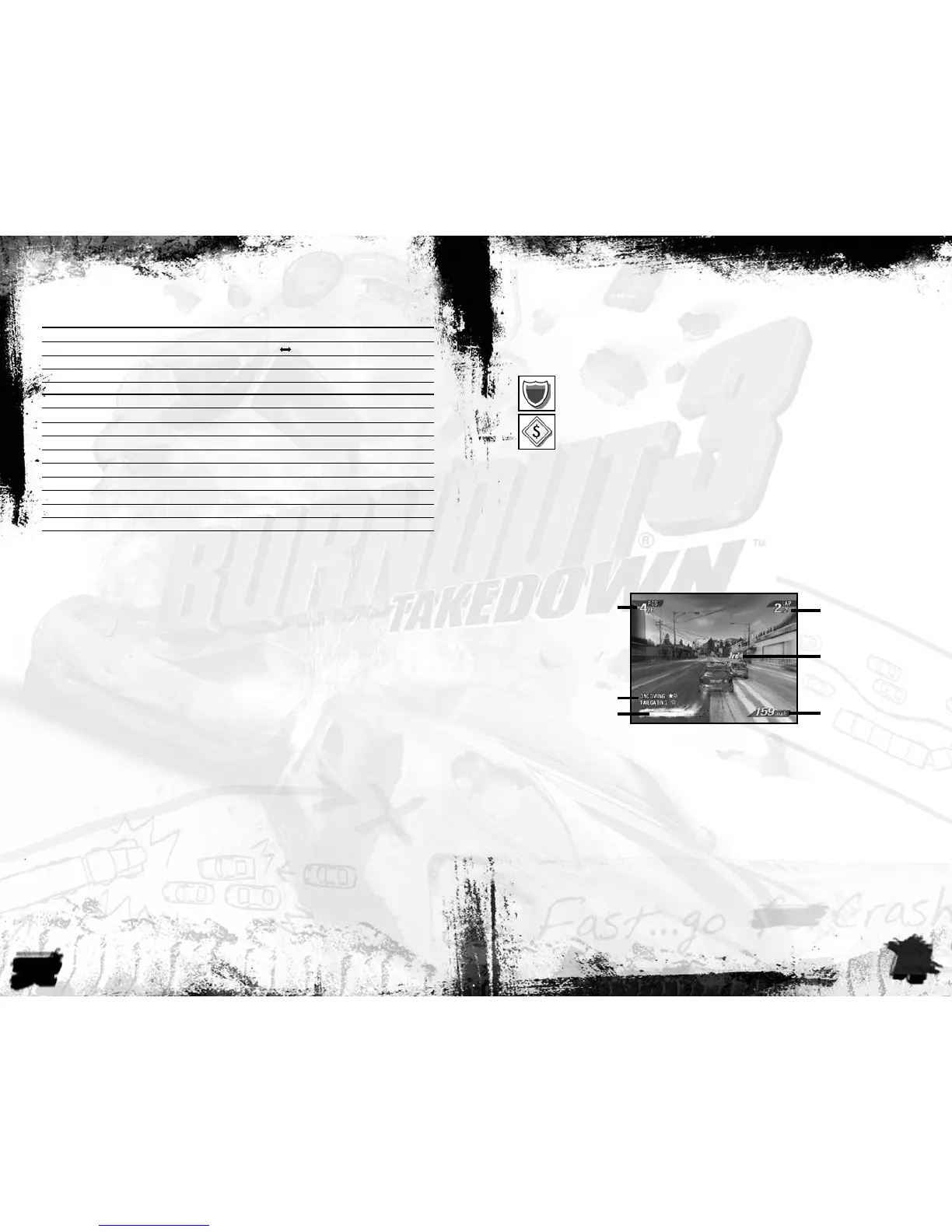
GAME SCREEN
RACE EVENTS
Battle the competition to be the rst to the nish line. Earn medals for placing, plus burnout points for
skillful—or just plain crazy—driving.
RACE Do whatever it takes to make it across the nish rst.
GRAND PRIX Earn GP points for qualifying in a series of races. Your goal is to get the
highest combined score.
ELIMINATOR Stay ahead to win: the driver in last place at the end of each lap is
knocked out.
FACE OFF Race one-on-one against a challenger to win their car.
ROAD RAGE Take down as many rival racers as possible in the time limit. Hit the
Takedown targets to win medals.
NOTE: In this mode your car takes damage when you crash. After the “Damage Critical” message
appears, one more smash totals your car and ends the event!
BURNING LAP Beat the bronze, silver, or gold time in one lap to earn medals.
SPECIAL EVENTS Burners with a stful of gold medals get invited to exclusive special
events.
COMPLETE CONTROLS
MENU CONTROLS
Highlight menu items
L=
Cycle choices/Move sliders
L
Select/Go to next screen
A
Return to previous screen
B
Accelerate
r
Brake/Reverse (when stopped)
l
Steering
L
Look Back
X
Change View
Y
Boost
A
Impact Time (While Crashing) Press and hold
A
Aftertouch (While Crashing)
L
Crashbreaker (Crash Mode Only)
B
Pause
>
SETTING UP THE GAME
Suit up, get in, and hold on because the race is about to begin.
PROFILE SCREEN
Burnout 3: Takedown requires a prole if you wish to track your progress.
To create a prole:
1. Highlight NEW PROFILE and press
A
. Use the on-screen keyboard to enter a name for your prole.
Select any letter or number to delete the existing name, and select DONE to nish.
2. At the save prompt, highlight YES and press
A
to save your prole to the hard drive.
NOTE: If you select NO, you are warned that the autosave will be disabled. Select YES at the warning and
your Prof ile will not be saved and the autosave will be turned OFF.
3. Highlight a Prole slot to save to and press
A
. Your new Prole is created and Autosave is set to ON:
your progress through the game is automatically saved. Press
A
to CONTINUE to the Main menu.
To load a prole:
To load a previously saved prole, highlight LOAD PROFILE and press
A
. Highlight your chosen
Prole and press
A
again. Press
A
a third time to CONTINUE to the Main menu.
MAIN MENU
BURNOUT 3 WORLD TOUR Boot up your Crash Nav to begin the world tour.
SINGLE EVENT Set up your own race or crash event.
MULTIPLAYER Race or crash with friends.
XBOX LIVE Take the mayhem online!
DRIVER DETAILS Check out your progress, view rewards and records, save/load your
prole, adjust game settings, or brush-up your skills with training.
Boost Bar—press
A
to
use boost.
Current Position
Rival racer/position
Lap Count
(when applicable)
Speed
Driving Skill



 To Next Page
 Loading...