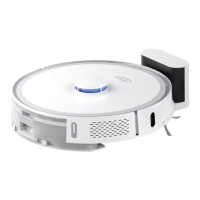
This document describes the XCLEA Robot Vacuum and Mop Cleaner, model QYSDJ01, and its optional accessories, the QYJCZ01 Dust Collector and QYHCZ01 Charging Dock. It is a comprehensive guide covering safety instructions, product overview, installation, usage, cleaning, maintenance, troubleshooting, FAQs, and technical data.
Function Description
The XCLEA Robot Vacuum and Mop Cleaner is designed for automated floor cleaning, combining vacuuming and mopping functionalities. It navigates autonomously using various sensors, including a laser pressure sensor, laser sensor, bumper, infrared docking sensor, and TOF wall tracking sensor, to map and clean spaces efficiently. The main unit features a main brush for sweeping, side brushes for edge cleaning, and a mopping module for wet cleaning. It can be controlled via a power button, reset button, and dock button on the unit itself, or through a mobile application (APP) for more advanced features like scheduling, cleaning modes, and remote operation.
The optional Dust Collector (QYJCZ01) serves as both a charging station and an automatic dust emptying system. When the robot docks, it automatically transfers collected dust into a disposable dust bag within the collector, minimizing manual intervention. It also features an LED display, power level/error code indicator, dust full reminder, communication signal indicator, and a smell ion generator.
The optional Charging Dock (QYHCZ01) provides a dedicated charging point for the robot vacuum and mop cleaner. It includes a charging dock indicator, signal emission area, and charging contacts.
Important Technical Specifications
Robot Vacuum and Mop Cleaner (QYSDJ01):
- Rated operating voltage: 14.4 V⎓
- Rated power: 50 W
- Lithium battery capacity: 5200mAh
- Rated charging voltage: 24 V⎓
- Net weight: approx. 3.5 kg
- Dimensions: 355 x 355 x 100 mm
- Charging time: approx. 250 minutes
- Cleaning time: approx. 250 minutes
- Dust box capacity: 300 ml
- Water tank capacity: approx. 250 ml
- Noise level (low/medium/high): <75dB (A)
- Battery type: Lithium battery
- WiFi module: Supports 802.11b/g/n transmission protocol.
- System requirements for APP: Android 5.0 or later, iOS 10.0 or later (iPhone 5 or later).
Dust Collector (QYJCZ01):
- Rated power: 850 W
- Rated input: 200-240 V~, 50-60 Hz
- Rated output: 24 V⎓, 1.2 A
- Dimensions: 358 x 300 x 174 mm
- Net weight: approx. 4.3 kg
- Vacuum time: approx. 12 seconds
- Noise level: <82 dB(A)
- Dust bag capacity: approx. 3L
Charging Dock (QYHCZ01):
- Rated operating voltage: 24 V⎓
- Rated power: 30 W
- Rated input: 24 V⎓, 1.2 A
- Rated output: 24 V⎓, 1.2 A
- Dimensions: 145 x 140 x 99 mm
- Power adapter: 100-240V~, 50-60 Hz, 0.9 A (for QYSDJ01) or max. 1.0 A (for QYJCZ01/QYHCZ01). Output: 24 V⎓ 1.2 A, 28.8 W.
Usage Features
The robot vacuum and mop cleaner offers versatile usage options:
- APP Control: Users can download the XCLEA APP (or Huawei SmartHome APP for Huawei phone users) to control the robot, schedule cleaning, select cleaning modes (e.g., localized cleaning), and monitor its status.
- Turning On/Off and Cleaning Modes: The robot can be turned on/off and cleaning initiated via the power button on the main unit. It supports various cleaning modes, including automatic cleaning, localized cleaning, and edge cleaning.
- Automatic Docking and Charging: The robot automatically returns to the charging dock or dust collector when its battery is low or after completing a cleaning cycle.
- Dust Collection (Optional): With the dust collector, the robot automatically empties its dust box, enhancing convenience and reducing direct contact with dust. The dust collector's LED display provides status indicators for power, dust bag fullness, and communication.
- Mopping Module: The mopping module allows for wet cleaning. Users attach a mop to the mop holder and fill the water tank. It's important to remove the mopping module during charging to prevent floor damage from a wet mop.
- Safety Instructions: The manual emphasizes critical safety precautions, including avoiding wet environments, flammable liquids, unauthorized disassembly, and ensuring proper plug insertion. It also provides guidelines for handling battery leaks and supervising children around the device.
Maintenance Features
Regular cleaning and maintenance are crucial for optimal performance and longevity of the device:
- Main Brush Maintenance: The main brush should be disassembled and cleaned regularly to remove entangled hair and fibers. Replacement is recommended every 3-6 months. A cleaning brush with a sharp blade is provided for this purpose.
- Side Brush Maintenance: Side brushes should also be disassembled, unscrewed, and cleaned to remove entangled debris. Replacement is recommended every 3-6 months.
- Dust Box and Filter Maintenance: The dust box and filter (2 in 1) should be emptied and rinsed with clean water regularly. The filter must be air-dried completely before reinstallation to prevent dust clumping.
- Mop Maintenance: The mop should be removed from the mopping module, rinsed with clean water, and air-dried completely after each use. Replacement is recommended every 3-6 months.
- Sensor Cleaning: All sensors, including charging plates, laser distance sensor, edge sensors, infrared docking sensors, and TOF wall tracking sensor, should be wiped clean with a soft, dry cloth.
- Universal Wheel Cleaning: The universal wheel should be pulled out, cleaned of hair and dirt, washed with water, and air-dried before reinstallation.
- Charging Dock Maintenance (Optional): The charging contacts on the charging dock should be wiped clean with a soft, dry cloth to ensure good contact.
- Dust Collector Maintenance (Optional):
- Dust Bag Replacement: The dust bag should be replaced when the dust full indicator is constant on, typically every 4 weeks.
- Dust Channel Cleaning: If the dust collector is blocked, its transparent cover can be opened with a screwdriver to clear obstructions.
- Infrared Lens and Charging Contacts Cleaning: These should be wiped clean with a soft, dry cloth.
- Fan Filter Bracket Cleaning: Check for and clean any entangled foreign objects or debris on the fan filter bracket.
- Troubleshooting Guide: The manual includes a comprehensive troubleshooting table to address common errors indicated by the power button flashing and voice prompts, offering solutions for issues like stuck bumpers, brushes, wheels, low battery, charging problems, and abnormal vacuum fan operation.
- FAQs: A dedicated section provides answers to frequently asked questions regarding power, charging, docking, abnormal noises, cleaning ability, WiFi connectivity, scheduled cleaning, and battery concerns.
- Warranty: The product comes with a 12-month warranty covering manufacturing or material defects, with specific exclusions for consumable items, improper use, unauthorized repairs, and normal wear and tear.

 Need help?
 General

 To Next Page