Setup Options
Introduction
These advanced options should be modified only by experienced users.
Modification of these options affects the way in which the XCOM operates, the
features available, and may affect the performance of the unit. These options
should not be modified in flight.
Operation
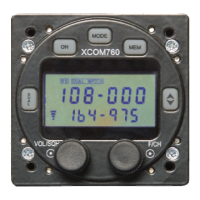
To access the setup screens, turn the unit off using the ON button and, while
holding the DUAL and MODE buttons, turn the unit back on using the ON button.
The current software version,
, will be displayed for a few seconds and then the
unit will enter the setup mode.
The following setup modes are cycled by pressing the F/CH knob:
• Int Enables or disables the intercom
• Side Enables or disables sidetone
• nb Enables or disables the noise blanker
• HiVolts Sets the alarm value for hi volts
• LoVolts Sets the alarm value for low volts
• Stuc Sets the stuck mike (transmit) timeout value
• Gain Adjusts the microphone gain
• Ptt2 Selects the copilot PTT mode
• Input Selects the line input mode
• AdjAct Enables or disables the adjustment of active frequency
Exit setup at any time by pressing the Ú button.
Int
Option
On or Off
This selects the intercom on or off (Default is on).
Disabling the intercom reduces power consumption by disabling the
headset amplifier during normal use. This is particularly useful
when the unit is used in gliders or other battery powered
installations. When the Intercom is selected off, the and
modes do not appear in the MODE settings.
Rotate the F/CH control to toggle the setting on or off.
Side
Option
On or Off
This selects the sidetone on or off (Default is on).
Disabling the sidetone reduces power consumption by disabling the
headset amplifier during transmission. This is particularly useful
when the unit is used in gliders or other battery powered
installations. When Sidetone is selected off, no voice is heard
during transmission.
Release 1.7 © XCOM Avionics 2005 www.xcom760.com Page 14


 To Next Page