6
LAPTOP DISPLAY
CONFIGURATION (PC)
PC/WINDOWS
1. Go to your Display Settings (Start > Setting >
System > Display)
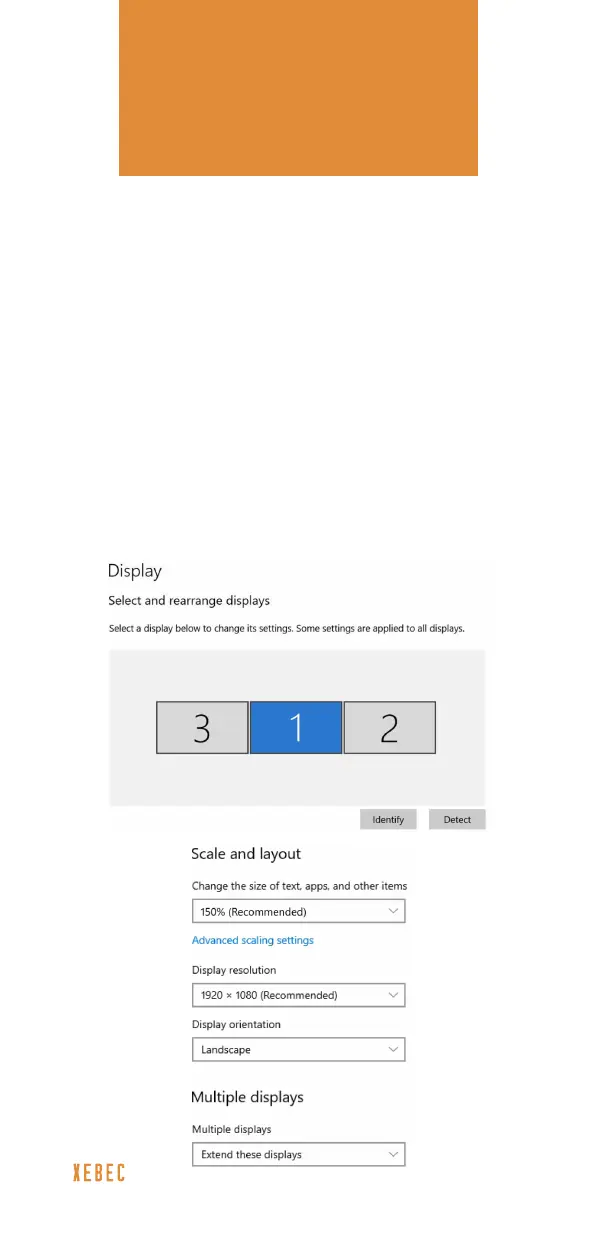
2. Click “Identify” to identify the number on each screen
3. Click and drag the numbered screens to the
conguration shown below*
4. Ensure that “Extend these displays” is selected under
Multiple Displays menu
5. To increase the zoom, click the “Change the size of
text, apps, and other items” dropdown and select
150%, or preferred zoom
*screens 3 and 2 might need to be swapped based on your specic setup



 To Next Page