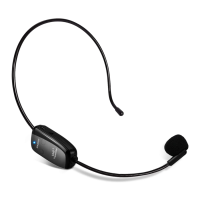
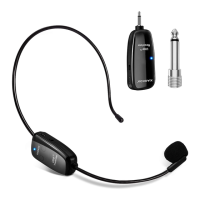
The XIAOKOA U12F is a wireless microphone system, specifically a headset model, designed for various audio applications. It utilizes UHF wireless technology, offering low energy consumption and a long standby time of up to 6 hours. The device can transmit signals up to 50 meters in maximum range under laboratory conditions, without direction limitation.
Product Overview:
The system consists of two main components: a wireless receiver and a wireless transmitter (headset).
- 6.35 mm Microphone audio output jack: This is the primary output for connecting the receiver to an amplifier or other audio input device.
- Charging jack: A port for charging the receiver.
- Indicator light: Provides visual feedback on the receiver's status, such as pairing or charging.
- Power switch: Controls the power supply to the receiver.
- Charging jack: A port for charging the headset transmitter.
- Power switch: Controls the power supply to the headset.
- Mic: The microphone component of the headset.
- Indicator light: Provides visual feedback on the headset's status, such as power, pairing, or low battery.
- Volume: A control for adjusting the volume of the microphone.
Important Technical Specifications:
- Transmission method: UHF
- Frequency response: 20Hz-20KHz
- Power consumption: < 75mA
- Power supply: Built-in 400mAh battery
- Frequency Range: 636MHz-799.5MHz
Usage Features:
How to set up on amplifier (Headset and receiver connection method):
- Step 1: Turn on the transmitter (headset).
- Step 2: Long press the "vol+" button on the transmitter for 5 seconds. The blue light on the transmitter will flash quickly and then loosen.
- Step 3: Turn on the receiver. When the blue light on the receiver stops flashing, it indicates that the devices are successfully paired.
- Step 4: Insert the receiver into the MIC port of the amplifier.
- Note: If the receiver is flashing for more than 10 seconds without pairing, turn off the receiver and then turn it back on to retry.
How to use multiple UHF devices:
If you need to use more than 3 UHF devices within an 80-meter range, follow these steps:
- Step 1: Refer to Method 1 "How to set up on amplifier" for each device to automatically pair.
- Step 2: For the second device onwards, long press the "Vol-" button on the transmitter for 5 seconds to switch to different frequencies. When the blue light stops flashing, the device is successfully paired.
- Step 3: If a device experiences disturbance or noise interference, it means its frequency is already occupied by other devices. In this case, repeat Step 2 to switch to a different frequency.
- Step 4: Once all devices have been successfully paired, they can be used directly.
- Note: It is crucial to follow these steps, otherwise, the multiple device setup will not work.
Maintenance Features:
Tips:
- When the blue light flashes quickly during use, it indicates a low voltage prompt. Please charge the device as soon as possible to ensure continuous operation.
How to disassemble (for headset holder):
- Step 1: (Initial state of the headset)
- Step 2: Use two thumbs to press down the headset holder at the same time.
- Step 3: After removing it, the headphone will separate out.
- Step 4 (How to Assemble): When assembling, there will be a joint. Align it by using two thumbs to push it up until it clicks into place.
This wireless microphone system is designed for ease of use, reliable performance, and flexibility in various audio environments, from single-user setups to multiple-device configurations.

 Need help?
 General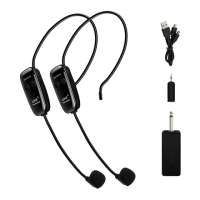

 To Next Page