10
Cleaning the Dust Compartment
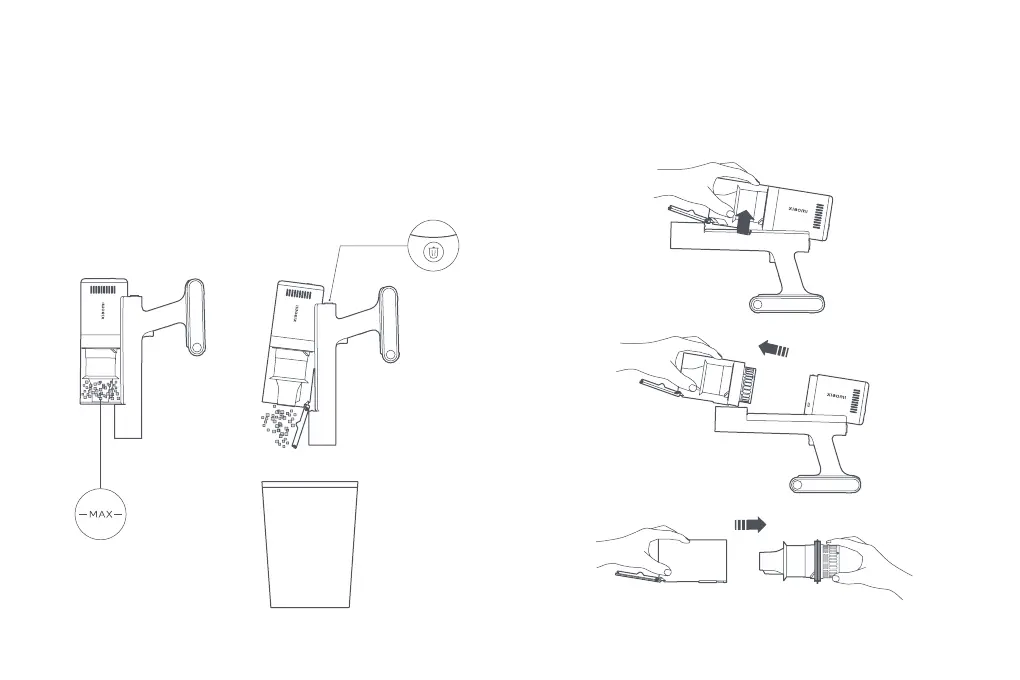
Before cleaning the dust compartment, disconnect the power supply and
remove the extension rod. The vacuum cleaner's cleaning ability will be reduced
if the dust compartment is filled to the "MAX" mark. To regain performance,
empty the dust compartment.
• Empty the dust compartment: Hold the dust compartment over a trash bin,
then press the dust release buon to empty out the dust.
Cleaning the Dust Compartment and Filter Assembly
1. Press the dust release buon to open the dust compartment cover, then
rotate and pull out the dust compartment in the direction shown and remove
the filter assembly.
Note:
There is a rubber baffle inside the dust compartment, please do not remove it.






 To Next Page