14
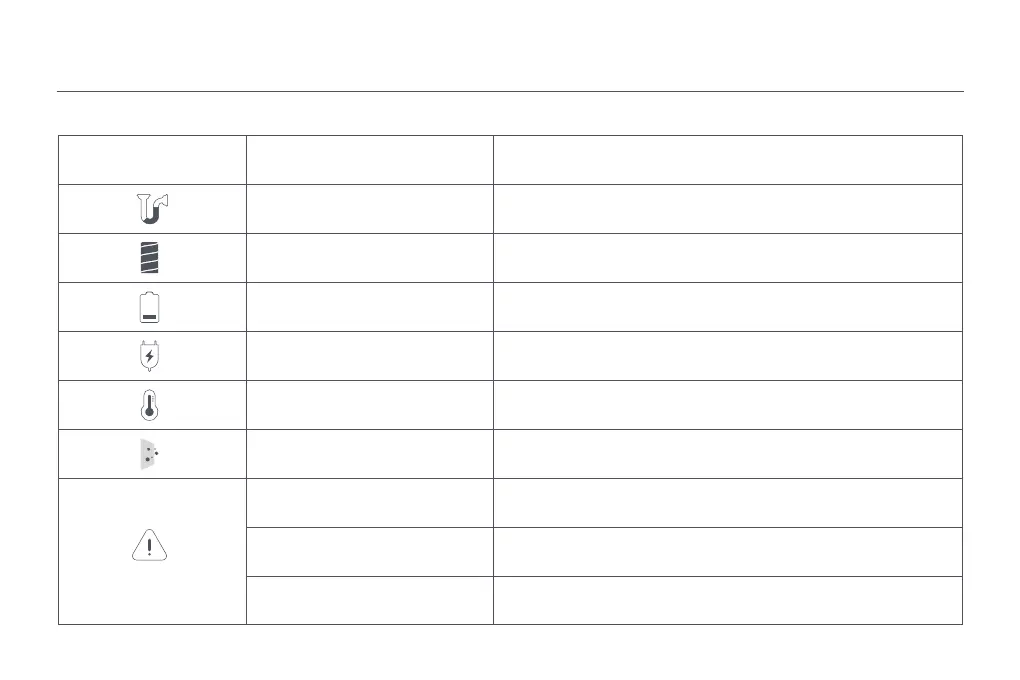
Error Icon Error Message Solution
Airway Blocked
Clear any blockages from the dust compartment, pre-filter, filter, extension
rod, brush bar, and nozzle.
Roller Brush Stuck Remove any debris or objects clogged or tangled on the roller brush.
Low Baery Recharge soon.
Baery Depleted Recharge soon.
Baery Overheated Wait until the baery temperature normalizes, then resume use.
Clean the Sensor Wipe away dust from the sensor using a dry cloth or paper towel.
Filter/Dust Compartment Error
Filter is not installed correctly, or dust compartment is not closed securely or
installed. Please install them properly.
Power Supply Error Only use the genuine power supply to charge the vacuum cleaner.
Error Code Please contact aer-sales service to arrange maintenance.
Troubleshooting
If the vacuum cleaner is not working properly, the display will show an error message. Please refer to the troubleshooting table below to find your solution based on the
error message.






 To Next Page