
 To Next Page
D
Donald BarberAug 8, 2025
What to do if there is no image on the Xiaomi G34WQi screen?
- KKyle DuncanAug 8, 2025
If there's no image on the screen, ensure that your computer is turned on and that the graphics card is functioning correctly.

What to do if there is no image on the Xiaomi G34WQi screen?
If there's no image on the screen, ensure that your computer is turned on and that the graphics card is functioning correctly.
Why is the image on my Xiaomi G34WQi Monitor dark?
If the image appears dark, the brightness and contrast settings may not be properly adjusted. Please adjust the brightness and contrast settings.
How to fix a Xiaomi G34WQi that won't turn on?
If your monitor won't turn on, the issue may be due to a lack of power. Ensure that the power adapter is correctly plugged in.
What to do if the image on my Xiaomi Monitor is jittery or has ripples?
If the image is jittery or has ripples, it might be due to electrical interference. Try moving the monitor away from other electronic devices that could be causing interference.
Details about the external AC adapter, including voltage, current, and power.
Explains the function of each button on the monitor control panel.
Recommendations for maintaining eye comfort and preventing strain during use.
Information about the monitor's low blue light feature and its benefits.
Instructions for environmentally responsible disposal of the product.
Official statement of the product's compliance with EU regulations.
 General
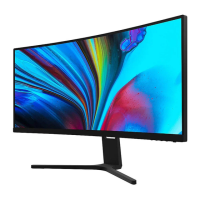
| Screen Size | 34 inches |
|---|---|
| Resolution | 3440 x 1440 |
| Refresh Rate | 180Hz |
| Panel Type | VA |
| Aspect Ratio | 21:9 |
| Brightness | 400 cd/m² |
| Curvature | 1500R |
| Adaptive Sync | AMD FreeSync Premium |
| HDR | HDR10 |
| VESA Mount | 100 x 100 mm |
| Response Time | 1 ms |
| Connectivity | HDMI, DisplayPort |
| Contrast Ratio | 4000:1 |