
 Need help?
Do you have a question about the Xiaomi Mi Band 6 and is the answer not in the manual?
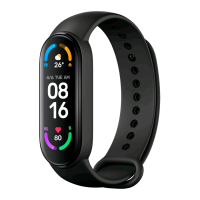
The Xiaomi Mi Band 6 is a fitness tracker designed to help users monitor their daily activities and sleeping habits. This user manual provides comprehensive instructions for its installation, wearing, connection, usage, and maintenance, ensuring an optimal user experience.
The Mi Band 6 consists of three main components: the fitness tracker, the wristband, and the charging cable. The fitness tracker itself features a touchscreen, a heart rate sensor, and a charging port. To install the fitness tracker, users should insert one end of the tracker into the slot from the front of the wristband. Then, press down on the other end with a thumb to push the fitness tracker completely into the slot, securing it within the wristband.
Proper wearing of the Mi Band 6 is crucial for accurate data collection, especially for the heart rate sensor. Users should comfortably tighten the band around their wrist, ensuring it is about one finger width away from their wrist bone. For optimal performance of the heart rate sensor, its back must maintain contact with the skin. The wristband should be worn neither too tight nor too loose, allowing some space for the skin to breathe. It is recommended to tighten the wristband before starting exercise and then loosen it afterward. If the band can easily move up and down the wrist, or if the heart rate sensor cannot collect data, the user should try tightening the wristband. The goal is for the band to fit comfortably around the wrist.
To unlock the full potential of the Mi Band 6, it needs to be connected to the Mi Fit app. Users can download and install the latest version of the Mi Fit app by scanning the provided QR code or by searching for it in the Google Play App Store or other third-party app stores. The app is compatible with Android 5.0 and iOS 10.0 or above. After installing the app, users should log into their Mi account and follow the on-screen instructions to connect and pair the band with their phone. Once the band vibrates and displays a pairing request on its screen, the user should tap the touch button to complete the pairing. It is essential to ensure that Bluetooth is enabled on the phone and to keep the phone and the band close to each other during the pairing process.
Once successfully paired with a device, the Mi Band 6 begins tracking and analyzing daily activities and sleeping habits. The device is operated primarily through its touchscreen. To light up the screen, users simply touch the button. Swiping up or down allows users to navigate through various functions, such as viewing exercise data and heart rate measurements. To return to the previous page, users should swipe right on the screen.
For the NFC version of the Mi Band 6, users can utilize the NFC bus card feature. Through the Mi Fit app, users can select the NFC bus card that needs to be activated. The app will confirm when the card is successfully activated. Once activated, the wristband can be used to swipe for public transportation, such as buses or subways. When swiping the card, it is important to keep the wristband close to the middle of the swiping area for proper detection.
The Mi Band 6 also integrates the Xiao AI Assistant, an artificial intelligence assistant developed by Xiaomi, offering an intelligent voice service experience. Users can wake up Xiao AI by swiping to the right on the watch face page. Once activated, Xiao AI can be used to query encyclopedias, check weather settings, set alarms, and even remotely control smart devices at home. For a comprehensive list of functions, users should refer to the app connected to their mobile phone. A crucial reminder for using Xiao AI's smart voice service is that the bracelet must remain connected to the app, and the app needs access to network services.
When it's necessary to remove the fitness tracker from the wristband, users should first take the band off their wrist. Then, hold onto each side of the wristband and gently pull until a small gap appears between the fitness tracker and the wristband. Once this gap is visible, use a finger to pop the fitness tracker out of its slot from the front side of the wristband.
To ensure continuous operation, the Mi Band 6 should be recharged immediately when the battery level is low. The charging process involves connecting the provided charging cable to the charging port on the fitness tracker.
Several precautions are outlined to ensure the longevity and proper functioning of the Mi Band 6. When measuring heart rate, it is important to keep the wrist still during the measurement to ensure accuracy. The Mi Band 6 NFC version has a waterproof level of 5 ATM, meaning it can be used for hand washing, swimming in pools, and shallow beaches. However, it is not suitable for hot water, saunas, or diving. The touchscreen does not support underwater operation; therefore, if the bracelet is wet, users should clean its surface with tap water and wait for it to dry before attempting any operations.
To prevent skin irritation, users should avoid wearing the band too tightly. The charging contact part of the bracelet should always be kept dry and clean. If any symptoms such as redness or swelling appear on the contact area, discontinue use immediately and consult a doctor. It is important to note that the Mi Band 6 is not a medical device, and any data or information provided by the product should not be used for diagnosis, treatment, or disease prevention. When charging the device, users should always use a power adapter that meets the required safety standards or a CCC-certified power adapter.
 General
| Display Type | AMOLED |
|---|---|
| Display Size | 1.56 inches |
| Resolution | 152 x 486 pixels |
| Battery Life | Up to 14 days |
| Water Resistance | 5 ATM |
| Sensors | Heart rate sensor, SpO2 sensor, Accelerometer, Gyroscope |
| Connectivity | Bluetooth 5.0 |
| Compatibility | Android 5.0 or iOS 10.0 and above |
| Sleep Tracking | Yes |
| Weight | 12.8 grams |
| Strap Material | TPU |
| Sports Modes | 30 modes |




 To Next Page