2 gibsonconnect.com | 731-562-6000
Getting Started with Mi Box
Thank you for choosing Gibson Connect TV! This guide will help you to download and log into Gibson Connect
TV using a Mi Box. Other plaorms (like Android or Apple iOS) or devices (like smartphones, tablets and web
browsers) may require a dierent process.
Before aempng to download Gibson Connect TV, you must rst have an acve and installed Gibson Con-
nect internet service subscripon. You can subscribe to Gibson Connect’s TV service by contacng us at 731-
562-6000 or by calling or vising your local Gibson Electric Membership Corporaon Member Service Center.
A Gibson Connect representave will provide or help you obtain your login name and password.
Gibson Connect TV login name: _______________________________________________
Gibson Connect TV login password: ____________________________________________
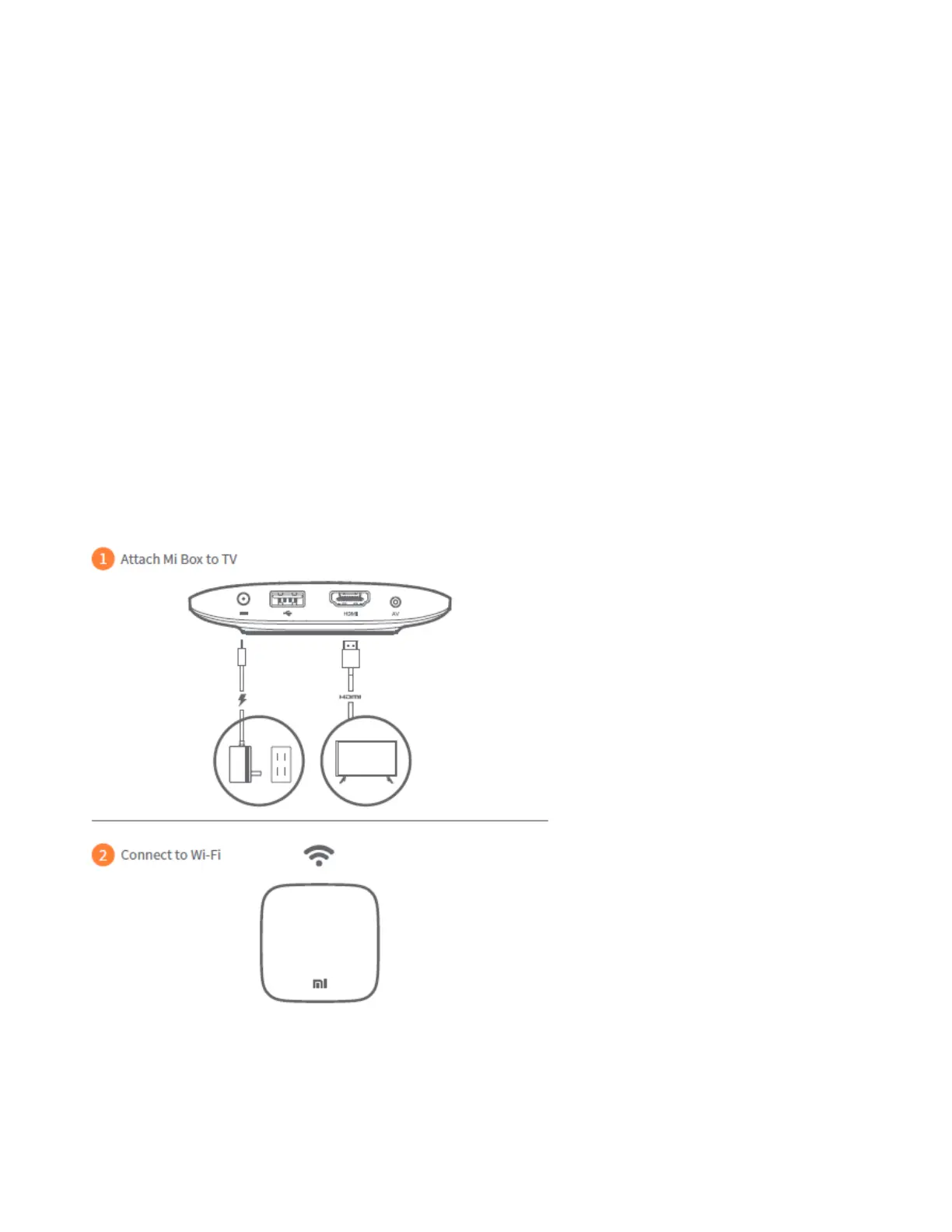
1. If you have not already done so, acvate Mi Box on your television by following the instrucons included
with the device. The diagram below can help you with the Mi Box setup process.
2. Connect your Mi Box device and follow the on-screen instrucons to pair the remote and Wi-Fi.
Next, complete the given instrucons on your television to download the app.


 To Next Page
 Loading...