EasyManua.ls Logo

Xiaomi Mi Electric Shaver S700 - User Manual

Xiaomi Mi Electric Shaver S700
13 pages
Print Icon
To Next Page IconTo Next Page
Loading...
Electric Shaver S700 User Manual
Question and Answer IconNeed help?

Do you have a question about the Xiaomi Mi Electric Shaver S700 and is the answer not in the manual?

Summary

Safety Instructions

Warnings

Important safety warnings and precautions for using the electric shaver to prevent accidents and damage.

Precautions

Notes

Important notes and usage guidelines for the electric shaver, including indoor use and temperature recommendations.

Product Overview

How to Use

Operating the shaver

Instructions on how to turn on and use the electric shaver, including pressure and motion recommendations.

Switching mode

Guide on changing between low, medium, and high speed modes of the electric shaver during operation.

Travel Lock Functionality

Activating and Deactivating Travel Lock

Instructions for enabling the travel lock to prevent accidental starts and how to disable it.

Charging the Shaver

Charging Dock and Type-C Port

Details on charging the shaver via the dock and Type-C port, including battery status indicators.

Cleaning and Maintenance

Shaver Cleaning Steps

Step-by-step guide for cleaning the shaver head and body with warm water and drying thoroughly.

Environmental Protection

Safety Warnings for Disposal

Safety warnings related to fire, disassembly, and battery handling during disposal of the shaver.

Removing Battery

Step-by-step guide on how to safely remove the built-in battery from the shaver for disposal.

EU Declaration of Conformity

WEEE Disposal and Recycling Information

Guidelines for proper disposal and recycling of electronic waste to protect health and the environment.

Specifications

Product Specifications

Technical details of the Xiaomi Electric Shaver S700, including model, IP rating, and charging time.

Power Adapter Specifications

Technical details of the power adapter, including input/output voltage, current, power, and efficiency ratings.

Troubleshooting

Poor Shaving Quality

Causes and solutions for poor shaving, including worn heads, clogs, or low battery.

Skin Irritation Post-Shave

Addressing skin irritation by suggesting skin adaptation and checking the shaving head.

Reduced Battery Runtime

Explains short usage time due to motor load or low battery, advising cleaning or charging.

Clean;Error Indicator Issues

Troubleshooting the clean/error indicator, recommending shaver cleaning or head reinstallation.

Motor Operation Problems

Diagnosing motor issues like indicator not lighting up, suggesting charging or button checks.

Charging Difficulties

Troubleshooting charging problems, including poor contact, internal damage, or temperature issues.

Overview

The Xiaomi Electric Shaver S700 is a personal grooming device designed for shaving facial hair. This user manual provides comprehensive instructions for its safe operation, maintenance, and troubleshooting.

Function Description

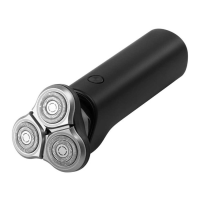
The Electric Shaver S700 is primarily used for dry shaving facial hair. It features a shaving head with multiple blades designed to cut hair efficiently and smoothly. The shaver operates at different speeds (low, medium, and high) to accommodate various shaving preferences and hair types. It is equipped with a built-in lithium-ion battery for cordless operation and can be charged via a charging dock or a Type-C charging port directly on the shaver.

Usage Features

  • Operating the Shaver: To start or stop the shaver, simply press the start/stop button.
  • Switching Modes: The shaver offers three speed modes: low, medium, and high. When the shaver is running, pressing the mode button cycles through these speeds, with an indicator light showing the selected mode. Even when the shaver is stopped, you can press the mode button to pre-select a mode for the next use; the indicator will illuminate for 5 seconds and then turn off. The shaver will then start in the pre-selected mode. If no mode is changed while stopped, it will resume in the last used mode.
  • Initial Use and Skin Adaptation: It is normal to experience slight skin irritation during the first few shaves. Regular use (at least three times a week for three weeks) is recommended to allow the skin to adapt.
  • Shaving Technique: Apply gentle pressure and move the shaver in circular motions across your face. For optimal results, dry shaving is recommended, and repeated passes over the same area are not necessary to achieve a clean shave.
  • Travel Lock: The shaver includes a travel lock feature to prevent accidental activation during transport.
    • Enabling Travel Lock: When the shaver is off, press and hold the mode button for 3 seconds. The travel lock indicator will light up for 3 seconds and then turn off, signifying that the lock is active. The motor will not rotate when the lock is enabled.
    • Disabling Travel Lock: To unlock, press and hold the mode button for 3 seconds. The travel lock indicator will blink and then turn off, and the shaver will be ready for use.
    • Travel Lock Indication: If the travel lock is enabled and you attempt to start the shaver by pressing the start/stop button, the travel lock indicator will blink, indicating that the device is locked. You can still press the mode button to change modes while locked.
  • Charging: The shaver can be charged in two ways:
    • Charging Dock: Connect the charging cable to the power port of the charging dock, plug it into a power supply, and then place the shaver onto the dock.
    • Type-C Charging Port: Connect the charging cable directly to the Type-C port on the back of the shaver and plug it into a power supply.
  • Charging and Usage Status Indicators: The shaver provides clear indicators for battery level and charging status.
    • While Using: A white light indicates 100%-40% battery, orange for 40%-20%, and red for 20%-1%. If the battery is at 0%, the red light blinks three times and turns off, and the shaver will not start.
    • While Charging: A red breathing light indicates 0%-20% charge, orange breathing for 20%-40%, and white breathing for 40%-99%. A solid white light indicates 100% charge.
  • Charging Precautions: Ensure the shaver and charging dock are dry before charging. Avoid charging in humid environments. Do not charge unattended for extended periods or longer than 24 hours. If the battery is low, the shaver can be used while charging via the Type-C port, but not in a bath or humid environment. The charging dock should not be washed with water; wipe it with a wet cloth.
  • Battery Life and Storage: A full charge provides approximately 60 minutes of usage. If the shaver will not be used for an extended period, fully charge it at least once every six months to maintain battery health.
  • Environmental Considerations: The shaver contains a built-in lithium-ion battery. Do not disassemble, impact, crush, or throw the battery into fire. Discontinue use if the battery shows severe swelling. Avoid leaving the battery in high-temperature environments.
  • Waterproofing: The shaver meets IPX7 waterproofing standards, allowing it to be cleaned with water. However, it should not be immersed in water for prolonged periods. Water dripping through the body gaps during rinsing is normal and safe, as electronic components are sealed in a waterproof compartment. Standing the shaver upright after rinsing helps drain water quickly.

Maintenance Features

  • Cleaning Reminder: The clean/error indicator will blink for 5 seconds after starting the shaver (and then turn off) to remind you to clean it for optimal performance. It also blinks automatically every 30 minutes of use to prompt regular stubble buildup cleaning.
  • Cleaning Procedure:
    1. Ensure the shaver is stopped and not charging before cleaning.
    2. Rinse the shaver under a faucet with warm water.
    3. Remove the shaving head by pulling it upwards from its indentation.
    4. Rinse the holder of the shaving head with water or use the provided cleaning brush.
    5. Rinse the inside of the shaving head with warm water. Do not use a towel or paper towel to wipe it.
    6. Ensure both the shaving head and the shaver body are completely dry before reassembling the shaving head.
  • Cleaning Precautions: When cleaning, make sure the protective cover of the Type-C charging port is installed. Do not rinse the charging port or the bottom of the shaver.
  • Shaving Head Replacement: To maintain optimal performance, it is recommended to replace the shaving head every two years. Replacements can be purchased from www.mi.com.
  • Battery Removal for Disposal: At the end of the shaver's service life, the built-in battery should be removed and recycled according to local regulations.
    1. Ensure the battery is completely depleted.
    2. Use a standard screwdriver to pry open the bottom cover, then a Phillips-head screwdriver to remove the screws on the bottom.
    3. Open the protective cover of the Type-C charging port on the back.
    4. Take out the inner compartment and remove its screws with a Phillips-head screwdriver.
    5. Use a standard screwdriver to pry open the top cover of the inner compartment, then remove the circuit board and battery.
    6. Cut the cables connecting the battery and the circuit board one by one to avoid short circuits.
    7. Take the removed battery to an officially designated recycling center.
  • Self-Repair and Modification: Do not modify or repair the shaver yourself. Do not disassemble the body to replace the battery, as the battery is not replaceable by the user. Disassembly should only occur when disposing of the shaver. The shaver cannot be restored once disassembled.
  • Damage Check: The shaving head is fragile. If the shaver is accidentally dropped, check for damage to the shaving head and ensure the sound it makes is normal before use. Always install the protective cover after each use. Immediately stop using the shaver if the shaving head or blade meshes are damaged.

Xiaomi Mi Electric Shaver S700 Specifications

General IconGeneral
ModelMi Electric Shaver S700
Blade TypeStainless Steel
Heads3
Battery Life60 minutes
Charging Time2 hours
Water ResistanceIPX7
Charging TypeUSB-C
BrandXiaomi
Blades3
Battery TypeLithium-ion
ColorBlack
TypeRotary Shaver
MaterialPlastic and metal

Related product manuals