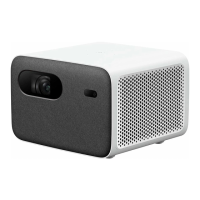
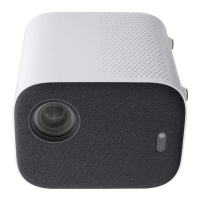
The Mi Smart Projector 2 is a compact and versatile device designed for projecting images and videos, offering a range of features for an enhanced viewing experience. This user manual provides comprehensive instructions for its operation, maintenance, and safety.
Function Description
The Mi Smart Projector 2 serves as a portable projection system, capable of displaying content from various sources onto a screen or wall. It utilizes LED Light Source with DLP technology to produce clear and vibrant images. The projector is equipped with an Android TV operating system, allowing users to access a wide array of applications, streaming services, and digital content directly from the device. It supports high-definition resolution, ensuring a sharp and detailed visual output. The inclusion of Bluetooth 5.0/BLE and Wi-Fi IEEE 802.11 a/b/g/n/ac (2.4GHz/5GHz) connectivity enables seamless wireless communication with other devices and networks. For audio, the projector integrates Dolby Audio + DTS-HD technology and features two 5W full-range speakers, delivering an immersive sound experience.
Usage Features
The projector is designed for ease of use, incorporating several features to optimize the projection setup and viewing experience.
- Projection Lens and Camera: The front of the projector houses the projection lens and a camera, which are crucial for image output and auto-focus functionality.
- On/Off Button: Located on the top of the device, this button allows users to power the projector on or off.
- Rubber Feet and Air Inlet: The bottom of the projector features rubber feet for stability and an air inlet for cooling.
- Heat Dissipation Vent: Positioned at the rear, this vent ensures efficient heat dissipation, preventing overheating during prolonged use.
- Connection Ports: The rear panel includes several ports for external connections:
- DC IN: For connecting the power adapter.
- Headphone Port: For connecting external audio devices like headphones or speakers.
- USB2.0: Supports USB 2.0 devices for media playback or other functionalities.
- HDMI: An input port for connecting devices such as laptops, gaming consoles, or Blu-ray players.
- 1/4" Female Threaded Tripod Mount: Located on the bottom, this mount allows the projector to be securely attached to a tripod or a suspended ceiling bracket, offering flexibility in placement.
Remote Control: The included remote control is central to navigating the projector's interface and features.
- Power Button: Turns the projector on or off, and opens the menu when the projector is on.
- Google Assistant Button: Activates Google Assistant for voice commands.
- Navigation Pad: Used for moving through menus and confirming selections.
- APP Button: Provides quick access to the app interface.
- Return Button: Navigates back to the previous menu.
- Home Button: Returns to the home screen.
- Pairing the Remote Control: The remote can be paired by holding it close to the projector and simultaneously pressing the app and home buttons.
- NETFLIX Button: Direct access to the Netflix application.
- LIVE Button: Accesses the Live Channel.
- Volume Button: Adjusts the audio volume.
Auto Focus: The projector features an auto-focus function to ensure a clear image. Users can manually trigger auto-focus via the settings menu (Settings > Projector > Focus > Execute Focus) or enable the Auto Focus switch, which will automatically adjust the focus when the projector is moved.
Keystone Correction: To correct distorted images caused by angled projection, the Mi Smart Projector 2 offers keystone correction. This can be accessed through Settings > Projector > Keystone Correction > Keystone Correction. Options include Quick Adjustment, Fine Tuning, and Reset. The projector also supports Omni-directional auto-keystone correction, which automatically adjusts the projected image when the device is moved.
Frequently Used Menu: The "Launch Board" in the app interface displays frequently used functions, including Execute Focus, Keystone Correction, Bluetooth Speaker, File Manager, Settings, Inputs, and User Manual, providing quick access to essential features and detailed instructions.
Maintenance Features
Proper maintenance is crucial for the longevity and optimal performance of the Mi Smart Projector 2.
- Cleaning: The manual advises against blocking the air vents to prevent heat build-up and potential fire hazards. Regularly ensuring clear airflow through the air inlets and outlets is important.
- Power Management: Always use the provided genuine power adapter. Unplug the projector during thunderstorms or extended periods of non-use to protect against power surges and lightning strikes.
- Environmental Considerations: The projector should not be exposed to rain, moisture, or extreme temperatures. It should be kept away from poorly ventilated spaces, strong magnetic fields, direct sunlight, and fire alarms.
- Handling: Avoid looking directly into the lens when the projector is on to prevent eye damage. Do not attempt to disassemble the projector, as it contains dangerous high voltage components. Maintenance and repair should only be performed by qualified or authorized technicians.
- Transportation: It is recommended to transport the projector in its original or similar packaging to prevent damage.
- Battery Disposal: Batteries in the remote control should be disposed of or recycled according to local laws and regulations.
- Troubleshooting: The manual provides solutions for common issues such as no projected image, Android system crashes, screen display errors, remote control pairing issues, and overheating. In case of internal system errors, users are advised to contact a qualified technician or the after-sales department.
By adhering to these guidelines, users can ensure the safe and effective operation of their Mi Smart Projector 2.


 To Next Page
 General
 Weight and Dimensions