
 Need help?
Do you have a question about the Xiaomi Mi TV Stick and is the answer not in the manual?
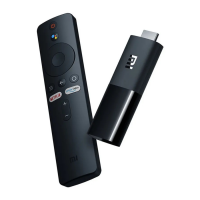
The main Mi TV Stick streaming device.
Remote control with voice command capabilities for operating the device.
Adapter for powering the Mi TV Stick.
 General
| Internal | No |
|---|---|
| Graphics card | Mali-450 |
| Audio decoders | DTS, Dolby Digital |
| Processor cores | 4 |
| Supported video modes | 1080p |
| Processor architecture | ARM Cortex-A53 |
| Audio formats supported | AAC, FLAC, MP3, OGG |
| Image formats supported | BMP, GIF, JPG, PNG |
| Video formats supported | AVI, H.264, H.265, MKV, MOV, MP4, MPEG1, MPEG2, MPEG4, RM, TS, VC-1, VOB, VP9 |
| Maximum video resolution | 1920 x 1080 pixels |
| Operating system version | Android 9.0 |
| Operating system installed | Android |
| Power source | Interface port |
| Product color | Black |
| Internal memory | 1000 MB |
| Storage media | Flash |
| Internal storage capacity | 8 GB |
| Device interface | HDMI |
| Bluetooth version | 4.2 |
| USB ports quantity | 0 |
| Micro-USB ports quantity | 1 |
 Weight and Dimensions
| Depth | 92.4 mm |
|---|---|
| Width | 30.2 mm |
| Height | 15.2 mm |
| Weight | 28.5 g |

 To Next Page