Need help?
Do you have a question about the Xiaomi MJJSQ05DY and is the answer not in the manual?
Instructions for safely installing the humidifier to avoid electrical hazards and damage.
Guidance on safely turning off, unplugging, and emptying the humidifier before moving.
Advice on humidifier placement to prevent damage from temperature and moisture.
Information on proper disposal and recycling of electronic waste according to WEEE directive.
Declaration of compliance for radio equipment type MJJSQ05DY with EU directives.
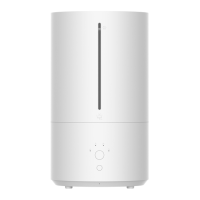
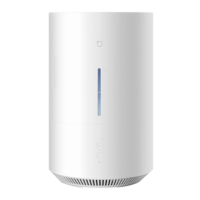
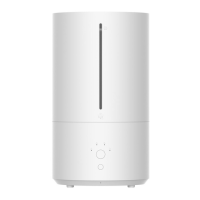
The Xiaomi Smart Humidifier 2 is a device designed to increase and maintain humidity levels in an indoor environment, contributing to improved air quality and comfort. It operates by releasing a fine mist into the air, which helps to alleviate issues caused by dry air, such as dry skin, irritated respiratory passages, and static electricity. The humidifier is equipped with a UV-C light for sterilization, aiming to ensure that the mist released is clean and free from harmful microorganisms.
The primary function of the Smart Humidifier 2 is to humidify the air. It achieves this through a vaporizer that converts water into a fine mist. The device features an inner and outer mist outlet, allowing for efficient dispersion of humidity. A water tank holds the water supply, and a water level window allows users to monitor the remaining water. The humidifier includes a base that houses the electronic components, including a floating board, vaporizer, water conduits, and a floater, all working in conjunction to produce and release mist.
The device offers multiple operating modes to suit different user preferences and environmental conditions. These include Level 1, Level 2, Level 3, and a Constant Humidity mode. The Constant Humidity mode is particularly useful as it aims to maintain a default humidity level of 60% RH. If the ambient humidity falls below this target, the humidifier will automatically switch to Level 3 to increase humidity more rapidly. Once the target is reached, it will revert to Level 1 to maintain the desired level. This intelligent mode helps prevent over-humidification and potential dampness in the surrounding area.
A built-in UV-C light is integrated into the humidifier for sterilization purposes. This light is activated simultaneously with the humidifier, working to sterilize the water before it is dispersed as mist. After the humidifier is turned off, the UV-C light continues to operate for two minutes to ensure thorough sterilization. This feature is crucial for preventing the growth and spread of microorganisms that could otherwise be present in the water tank and released into the air, posing health risks.
The Smart Humidifier 2 also incorporates several safety and protection features. It includes dry running protection, which automatically triggers a warning and enters standby mode when the water tank runs out of water. Water tank removal protection ensures that the humidifier stops working if the water tank is removed from the base. Over-humidity protection is another key feature, where the humidifier will automatically switch from Level 3 to Level 1 if the ambient humidity exceeds 70% RH for a prolonged period, preventing excessive moisture buildup.
For enhanced control and smart home integration, the humidifier can be connected to the Mi Home/Xiaomi Home app. This allows users to control the device remotely, adjust settings, and potentially integrate it with other smart home devices. The app connectivity provides a convenient way to manage the humidifier's operation and monitor its status from a smartphone.
To use the humidifier, it must first be connected to an electrical outlet. Upon connection, a beep indicates that it is in standby mode. The device is turned on or off by pressing the power button. When first turned on, it defaults to Level 1.
Adding water to the humidifier is straightforward. Water can be added to the water tank from the hollow part of the water tank cover, up to the maximum water level mark. Alternatively, the water tank can be removed, filled on a level surface, and then reinstalled, ensuring the water level window aligns with the power button. It is important to avoid splashing water on the mist outlets during refilling to prevent leakage.
The operating mode can be switched by pressing the mode button, which cycles through Level 1, Level 2, Level 3, and Constant Humidity mode. The corresponding indicator light will remain white to show the selected mode. The device remembers the last used mode when it is turned off and back on.
For users who enjoy aromatherapy, the humidifier includes an essential oil compartment. Essential oil (sold separately) can be applied to the fiber cotton within this compartment, which is then placed back into the device. It is crucial to only add essential oils to this designated compartment and not directly into the water tank or any other part of the humidifier, as this could cause damage.
The Wi-Fi function can be enabled or disabled by simultaneously pressing the power button and the mode button. To reset the Wi-Fi, the mode button should be pressed and held for seven seconds until the Wi-Fi indicator blinks orange. This allows for re-establishing the connection to the Mi Home/Xiaomi Home app if needed.
When placing the humidifier, it should always be on a level surface to ensure accurate water level readings and prevent overflow. It is also advised to keep it away from heat sources and direct sunlight. To protect furniture and appliances from moisture, the humidifier should not be placed directly on wooden surfaces or within two meters of other furniture and appliances.
Regular maintenance is essential for the optimal performance and longevity of the Smart Humidifier 2, as well as for ensuring hygienic operation. Before any cleaning or maintenance, the humidifier must always be turned off and unplugged from the power outlet.
The humidifier's exterior can be wiped with a clean, soft, and damp cloth. It is recommended to clean the exterior once a week. The filter should be cleaned at least once a week, and the water tank every three days.
To remove scale buildup in the water tank, citric acid (sold separately) can be poured into the tank. The scale can then be wiped off with a cotton swab or a soft brush, followed by cleaning the tank with water. This helps prevent mineral deposits from affecting the humidifier's efficiency and mist quality.
If the humidifier is not going to be used for an extended period, it is important to empty the water tank completely. When emptying, care should be taken not to pour water along the side with the buttons. After emptying, all parts should be cleaned and dried thoroughly before storing the humidifier.
The fiber cotton in the essential oil compartment should be replaced every three months to maintain effective diffusion of essential oils and prevent buildup.
It is critical to never leave water in the reservoir when the appliance is not in use for an extended period, and to empty and clean the humidifier before storage and before next use. The water tank should be emptied and refilled every third day, and cleaned with fresh tap water or cleaning agents as required. Any scale, deposits, or film that has formed on the sides or interior surfaces of the water tank should be removed, and all surfaces wiped dry. This strict cleaning regimen is vital to prevent the growth of micro-organisms that can pose serious health risks if dispersed into the air.
Users are advised not to attempt to disassemble, repair, or modify the humidifier themselves. In case of errors or unusual sounds, bad odors, or overheating, the humidifier should be immediately unplugged, and the after-sales service team contacted.
 General
| Brand | Xiaomi |
|---|---|
| Model | MJJSQ05DY |
| Category | Humidifier |
| Language | English |


 To Next Page