05
06
4. When there is a pop-up on your computer to notify you that
the mouse is ready for use, you can start using the mouse.
Notes:
In the macOS operating system, open "System Seings"
and click Bluetooth, then select the "Mi Mouse3C" from
the device list and click "Connect". Follow the onscreen
instructions to finish pairing.
Make sure the computer to be connected supports
Bluetooth and its Bluetooth function is enabled.
Wireless signals between your computer and the mouse
may be susceptible to interference. It is recommended to
change to the 2.4 GHz channel when the Bluetooth
connection is unstable.
3. In the Windows operating system, right-click the Bluetooth
icon in the toolbar and click "Add a Bluetooth device" to open
the "Bluetooth and other devices" panel, or click " > Seings
> Devices". Then click "Add Bluetooth or other device >
Bluetooth > Mi Mouse3C" to complete the connection.
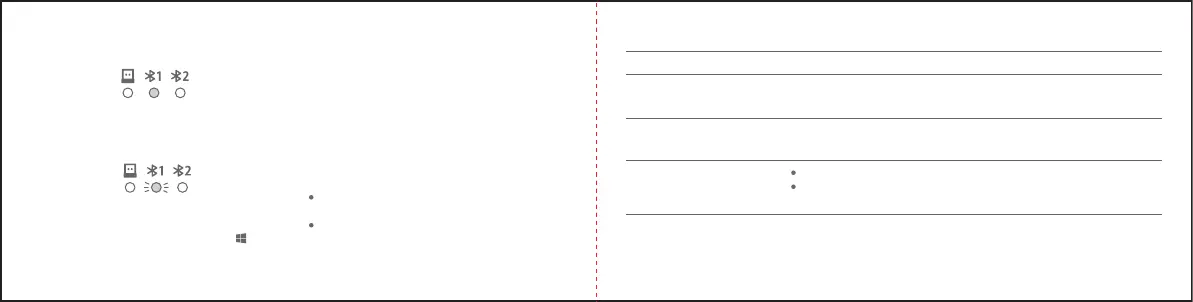
2. Press and hold the function buon for over 3 seconds to
enter the Bluetooth pairing mode, and the corresponding
Bluetooth channel indicator blinks quickly.
Connecting via Bluetooth
1. Press the function buon to change to a Bluetooth channel.
Indicator Status
The selected channel's indicator
slowly blinks white 6 times.
The selected channel's indicator
quickly blinks white for 3 minutes.
The selected channel's indicator
remains white for 3 seconds and
then goes out.
The low baery level indicator slowly
blinks orange-red for 10 seconds.
Mouse Status
The selected channel is not paired.
The mouse enters pairing mode aer the function buon has been pressed
and held for 3 seconds.
The selected channel is paired successfully.
The selected channel is connected properly when the mouse is turned on or woken up.
The mouse is working under a low baery level.
Note: If the mouse is pressed or moved again within 10 seconds, the 10-second low
baery reminder will start again.
Indicator Descriptions



 To Next Page