4
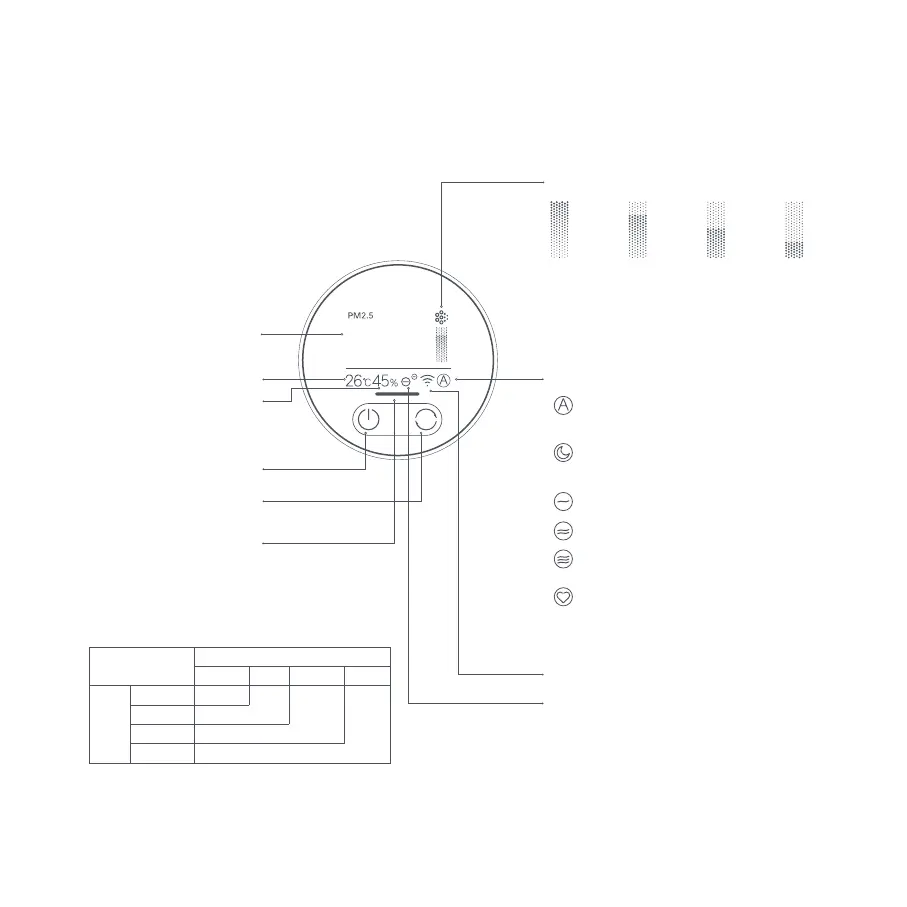
Display Instructions
Power Button
Mode Switch Button
Temperature
Humidity
PM2.5 Value
Mode
Wi-Fi Indicator
Negative Ion Indicator
Air Quality Indicator
The indicator displays green, yellow,
orange or red based on the highest
concentration of fine particles (PM2.5)
and coarse particles (PM10-2.5) in the air.
The negative ion function is enabled by default. The purifier can generate
negative ions when it is working, and then the negative air ions (NAI) are
produced through the reaction between the negative electron and the oxygen
molecules. NAI is very good at trapping certain air pollutants.
The function can be enabled or disabled in the app. When it is enabled, the
negative ion indicator is on; when it is disabled, the indicator is off.
025
Automatic: Automatically switch modes
according to the indoor air quality.
Sleep: Ultra-low noise for a comfortable
sleeping environment.
Low speed
Medium speed
High speed
Manual: Set and save the coverage
area in the app to adjust the purifying
efficiency.
Coarse Particles Indicator
ExcellentGoodModeratePoor
Note: Coarse particles have an aerodynamic diameter
ranging from 2.5 to 10 µm (PM10–PM2.5). Examples of
coarse particles include dust, pollen, spores, and fly
ash.
PM2.5
Value
Coarse particles
1–20 μg/m³ Green
Excellent Good Moderate Poor
Yellow
Orange
Red
21–35 μg/m³
36–55 μg/m³
>55 μg/m³






 To Next Page