
 Need help?
Do you have a question about the Xiaomi Smart Air Purifier 4 Compact and is the answer not in the manual?
Ensuring optimal performance by maintaining adequate distance between the purifier and surrounding objects.
Steps to connect the power cord to the purifier and an electrical outlet for operation.
Turning on/off, switching modes, adjusting display brightness, and child lock.
Managing Wi-Fi settings and connecting to the Mi Home/Xiaomi Home app.
Understanding filter exhaustion alerts and performing filter resets.
Procedure for safely removing the old filter and installing a new one.
Guide on cleaning the filter compartment and the particle sensor.
Statement of compliance with EU directives for radio equipment.
Information on proper disposal and recycling of the product.
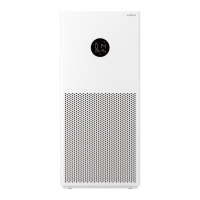
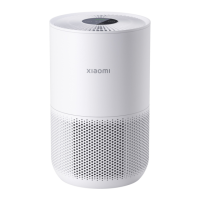
This document describes the Xiaomi Smart Air Purifier 4 Compact, a device designed to improve indoor air quality.
The Xiaomi Smart Air Purifier 4 Compact is an air purification device that filters out dust, hair, and other particles from the air. It features an air quality indicator that displays the PM2.5 value in real-time, using different colors (green, yellow, orange, or red) to indicate varying levels of air quality. The purifier offers multiple operating modes, including Automatic, Sleep, and Manual, allowing users to select the most suitable setting for their environment and needs.
The Automatic mode intelligently switches modes based on the indoor air quality, providing hands-free operation. The Sleep mode is designed for ultra-low noise, ensuring a comfortable sleeping environment. In Manual mode, users can set and save the coverage area via the accompanying app to optimize purifying efficiency. The device also includes a child lock function to prevent accidental changes to settings, a Wi-Fi indicator for connectivity status, and a filter exhaustion indicator to alert users when the filter needs replacement.
To operate the purifier, users can press the power button to turn it on or off. While the purifier is on, the mode switch button allows users to cycle through the available modes (Automatic, Sleep, Manual). The display's brightness can be adjusted by pressing the light adjustment button, which cycles through "on," "dim," and "off" levels.
For safety, the child lock function can be enabled or disabled by pressing and holding the mode switch button for 7 seconds. When enabled, the child lock indicator will illuminate.
The purifier can be connected to the Mi Home/Xiaomi Home app, which allows for remote control and additional functionalities. To connect, users scan a QR code to download the app, then follow the in-app prompts to add the device. If the Wi-Fi connection needs to be reset, users can press and hold the light adjustment button for 7 seconds until the purifier makes a notification sound and the Wi-Fi indicator blinks. To enable or disable Wi-Fi, both the mode switch button and the light adjustment button must be pressed and held simultaneously for 15 seconds.
For optimal performance, it is recommended to place the purifier with at least 20 cm of distance between its air inlets and walls or other objects. Keeping doors and windows closed during operation is also advised for a better purifying effect.
Regular maintenance is crucial for the purifier's efficiency and longevity. Before any maintenance, the purifier must be turned off and unplugged from the power supply.
Filter Replacement: The device features a filter exhaustion indicator that blinks when the filter needs to be replaced. To replace the filter, users should remove the old filter and install a new one correctly, following the illustrated instructions. After replacing the filter, the filter needs to be reset by pressing and holding the power button for 6 seconds while the purifier is in standby mode. A notification sound and the air quality indicator turning green for 1 second confirm a successful reset. It is recommended to replace the filter every 6 to 12 months, using genuine and compatible filters from official channels.
Cleaning the Filter Compartment: To maintain optimal ventilation and purification, dust should be removed from the air inlets and the filter compartment using a vacuum cleaner, or these areas can be gently wiped with a soft cloth. It is important not to rinse or spray the purifier directly with water or wipe it with a soaking wet cloth to avoid damage.
Cleaning the Particle Sensor: The laser particle sensor should be cleaned periodically. This involves using a non-sharp tool to open the sensor cover, then using an air blow gun or hair dryer to clean the cover and the sensor. A dry cotton swab can also be used to gently wipe any dust adhering to the sensor. This cleaning is suggested approximately every six months.
General Precautions:
 General
| Model | Xiaomi Smart Air Purifier 4 Compact |
|---|---|
| Power Consumption | 27 W |
| Connectivity | Wi-Fi IEEE 802.11 b/g/n 2.4 GHz |
| Filter Type | Primary filter + HEPA filter + Activated carbon filter |
| Weight | 2.2 kg |
| Control | Xiaomi Home App, Touch buttons |
| Compatibility | Google Assistant, Amazon Alexa |
| Operating Temperature | 0°C to 40°C |
| CADR (Clean Air Delivery Rate) | 230 m³/h |






 To Next Page