
 Need help?
Do you have a question about the Xiaomi Redmi 5A and is the answer not in the manual?
Guidelines for using two SIM cards, including network compatibility details.
Information on how to access the device's user manual for further guidance.
Important notice regarding the service policy and the requirement for a repair report.
Table detailing harmful and toxic substances present in the smartphone components.
This document serves as a comprehensive user guide for the Redmi 5A smartphone, covering its basic functions, safety information, warranty, service policies, and environmental considerations.
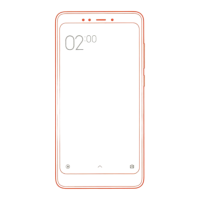
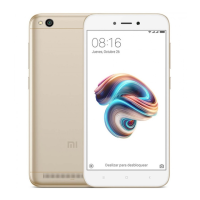
The Redmi 5A is a mobile phone designed for everyday use, featuring a standard set of physical controls and software navigation. On the right side of the device, you'll find the volume buttons, which allow you to adjust the audio output, and the power button, used for turning the device on/off and locking/unlocking the screen. The front of the device displays the time and provides on-screen navigation buttons: "Menu" for accessing recent applications or additional options, "Home" for returning to the main screen, and "Back" for navigating to the previous screen. The device also includes a USB port, typically located at the bottom, for charging and data transfer.
To turn on the Redmi 5A, press and hold the power button for a few seconds. Once the device boots up, on-screen instructions will guide you through the initial setup process. The phone operates on MIUI, Xiaomi's custom Android-based operating system, known for its ergonomic functions and weekly updates, aiming to provide an enhanced user experience.
The Redmi 5A is equipped with a SIM card socket that supports two Nano-SIM cards or one Nano-SIM and one microSD card for expandable storage. Card socket 1 supports a Nano-SIM, while card socket 2 supports either a Nano-SIM or a microSD card. This dual-SIM capability allows users to manage two different phone numbers or network plans simultaneously.
When using two SIM cards, it's important to note certain limitations. For instance, if both SIM cards are from China Telecom, only one will operate on the 4G network, while the other will not function. In other scenarios, users can combine SIM cards from different carriers, selecting one to operate on the 4G network, with the other defaulting to a 2G network. This flexibility allows users to optimize their network usage based on their needs.
The Redmi 5A comes with essential safety information to ensure proper and safe use. It is crucial to read these guidelines before operating the device. Only use power sources, chargers, and batteries recommended by the manufacturer to prevent fire, explosion, or other dangerous consequences. Similarly, use only manufacturer-licensed accessories compatible with this specific model.
The device is designed to operate within an ambient temperature range of 0°C to 40°C. Operating the device outside this range may lead to malfunction. The battery in the Redmi 5A is non-removable; therefore, do not attempt to replace it yourself to avoid damaging the device or battery. Battery replacement should only be performed by an authorized service center.
When charging, use only the manufacturer-specified charger. Using chargers with different voltage settings can lead to current leakage, fire, or damage to the phone or charger. Once the device is fully charged, disconnect it from the charger and unplug the charger from the socket. Continuous charging should not exceed 12 hours.
Proper disposal of the battery is critical. Do not dispose of used batteries with household waste, as improper disposal can result in fire and explosion. Always comply with relevant local regulations when disposing of the device, battery, and other components. Never disassemble, bump, compress the battery, or throw it into an open flame. Avoid short-circuiting the metal contacts of the battery, as this poses a risk of short circuits, burns, and other injuries. Do not allow the battery to overheat, as this can lead to an explosion. To prevent electrolyte leakage, overheating, and explosion, do not disassemble, hit, or squeeze the battery. If the battery inflates, stop using it immediately and keep your smartphone dry.
The Redmi 5A is covered by a warranty that includes repair, replacement, and return services for mobile phones. For detailed service policies, users can refer to the official Xiaomi website under the "After-sales Service Policy" section. In case of a repair, it is essential for the buyer to obtain a repair report from the official Xiaomi service center as proof of service and store it properly.
The device has a safe service life during which dangerous substances or elements (excluding the battery) and its accessories will not be released. This period also ensures that the product's use does not cause serious environmental pollution or harm to the user's health and material values. The safe battery life, under specified conditions in the manual, is 5 years.
To protect your hearing, avoid listening to music at high volumes for extended periods. Adhere to all relevant requirements and legislation regarding mobile phone usage. It is forbidden to use the mobile phone near petrol stations, chemical stores, and other places with flammable and explosive fumes. Do not use the mobile phone in operating rooms, emergency rooms, or intensive care units to prevent interference with medical devices. Similarly, avoid using it near pacemakers, hearing aids, cochlear implants, and other medical equipment. When on an airplane, always observe aviation security rules and turn off the mobile phone.
Follow traffic safety rules and regulations when using the mobile phone while driving. During a lightning storm, do not use the mobile phone outdoors to avoid lightning strikes. Do not make calls while charging the battery. Avoid using chargers in bathrooms or other high-humidity environments, as this can lead to electric shock, bodily injury, fire, and damage to the charger. Always adhere to legal requirements that prohibit mobile phone use in certain locations.
The Redmi 5A complies with the European Union RoHS Directive on Restriction of Hazardous Substances. This product's components contain harmful and toxic materials, but their content is generally within the requirements of standard GB/T 26572. However, in some cases, the content of these materials in at least one homogeneous material may exceed the limits of the standard. Currently, there is no proven technology to replace or reduce the use of lead in certain components like electric ceramics, optical glass, alloy steel, or copper alloys.
To update the mobile phone's operating system, always use the built-in system update function or the services of official Xiaomi after-sales service branches. Using other methods for updating the system can lead to device malfunction, loss of user data, damage to system security, and increased security risks.
For more information about the product, visit www.mi.com. For details on the MIUI operating system, visit www.miui.com. Xiaomi VIP users can visit uvip.xiaomi.cn to confirm their status and enjoy exclusive privileges during purchase, delivery, after-sales service, and customer service.
The MIUI system includes complex system applications and popular third-party applications for various daily uses. Information about preinstalled applications can be found at http://www.miui.com/res/doc/bundles.html.
To access the user's manual, navigate to "Phone settings > About phone > User's guide" on your device. Alternatively, you can scan the provided QR code to get the manual.
The maximum value of the specific absorption coefficient of electromagnetic energy (SAR) for this product is less than or equal to 2.0 W/kg, meeting the requirements of state standard GB21288-2007. For legal information, refer to "Settings - About phone - Legal information."
The Redmi 5A is a digital mobile phone (TD-LTE) manufactured by Xiaomi Communication Technology Co., Ltd. Its model number is MCE3B, with CMIIT ID: 2017CP4744. All rights are reserved by Xiaomi Inc.
 General
| Display Size | 5.0 inches |
|---|---|
| Resolution | 720 x 1280 pixels |
| Display Type | IPS LCD |
| Processor | Qualcomm MSM8917 Snapdragon 425 |
| CPU | Quad-core 1.4 GHz Cortex-A53 |
| GPU | Adreno 308 |
| RAM | 2GB / 3GB |
| Internal Storage | 16GB / 32GB |
| Rear Camera | 13 MP |
| Front Camera | 5 MP |
| Battery Capacity | 3000 mAh |
| Operating System | Android 7.1.2 (Nougat) |
| User Interface | MIUI 9 |
| Weight | 137 g |
| Dimensions | 140.4 x 70.1 x 8.4 mm |







 To Next Page