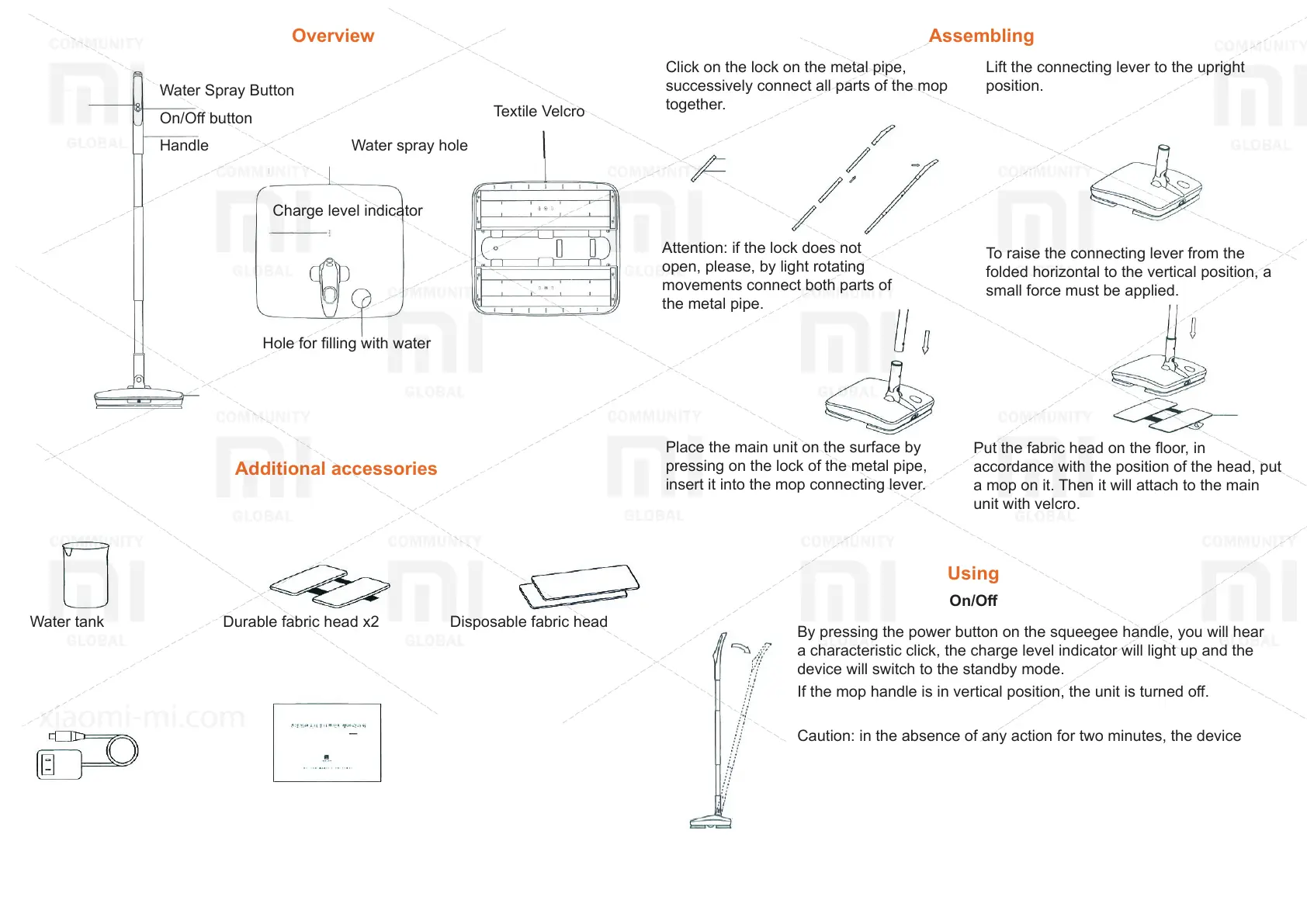
Overview
Water Spray Button
On/O button
Handle
Charge level indicator
Water spray hole
Hole for lling with water
Textile Velcro
Additional accessories
Water tank Durable fabric head x2 Disposable fabric head
Power adaptor Manual
Assembling
Click on the lock on the metal pipe,
successively connect all parts of the mop
together.
Attention: if the lock does not
open, please, by light rotating
movements connect both parts of
the metal pipe.
Lift the connecting lever to the upright
position.
To raise the connecting lever from the
folded horizontal to the vertical position, a
small force must be applied.
Place the main unit on the surface by
pressing on the lock of the metal pipe,
insert it into the mop connecting lever.
Put the fabric head on the oor, in
accordance with the position of the head, put
a mop on it. Then it will attach to the main
unit with velcro.
Using
On/O
By pressing the power button on the squeegee handle, you will hear
a characteristic click, the charge level indicator will light up and the
device will switch to the standby mode.
If the mop handle is in vertical position, the unit is turned o.
Caution: in the absence of any action for two minutes, the device
goes into standby mode. In this case, 100% of the charge level
ashes on the display. Move the handle to the upright position and
pull back towards you to return to normal use.



 To Next Page