This document describes the Mi Earphones 2 Pro, a pair of wireless earphones designed for audio playback, calls, and voice assistant interaction, featuring active noise cancellation and wireless charging capabilities.
Product Overview
The Mi Earphones 2 Pro consist of two individual earphones and a charging case. Each earphone features a Touch Button for control, a Secondary Microphone and a Primary Microphone for calls and noise cancellation. The charging case includes an Indicator Light to show status, a Function Button for pairing and battery checks, and a Type-C Charging Port for wired charging. The package includes the charging case, earphones, a user manual, a Type-C charging cable, and ear tips.
Important Technical Specifications
- Name: Wireless Earphones
- Model: TWSEJ10WM
- Net Weight: 58 g (total, including charging case and earphones)
- Earphone Input: 5 V⎓0.11 A
- Charging Case Output: 5 V⎓0.25 A
- Charging Port: Type-C
- Charging Case Input: 5 V⎓1 A
- Impedance: 32 Ω
- Wireless Connectivity: Bluetooth 5.0
- Bluetooth Profiles: BLE/HFP/A2DP/AVRCP
- Supported Audio Codecs: SBC/AAC
- Wireless Range: 10 m (in open space without obstacles)
- Charging Time: Approximately 1 hour (using wired charging)
- Earphone Battery Life: Approximately 6 hours (with active noise cancellation disabled)
- Total Battery Life (with charging case): Approximately 30 hours
- Bluetooth Operation Frequency (for EU): 2402–2480 MHz
- Maximum Transmit Power for BT (for EU): <13 dBm
- Maximum Transmit Power for BLE (for EU): <13 dBm
- Wireless Charging Operating Frequency: 110–205 kHz
- Storage Temperature: -20 °C to 45 °C
- Storage Humidity: 5%–95% RH
- Maximum Ambient Operating Temperature: 40°C
Usage Features
Charging:
- Charging the earphones: When placed in the charging case, the earphones automatically begin charging.
- Charging the charging case: The case can be charged via the Type-C charging cable or by placing it on a compatible wireless charging pad with its indicator facing up. The charging indicator light on the case remains on during charging and turns off when fully charged.
Checking Battery Level:
- Earphones: After connecting to a phone, the earphone battery level can be checked on the phone's status bar. Note that the status bar displays the lowest battery level of the two earphones, and this feature may not be supported by all phones.
- Charging Case: Open the charging case lid or press the function button if the lid is closed. If the indicator light stays lit for 5 seconds, the battery level is sufficient. If the indicator light blinks, the battery level is low and requires immediate charging.
- Via Mi Phone: For Mi phone users, after connecting the earphones, place them in the charging case and close the lid. Ensure Bluetooth is enabled on your Mi phone. Hold the phone close to the charging case, then open the lid. A notification will appear on the phone, showing the battery levels of both the earphones and the charging case. This feature requires the Mi phone to be updated to the latest stable version and is only supported by some Mi phones.
Power Management:
- Turning On: The earphones automatically turn on when the charging case is opened.
- Sleep Mode: Placing the earphones back into the charging case and closing the lid will disconnect them and automatically put them into sleep mode.
Wearing:
- Take the earphones out of the charging case and insert them into your ears, matching the left (L) and right (R) marks.
- Note: Always place the earphones back into the charging case after use to extend their lifespan and prevent loss.
Connecting:
- To a new device:
- Place the earphones into the charging case, then press and hold the function button for 2 seconds. The charging case's indicator light will start blinking, indicating the earphones are awaiting a connection.
- Enable Bluetooth on your device, then locate and connect to "Mi Earphones 2 Pro". If a passcode is requested, enter "0000".
- First-time use: Before initial use, place the earphones into the charging case and press and hold the function button for 5 seconds to activate them. Once activated, they will automatically enter the awaiting connection state.
- With a Mi phone (Quick Connection): Place the earphones into the charging case and close the lid. Ensure Bluetooth is enabled on your Mi phone. Hold your phone close to the charging case, then open the lid. Follow the on-screen instructions to connect. This quick connection feature is only supported by some Mi phones running the latest stable version.
- Connection Interrupted: If the device is out of wireless range or Bluetooth is disabled, the earphones will enter awaiting connection mode. If no device connects within five minutes, they will enter sleep mode.
- Automatic Connection: When the earphones are in the charging case, opening the lid will automatically connect them to the most recently used Bluetooth device. If they don't connect within five minutes, they enter sleep mode. If automatic connection fails, manual connection via the device's Bluetooth settings is required.
Function Overview (Controls):
- Incoming Calls: Gently tap either earphone twice to answer or end calls.
- Music and Voice Assistant (while wearing both earphones):
- Gently tap the right (R) earphone twice: Play/Pause music.
- Gently tap the left (L) earphone twice: Wake up the voice assistant.
- Press and hold either earphone: Cycle through Noise cancellation on > Transparency mode > Wind noise cancellation > Noise cancellation off.
- Taking out an earphone: Pauses music.
- While wearing one earphone: Gently tap the earphone twice to Play/Pause music.
- Notes on controls:
- The voice assistant function requires device support and permission.
- When using only the left earphone, the right earphone must be in the charging case with the lid closed.
- Noise cancellation mode is not available in single earphone mode.
- Wind noise cancellation mode reduces wind noise effects during noise cancellation.
Maintenance Features
Clearing Connection History:
- Place the earphones into the charging case.
- Press and hold the charging case's function button for at least 10 seconds, and release it once the charging case's indicator lights up.
This action resets the earphones, clears old connection history, causes the charging case's indicator to blink, and puts the earphones back into pairing mode.
General Advice:
- Read the manual carefully before use and retain it for future reference.
- Due to Bluetooth signal characteristics, occasional disconnects or no sound may occur in dense environments with 2.4 GHz electromagnetic signal interferences.
Safety Caution:
- Do not expose batteries or battery packs to excessive heat (sunshine, fire, etc.).
- Avoid replacing the battery with an incorrect type, which could defeat safeguards (fire, explosion, corrosive electrolyte leakage).
- Do not dispose of batteries in fire or a hot oven, or mechanically crush or cut them, as this can lead to an explosion.
- Avoid leaving batteries in extremely high-temperature environments, which can result in explosion or leakage of flammable liquid or gas.
- Avoid subjecting batteries to extremely low air pressure, which may result in an explosion or leakage of flammable liquid or gas.
- Risk of explosion if the battery is replaced by an incorrect type.
- Dispose of used batteries according to instructions.
- To prevent possible hearing damage, do not listen at high volume levels for long periods.
WEEE Information:
All products bearing the WEEE symbol (Waste Electrical and Electronic Equipment, as per directive 2012/19/EU) should not be mixed with unsorted household waste. Instead, they should be handed over to a designated collection point for the recycling of waste electrical and electronic equipment, as appointed by the government or local authorities. Correct disposal and recycling help prevent potential negative consequences to the environment and human health. Contact the installer or local authorities for more information on collection points and terms.
Compliance:
The device (Model: TWSEJ10WM) complies with Directive 2014/53/EU. The full text of the EU declaration of conformity is available at http://www.mi.com/global/service/support/declaration.html.
WARNING: To avoid fire risk, connect the product only to a power supply with an output compliant with PS1 requirements (IEC/EN/UL 62368 standards, output capability less than 15W).
The Bluetooth® word mark and logos are registered trademarks owned by Bluetooth SIG, Inc., used under license by Xiaomi Inc. Other trademarks and trade names belong to their respective owners.
The Qi logo is a trademark of the Wireless Power Consortium.
Manufactured for: Xiaomi Communications Co., Ltd.
Manufactured by: Tiinlab Corporation (a Mi Ecosystem company)
Address: No. 3333, Liuxian Avenue, Tower A, 35th Floor, Tanglang City, Nanshan District, Shenzhen, China.
For further information, visit www.mi.com.

 Need help?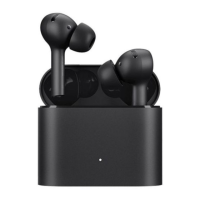

 To Next Page
 General