Need help?
Do you have a question about the XLC CY-307BW and is the answer not in the manual?
Details mounting the cycle computer bracket on the handlebar or stem using rubber and nylon ties.
Instructions for attaching the cycle computer unit securely to its bracket.
Guides on positioning and attaching the speed sensor to the bicycle's front fork.
Steps for securing the speed magnet onto a bicycle wheel spoke.
Method for determining wheel circumference for accurate device readings.
Detailed instructions for setting the device's clock and time format.
How to set speed units, bike profiles, and total odometer values.
Step-by-step guide for replacing the battery in the main cycle computer unit.
Step-by-step guide for replacing the battery in the speed sensor unit.
Troubleshooting steps for display issues related to battery power or installation.
 General
| Display | LCD |
|---|---|
| Material | Plastic |
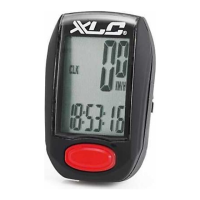
| Functions | Current Speed, Average Speed, Maximum Speed, Trip Distance, Total Distance, Riding Time, Clock |
| Battery | CR2032 |
| Color | Black |
| Mounting Type | Handlebar |

 To Next Page