This document is a user guide for the XOX TITAN 2G Smartphone.
Function Description
The XOX TITAN is a 2G smartphone designed for general mobile communication and basic smart features. It allows users to make and receive calls, send and receive text messages (SMS) and multimedia messages (MMS), browse the internet, and manage personal information. The device supports dual SIM functionality, enabling users to manage two different mobile network connections simultaneously. It includes a camera for taking pictures and videos, an FM radio, a music player for audio files, and a video player for movies. Basic productivity tools like a calculator, calendar, clock with alarms, and a sound recorder are also integrated. The phone runs on Android 4.0, providing access to a range of applications through the Play Store.
Important Technical Specifications
- Dimensions: 113x61x13.5mm
- Weight: Approximately 117g
- LCD: 3.5" HVGA (320x480) TFT, 2-point Capacitive Touch
- Operating System: Android 4.0
- Processor: Spreadtrum SC6820 1.0GHz
- Memory: 512MB, Micro SD support up to 32GB
- Bluetooth: BT 2.1
- Connections: Micro-USB, Mono Speaker, Headset, Microphone, FM Radio, Analog TV
- Battery: 1300mAh, USB Charging
- WLAN: IEEE 802.11 b/g
- Service Time: Up to 200h Standby time, up to 3.5hrs Talk time
- Wireless: Quad-band (850/900/1800/1900)
- SIM: Dual SIM, Dual Standby
- Camera: 0.3MP Front, 1.3MP Rear
Usage Features
The XOX TITAN features a touch screen interface for navigation and interaction.
- Keys:
- Power On/Off Key: Located at the top, used to lock the screen, access options (silent mode, airplane mode, power off), and turn the phone on/off.
- Volume Key: Located on the right side, used to adjust ringer volume.
- Icons:
- Home Icon: Returns to the home screen.
- Menu Icon: Provides access to options for the current function.
- Back Icon: Returns to the previous screen.
- Touch Screen Gestures:
- Touch: Selects icons, letters, symbols, or buttons.
- Touch and Hold: Opens context menus or allows dragging of icons.
- Swipe or Slide: Navigates between home screens or scrolls lists.
- Onscreen Keypad: Used for text entry; supports suggestions and allows text input by speaking.
- Making Calls: Calls can be made from contacts, call logs, or by dialing a number. Supports answering, rejecting, and managing multiple calls.
- Browser: Views web pages, searches the internet, refreshes pages, zooms in/out, finds text, copies text, navigates history, and manages multiple browser windows. Supports downloading files to the SD card and managing bookmarks.
- Calculator: Performs basic and advanced arithmetic operations.
- Calendar: Views and creates events, synchronizes with accounts (Google, Microsoft Exchange ActiveSync), and customizes settings (alerts, notifications, time zones).
- Camera: Shoots pictures and videos in landscape mode. Allows switching between camera and video recorder functions and fine-tuning parameters.
- Clock: Sets alarms.
- Contacts: Manages contacts, including searching, adding new contacts, displaying options, assigning to groups, deleting, importing/exporting, and adding to favorites.
- Downloads: Views a list of downloaded files and applications.
- Email: Reads and sends emails. Supports adding multiple accounts, viewing combined inboxes, starring emails, composing messages with attachments, and adding signatures.
- FM Radio: Requires compatible headphones (used as antenna) to operate.
- Gallery: Views pictures and videos stored on the phone or SD card.
- Latitude/Local/Maps: Provides access to Google Maps and location-fixing functions.
- Messaging: Exchanges text (SMS) and multimedia (MMS) messages. Composes new messages with text, pictures, voice recordings, audio files, videos, or picture slideshows. Replies to message threads.
- Music: Plays audio files stored on the SD card. Supports organizing music by artists, albums, songs, or playlists. Playback controls include current playlist, shuffle, repeat, and navigation through songs.
- Mobile Phone (Dial Pad): Accesses a dial pad for inputting phone numbers and initiating calls.
- Play Store: Downloads and manages media files and applications.
- Search: Opens a search box for the phone and web.
- Settings: Customizes and configures the phone:
- Dual SIM settings: Configures standby, data connection, voice call, and MMS settings for dual SIMs.
- Wireless & Networks: Manages Wi-Fi, Bluetooth, mobile networks, VPNs, and Airplane mode.
- Call settings: Configures voice calls, internet calls, and fixed dialing numbers.
- Audio profiles: Activates profiles based on conditions.
- Display: Configures brightness, auto-rotate screen, animation, proximity screen mode, and screen timeout.
- Location & Security: Activates location services and secures phone data.
- Applications: Views, manages, and controls installed applications and running services.
- Accounts & sync: Manages background data synchronization and auto-sync.
- Privacy: Manages personal information and resets the phone.
- Storage: Monitors used/available space on phone and SD card, manages SD card.
- Language & keyboard: Selects language and configures onscreen keyboard.
- Voice input & output: Sets text-to-speech parameters.
- Accessibility: Configures accessibility plug-ins.
- Date & time: Sets date, time, and time zone preferences.
- Timer switch machine: Sets automatic power on/off times.
- About mobile phone: Displays phone-related information.
- Sound Recorder: Records audio files with start, review, and stop functions.
Maintenance Features
- Battery Optimization: Users can extend battery life by turning off unused features (Wi-Fi, Bluetooth, GPRS), reducing screen brightness, setting shorter screen timeouts, and turning off automatic syncing for Gmail, Calendar, and Contacts. Battery usage can be monitored in Settings.
- SIM Card Handling: Instructions emphasize careful handling of the SIM card to prevent damage from friction or bending. It also advises keeping the SIM card out of children's reach.
- Troubleshooting Guide: The manual includes a troubleshooting section for common issues like SIM card errors, poor signal quality, power-on problems, call dialing issues, network connection problems, and charging difficulties. Solutions range from checking SIM card position and cleanliness to moving to areas with better signal or using the correct charger.
- Factory Data Reset: The guide mentions that a factory data reset can erase all personal data from internal storage, including messages and contacts.
- SD Card Management: Users are advised to format the SD card if errors occur, especially after power interruptions during music downloads, to ensure proper phone operation.
- Software Updates: While not explicitly detailed as a user-initiated feature, the "Build version" in Calendar settings suggests software versions are tracked, implying potential for updates.
- Qualified Servicing: The manual states that only qualified personnel should repair the phone, as any attempt to repair by the user will void the warranty.
- Accessories and Batteries: Emphasizes using only approved accessories and batteries for safety and optimal performance.

 Need help?
 General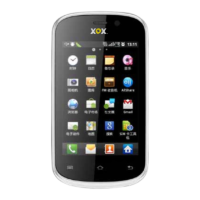

 To Next Page